People running several chats
The desktop activity tray and prioritized status states can make it easier to notice which conversation needs input or has finished.
Independent tool overview
Codex Pets are optional animated companions that make ChatGPT and Codex activity easier to follow across the desktop app, supported web chats, and compatible terminals.
Visit the official Codex Pets site ↗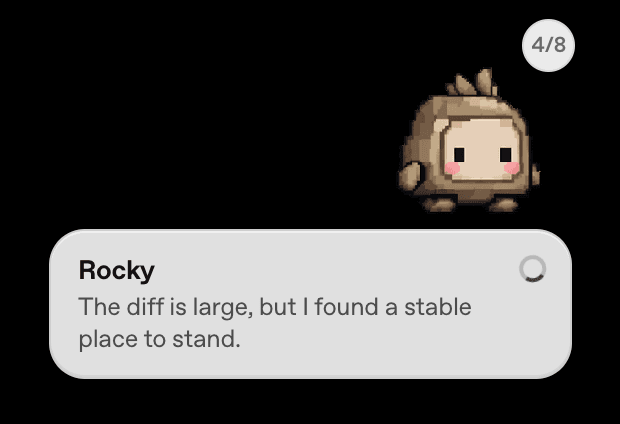
Overview
Codex Pets are a visibility and personalization feature inside ChatGPT and Codex, not a separate AI agent. A pet changes appearance and reacts to work states, but it does not change how ChatGPT completes a task or make the underlying coding agent more capable.
The fullest experience is in the ChatGPT desktop app, where a pet can float above other windows, surface activity across multiple chats, and take the user back to the relevant conversation. Its states distinguish work that is running, waiting for input, ready to review, or blocked.
Pets also appear in supported ChatGPT Work chats and interactive Codex CLI sessions, although those versions have fewer controls. Users can choose built-in companions or create compatible custom pets, with important differences in storage, display, and synchronization across interfaces.
Use cases
The strongest fit depends on the job you need the product to complete, not the size of its feature list.
The desktop activity tray and prioritized status states can make it easier to notice which conversation needs input or has finished.
A floating pet gives a lightweight visual signal when an active task changes state while the user is working in another window.
Built-in and custom companions add personality without changing prompts, models, permissions, or task behavior.
Compatible terminals can display a pet for the current Codex CLI session and show the same core activity states.
Capabilities
The desktop pet can stay above other app windows and signal activity across ChatGPT conversations.
Running, Needs input, Ready, and Blocked animations distinguish active work from tasks that require attention or review.
When several chats are active, the desktop experience prioritizes needs-input items, followed by blocked, ready, and running work.
Users can choose an included companion, generate a local custom pet in the desktop app, or upload a compatible sprite sheet on the web.
Interactive CLI sessions support pet selection and status display in terminals with iTerm2, Kitty graphics, or Sixel support.
The feature respects the operating system's reduced-motion setting and uses a still frame when animation is reduced.
Process
Step 1
In the ChatGPT desktop app, open the profile menu or Settings and select Pets.
Step 2
Select a built-in pet or create a custom one when that option is available for the current interface.
Step 3
Enter /pet or choose Wake Pet from the command menu to show the floating overlay.
Step 4
Use the animation and activity tray to identify running work, unread completions, blocked chats, and requests for input.
Step 5
Select an activity to return to its chat, or use /pet again or Tuck Away Pet when the overlay is no longer useful.
Cost
Codex Pets do not have a standalone price. They are an optional feature within ChatGPT and Codex when available for the user's account, workspace, app, and interface. Any subscription cost and Codex usage limits come from the underlying ChatGPT plan, not from the pet itself.
No separate charge
Use a pet when the feature is available in the user's ChatGPT or Codex experience.
Pricing checked . Check current pricing at the source ↗
Assessment
Compare
The right alternative depends on the specific output, workflow, controls and budget your project requires.
Coding
Choose the Codex App page for the broader desktop coding-agent workflow that Pets visually accompany.
Explore Codex App →Coding
Choose Claude Code when the priority is a terminal-first coding agent rather than an animated activity companion.
Explore Claude Code →Coding
Choose Windsurf for an agentic IDE with coding assistance built around the editor experience.
Explore Devin Desktop (formerly Windsurf) →Questions
Codex Pets are optional animated companions that show ChatGPT and Codex activity states. They help users notice running work, requests for input, completed activity, and blocked tasks.
No. OpenAI's documentation says choosing a pet changes its appearance, not how ChatGPT completes tasks. It is an interface and status feature.
In the ChatGPT desktop app, open Settings > Pets, choose a pet, and enter /pet or select Wake Pet from the command menu.
Yes. The desktop app can use the bundled hatch-pet skill to create a local companion. The web interface can upload a transparent PNG or WebP sprite sheet that meets OpenAI's size and dimension requirements.
Yes, in supported interactive Codex CLI sessions. Terminal pets require iTerm2 3.6 or later, or another terminal with Kitty graphics or Sixel support, and they are unavailable inside tmux and Zellij.
Bottom line
Codex Pets are a small but thoughtful monitoring layer for people who regularly leave ChatGPT or Codex work running in the background. The desktop overlay and multi-chat priority order are the most useful parts; the customization makes that status system more approachable. It should be evaluated as an optional interface feature, not as a standalone AI tool or a reason to expect different model performance.
Visit Codex Pets website ↗
Link - Stripe's new payment wallet for AI bots with human approval on every purchase

Claude Managed Agents - Anthropic's pre-built agent harness, with new ‘dreaming’ memory and multi-agent orchestration

Manus Cloud computer - No-code environment for deploying always-on agents, scrapers, and self-hosted apps

Higgsfield Supercomputer - ACloud-based AI agent with built-in tools, persistent memory, and scheduled task automation

Get access to all our AI courses, hundreds of real-world AI use cases, live expert-led workshops, an exclusive network of AI early adopters, and more.
Get unlimited access to all of our current & upcoming industry-specific AI courses for the duration of your subscription.
To keep up with the rapid pace of AI, our team publishes AI implementation guides daily. Our library contains 300+ practical use cases to automate real-world work.
Join weekly, live, interactive sessions with industry leaders who are at the forefront of AI for hands-on implementation guidance and exclusive insights.
Network with an exclusive community of AI-first professionals who are working smarter with AI. Learn how early adopters are using AI in their work and businesses.