Founder-led operations
Coordinate recurring sales, marketing, support, reporting, and follow-up work when one operator needs visibility and approval controls.
Independent tool overview
Assista is a bring-your-own-Claude platform for coordinating specialized AI agents that plan work, use connected business apps, run on schedules or events, and pause for approvals.
Visit the official Assista site ↗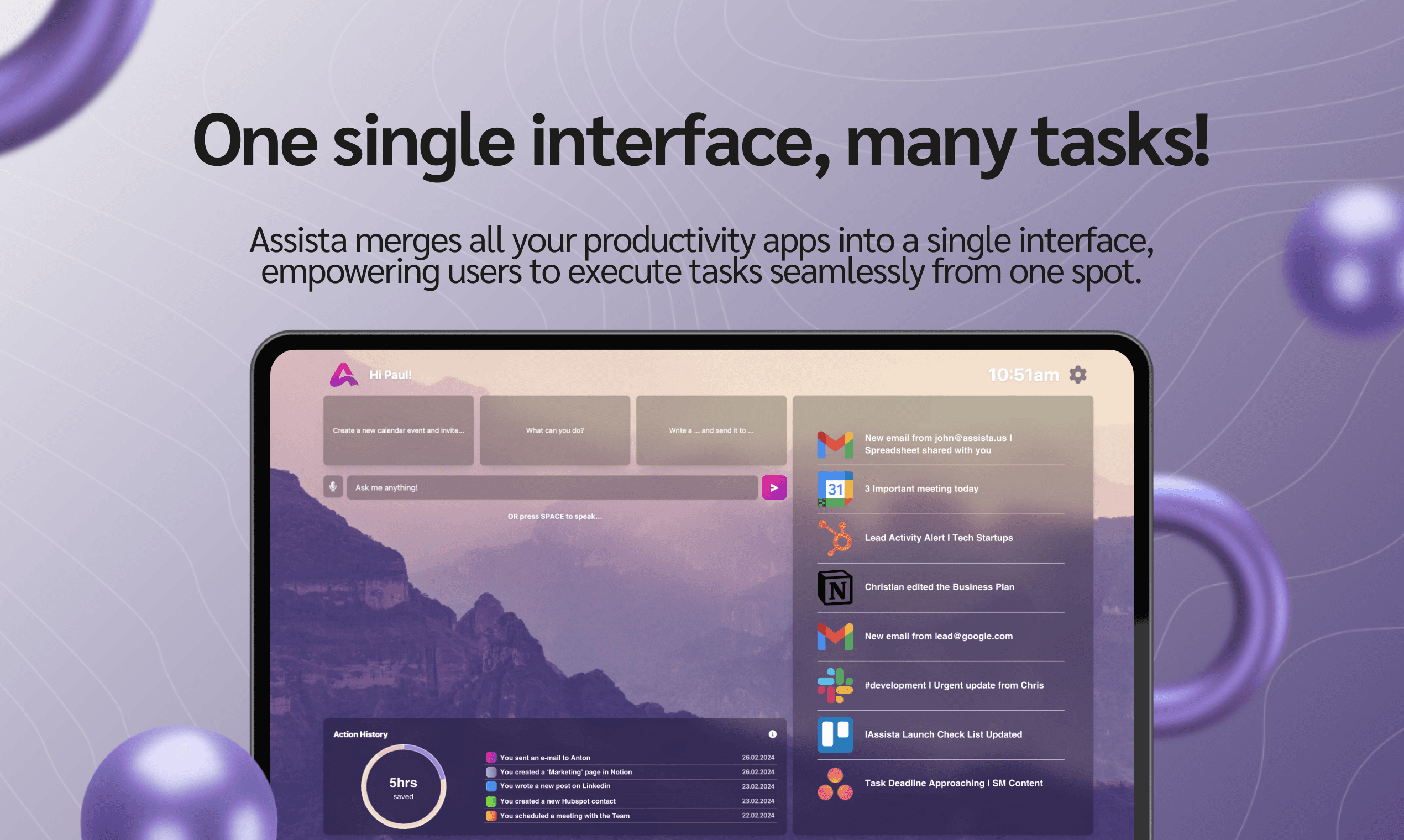
Overview
Assista has evolved beyond the simple voice-and-text productivity assistant described in its original directory listing. The current product lets a user state a business goal, then uses a coordinator agent to break that goal into workstreams and assign them to configured specialists such as sales, marketing, support, engineering, operations, or finance agents.
Work is visible on a Kanban board, and agents can read from a shared company knowledge base, use connected apps, run on recurring schedules, or wake from webhook events. Each specialist can have its own tools and approval rules, making Assista more like an AI operations layer than a general-purpose chat interface.
Assista requires the customer to connect their own Claude account or Anthropic API credentials. Assista does not mark up or meter model usage, but Anthropic's own plan limits and charges still apply. The product is most suitable for teams willing to design scopes, approvals, source material, and exception handling—not teams expecting unsupervised automation to be reliable by default.
Use cases
The strongest fit depends on the job you need the product to complete, not the size of its feature list.
Coordinate recurring sales, marketing, support, reporting, and follow-up work when one operator needs visibility and approval controls.
Run scheduled or event-driven processes that need context from tools such as Gmail, Slack, GitHub, Stripe, Notion, HubSpot, or calendars.
Use an existing Claude plan or Anthropic account while paying Assista for coordination, integrations, memory, scheduling, and execution controls.
Capabilities
A coordinator turns a plain-English goal into workstreams, proposes a plan, chooses from the user's configured specialists, and tracks their work. Specialists can be scoped to defined roles, tools, and approval rules.
Agent tasks move through assigned, in-progress, blocked, and completed states. A user can inspect the plan, intervene in a task, or redirect the team while work is underway.
Agents can run on time-zone-aware recurring schedules or respond to webhooks such as a failed payment, new issue, inbound message, or completed meeting. Triggers can carry their own scopes and approval rules.
Markdown-based skills can store product context, brand voice, customer profiles, decisions, and recurring workflows. Assista says these skills are company-scoped and can be inspected, edited, or deleted.
Agents can work across email, messaging, CRM, development, finance, calendar, and knowledge tools through OAuth connections. Assista's current pages describe a broad catalog, although the public site uses both 100+ and 1,000+ integration claims.
Every plan is advertised with access to Claude Haiku, Sonnet, and Opus through the customer's own Claude account or Anthropic API credentials, rather than bundled model credits.
Process
Step 1
Begin with a routine that produces drafts or reports rather than one that can publish, send, spend, delete, or modify production systems. Define the successful output and owner.
Step 2
Create only the specialists the goal requires, give each a narrow responsibility, and separate planning from execution so ownership is visible.
Step 3
Use the least-privileged OAuth permissions and model credentials possible. Avoid granting write access until read-only runs consistently produce correct plans and drafts.
Step 4
Document current policies, tone, customers, escalation rules, and prohibited actions. Remove conflicting guidance and assign someone to keep it updated.
Step 5
Require explicit review for external messages and consequential actions. Define what happens when a source is missing, a credential expires, a task conflicts, or an agent is uncertain.
Step 6
Review the Kanban trail and outputs, test event duplication and prompt injection, then add schedules, triggers, tools, and autonomy only after the bounded workflow is dependable.
Cost
Assista separates its platform subscription from model usage: customers connect their own Claude account or Anthropic API credentials. Annual billing is advertised as two months free. Prices below are Assista's published monthly rates on August 28, 2026; Claude charges or plan limits are separate.
$0
A no-card evaluation tier for connecting Claude and reviewing initial drafts.
$20/month or $200/year
For one person running one scheduled teammate.
$35/month or $350/year
For one person coordinating multiple recurring agents.
$40/seat/month or $400/seat/year
For a shared workspace with shared teammates and history.
Contact sales
For larger or contract-led deployments.
Pricing checked . Check current pricing at the source ↗
Assessment
Compare
The right alternative depends on the specific output, workflow, controls and budget your project requires.
Agents
Choose Manus when the priority is a general-purpose autonomous agent for completing varied computer-based tasks rather than a configured company agent team.
Explore Manus →Agents
Choose OpenClaw when you want a self-hostable personal agent that can be reached through messaging apps and extended with skills.
Explore OpenClaw →Business Operations
Choose Lindy when you want another managed platform for building business agents and automations around common SaaS tools.
Explore Lindy →Business Operations
Choose Gumloop when a visual no-code automation canvas is a better fit than delegating a goal to a coordinator and specialist agents.
Explore Gumloop →Questions
Assista is a bring-your-own-Claude platform for creating specialist AI agents, coordinating them around business goals, connecting them to work apps, and running tasks on schedules or events with configurable approvals.
Assista offers a $0 tier for connecting Claude, generating and reviewing drafts, and trying one send. Scheduling, publishing, and ongoing automated execution require a paid plan.
As of August 28, 2026, Assista lists Starter at $20 per month, Pro at $35, and Team at $40 per seat. Annual rates are $200, $350, and $400 per seat respectively. Enterprise pricing is custom.
No. Customers connect their own Claude subscription or Anthropic API credentials. Assista says it does not mark up or meter the AI, but the connected Claude account still has its own charges or usage limits.
Configured agents can plan and track work, read shared company skills, use connected apps, run on schedules, respond to webhook events, draft content or messages, and take allowed actions under the scopes and approval rules a user sets.
It can be configured with scoped tools and approval rules, but no generative agent should be assumed safe for consequential unsupervised actions. Start with read-only access and drafts, require review for external or destructive actions, and audit every trigger and credential.
Yes. The original assista.us address now redirects to getassista.com, where Assista is presented as a Claude-powered operating team with coordinators, specialists, schedules, triggers, shared memory, and business-app integrations.
Bottom line
Assista is most compelling for a founder or small operations team that already prefers Claude and wants recurring, cross-app work organized as a visible team of scoped agents. Its free tier is the right place to test planning and drafts. Pro is the meaningful solo tier when multiple scheduled teammates and triggers are required, but only after the team has designed least-privilege connections, human approvals, and clear exception handling.
Visit Assista website ↗
Discover AI-powered knowledge base for instant information retrieval.

Deep AI analysis of user feedback for product optimization.
An effortless way to translate videos globally.

Brainstorm, plan, prioritize, and execute marketing experiments.

Get access to all our AI courses, hundreds of real-world AI use cases, live expert-led workshops, an exclusive network of AI early adopters, and more.
Get unlimited access to all of our current & upcoming industry-specific AI courses for the duration of your subscription.
To keep up with the rapid pace of AI, our team publishes AI implementation guides daily. Our library contains 300+ practical use cases to automate real-world work.
Join weekly, live, interactive sessions with industry leaders who are at the forefront of AI for hands-on implementation guidance and exclusive insights.
Network with an exclusive community of AI-first professionals who are working smarter with AI. Learn how early adopters are using AI in their work and businesses.