Structured customer support
Route callers through identification, intent capture, troubleshooting, account actions, escalation, and wrap-up.
Independent tool overview
Agent Workflows is ElevenLabs' visual graph editor for routing voice and text conversations inside ElevenAgents. Teams can combine specialized subagents, required tool calls, conditional branches, transfers, and end states, then manage the workflow through the dashboard, CLI, SDK, or API.
Visit the official Agent Workflows site ↗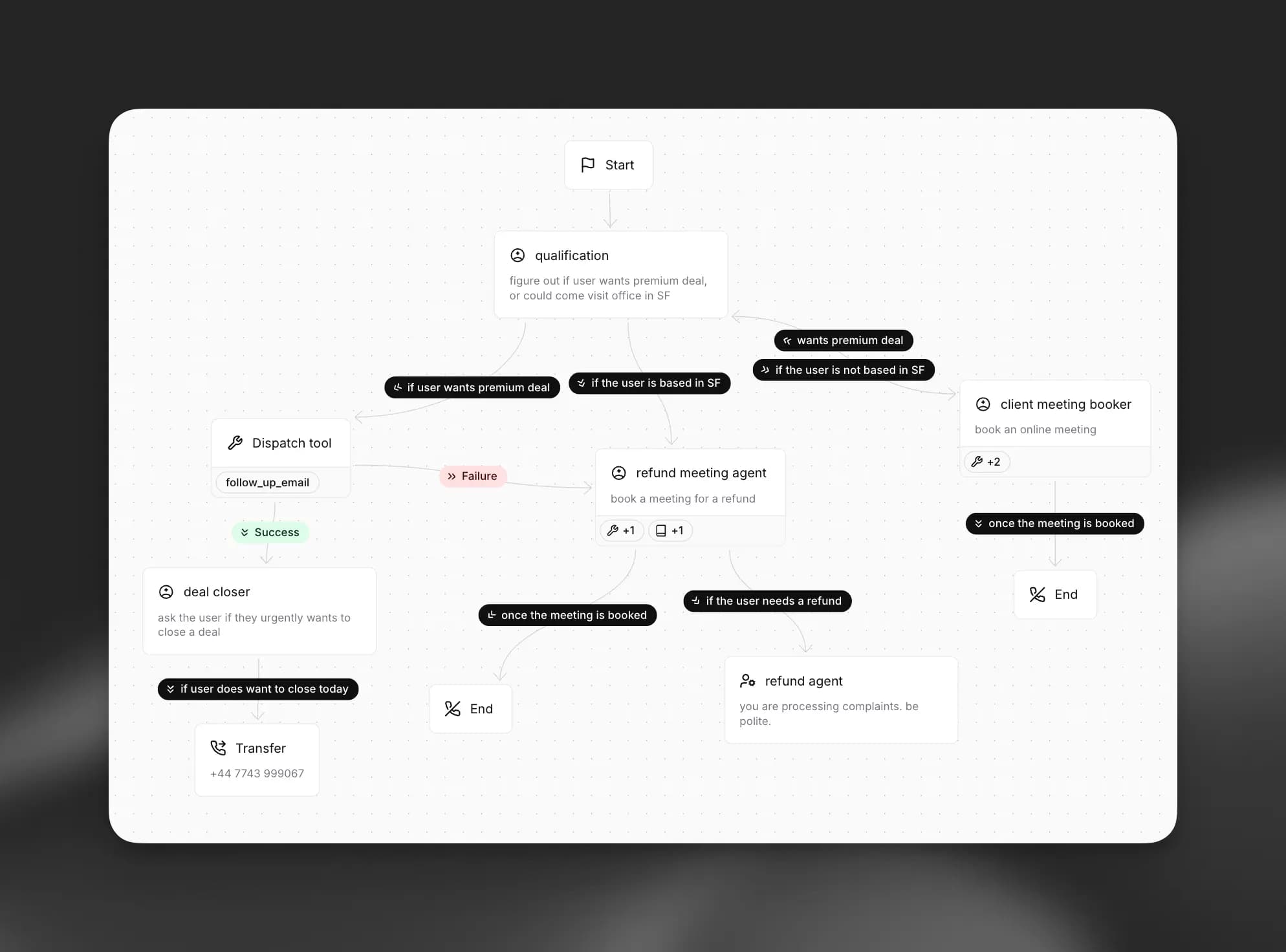
Overview
Agent Workflows is a feature of ElevenAgents rather than a separate automation product. It replaces one large linear prompt with an explicit conversation graph: each phase can use different instructions, models, voices, tools, and knowledge, while edges determine where the conversation goes next.
The visual structure makes complex call flows easier to inspect, but it does not make them deterministic. Natural-language edge conditions are still evaluated by an LLM, tools and integrations can fail, and spoken input can be transcribed incorrectly. Production teams need versioning, repeated tests, safe fallback paths, cost controls, privacy settings, disclosure, and human escalation.
Use cases
The strongest fit depends on the job you need the product to complete, not the size of its feature list.
Route callers through identification, intent capture, troubleshooting, account actions, escalation, and wrap-up.
Use dedicated phases for consent, qualification questions, CRM updates, scheduling, and human handoff.
Coordinate information gathering, calendar lookup, confirmation, rescheduling, and transfer paths.
Assign different prompts, models, voices, tools, and knowledge to distinct conversation phases.
The graph and per-node analytics are useful when operators need to see where conversations enter, stall, terminate, or change paths.
Capabilities
Build and connect conversation nodes in the dashboard instead of encoding every path in one prompt.
A node can append to or replace the base configuration, including system prompt, model, voice, tools, and knowledge sources.
Create a dedicated point that calls a specific tool, with separate success and failure routes based on its result.
Hand a conversation from one configured AI agent to another.
Route a voice call to a telephone number when a person should take over.
Terminate a call at an explicit point in the graph.
Forward and backward edges can use natural-language LLM conditions, expressions, or unconditional routing.
Pull, edit, and push workflow JSON through the CLI or update it with the SDK and API.
The analytics graph overlays node entries, average time, terminations, and incoming and outgoing edge distribution.
Simulation, next-reply, and tool-call tests cover full conversations, response criteria, and expected tool parameters.
Repeat the same test multiple times to measure pass rate instead of relying on one favorable generation.
Immutable versions, branches, traffic splitting, merging, and rebasing support safer staged changes.
Process
Step 1
Define user intents, required disclosures, allowed actions, success criteria, failure states, human handoffs, and emergency routes.
Step 2
Create only the nodes needed for the core path, with explicit success, error, timeout, refusal, and transfer behavior.
Step 3
Give subagents the minimum prompts, knowledge, tools, credentials, and data needed for that phase.
Step 4
Use simulation, next-reply, and exact tool-parameter tests across accents, silence, interruptions, prompt injection, ambiguity, and integration failures.
Step 5
Create an isolated branch, review the full configuration diff, then send a small percentage of traffic to the new version.
Step 6
Track node entries, exits, transfers, costs, latency, tool errors, complaints, privacy incidents, and real conversation failures.
Cost
The Workflow Builder is included with ElevenAgents plans. Plans include call minutes and concurrency, while additional hosted call minutes are $0.08 each, burst minutes are $0.16, and text messages are $0.003. LLM usage and telephony-provider charges are billed separately, so the subscription price is not the total operating cost.
$0/month
Evaluation plan with the Workflow Builder.
$6/month
Entry commercial plan.
$22/month; first month advertised at $11
Higher-usage individual plan.
$99/month
Professional plan with more included usage.
$299 or $990/month
Business plans with more minutes, concurrency, and seats.
Custom pricing
Contract plan for higher scale and governance.
Pricing checked . Check current pricing at the source ↗
Assessment
Compare
The right alternative depends on the specific output, workflow, controls and budget your project requires.
Sales
Consider Vapi for a developer-oriented voice-agent orchestration layer with a different provider and component model.
Explore Vapi →Business Operations
Consider Retell AI for another managed platform focused on low-latency conversational phone agents.
Explore Retell AI →Sales
Consider Bland AI for phone automation with its own pathway and transfer tooling.
Explore Bland AI →Business Operations
Consider Synthflow when a no-code sales and lead-conversion phone-agent workflow is the priority.
Explore Synthflow AI →Questions
They are visual conversation graphs inside ElevenAgents. Nodes can represent specialized subagents, required tool calls, transfers, or call endings, while edges control routing.
No. It is part of the ElevenAgents platform and is included as the Workflow Builder in current agent plans.
Yes. Workflow configuration lives in the agent configuration and can be managed through the CLI, SDK, and API. ElevenAgents also provides immutable versions, branches, and percentage-based traffic deployment.
Current documentation describes subagent, dispatch-tool, agent-transfer, transfer-to-number, and end nodes, connected by conditional or unconditional edges.
Use full simulation tests, next-reply tests, and tool-call tests. Run important cases repeatedly because agent outputs and LLM-based routing can vary.
The builder is included from the Free plan. Paid ElevenAgents plans range from $6 to $990 per month before Enterprise; LLM, telephony, extra minutes, burst usage, and text-message charges can add to the total.
Yes. ElevenLabs' terms guidance requires clear notice immediately before the interaction that the user is dealing with AI and that conversations are recorded and may be shared with ElevenLabs and third-party model providers.
It can automate bounded, well-tested paths, but organizations should retain human escalation for uncertainty, complaints, emergencies, sensitive users, and consequential actions.
Bottom line
ElevenLabs Agent Workflows is a strong fit for teams already building on ElevenAgents that need clearer branching, specialized conversation phases, explicit tool execution, and staged releases. Its graph, testing, analytics, and versioning are meaningful operational features. The main risk is mistaking visual structure for deterministic behavior: production quality still depends on narrow permissions, repeated tests, safe fallbacks, cost accounting, disclosure, privacy controls, and human escalation.
Visit Agent Workflows website ↗
Anything - AI agent that ships mobile and web apps without coding

Agent Builder - OpenAI's visual canvas for creating and versioning multi-agent workflows
Action Agent - Writer's enterprise-ready autonomous AI that works on your behalf

Petri - Anthropic's open-source agentic system for evaluating LLM safety

Get access to all our AI courses, hundreds of real-world AI use cases, live expert-led workshops, an exclusive network of AI early adopters, and more.
Get unlimited access to all of our current & upcoming industry-specific AI courses for the duration of your subscription.
To keep up with the rapid pace of AI, our team publishes AI implementation guides daily. Our library contains 300+ practical use cases to automate real-world work.
Join weekly, live, interactive sessions with industry leaders who are at the forefront of AI for hands-on implementation guidance and exclusive insights.
Network with an exclusive community of AI-first professionals who are working smarter with AI. Learn how early adopters are using AI in their work and businesses.