Professional editors
Useful for editors who need AI assistance without leaving a full nonlinear editing system.
Independent tool overview
Adobe Premiere Pro is a professional timeline editor with native AI-assisted video and audio tools. Adobe positions the AI layer as a way to reduce repetitive post-production work and generate needed video or sound elements from the timeline.
Visit the official Adobe Premiere Pro site ↗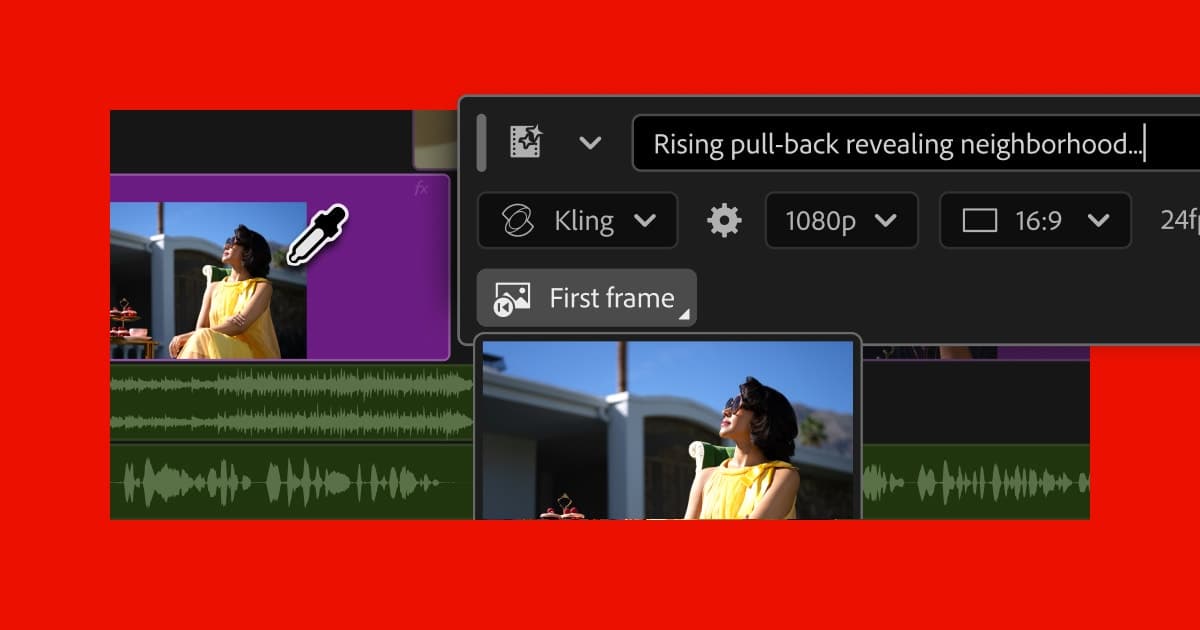
Overview
Premiere Pro brings AI into an established editing environment rather than treating generation as a separate destination. Editors can combine transcript- and media-aware tools with Adobe Firefly-powered generation while retaining normal timeline, color, audio, and export controls.
The practical advantage is continuity: generated or AI-assisted changes stay inside the project. The tradeoff is that model availability, generative credits, and some capabilities can vary by plan, region, and release channel.
Use cases
The strongest fit depends on the job you need the product to complete, not the size of its feature list.
Useful for editors who need AI assistance without leaving a full nonlinear editing system.
Fits teams producing frequent social, product, or campaign video with repeatable review and export requirements.
Capabilities
Adobe documents generation of video and sound effects from within the editing workflow.
AI features target complex or repetitive timeline tasks so editors can stay focused on the cut.
Editing, audio, captions, color, review, and export remain in one project environment.
Process
Step 1
Import media and use Premiere's search, transcription, and organization tools to find usable material.
Step 2
Edit on the timeline, applying AI-assisted cleanup or generated elements where they solve a defined gap.
Step 3
Check generated frames, rights, continuity, audio, captions, and final delivery settings before export.
Cost
Premiere is sold through Adobe subscriptions; generative usage and credits can depend on plan and feature.
See Adobe's current plan pricing
Premiere is sold through Adobe subscriptions; generative usage and credits can depend on plan and feature.
Pricing checked . Check current pricing at the source ↗
Assessment
Compare
The right alternative depends on the specific output, workflow, controls and budget your project requires.
Design
Adobe Firefly is an enriched alternative for direct generative media creation.
Explore Adobe Firefly →Content Creator
VideoProc Converter AI is an enriched alternative for AI-assisted media enhancement and conversion.
Explore VideoProc Converter AI →Questions
Yes. Premiere Pro includes native AI-powered editing and generation features, with some generative capabilities powered by Adobe Firefly.
It is best used to accelerate footage discovery, cleanup, timeline edits, and generation while preserving a professional review and export process.
Premiere is sold through Adobe subscriptions; generative usage and credits can depend on plan and feature.
Bottom line
Premiere is a strong fit when AI must support a serious editing pipeline rather than replace it. Teams seeking a simpler prompt-to-video experience may prefer a dedicated generator.
Visit Adobe Premiere Pro website ↗
Professional editing, color, effects, audio, and photo system with a Neural Engine and AI-assisted post-production tools.

Create websites effortlessly with instant page loads.
Node-based creative canvas for chaining image, video, voice, lip-sync, music, and sound generation into reusable workflows.

storly ai helps you effortlessly document your life stories.

Get access to all our AI courses, hundreds of real-world AI use cases, live expert-led workshops, an exclusive network of AI early adopters, and more.
Get unlimited access to all of our current & upcoming industry-specific AI courses for the duration of your subscription.
To keep up with the rapid pace of AI, our team publishes AI implementation guides daily. Our library contains 300+ practical use cases to automate real-world work.
Join weekly, live, interactive sessions with industry leaders who are at the forefront of AI for hands-on implementation guidance and exclusive insights.
Network with an exclusive community of AI-first professionals who are working smarter with AI. Learn how early adopters are using AI in their work and businesses.