Podcasters and interviewers
Record remote speech, edit from a transcript and prepare an understandable episode.
Independent tool overview
Record, edit and enhance spoken-word audio in the browser with Adobe Podcast Studio and Enhance Speech.
Visit the official Adobe Podcast site ↗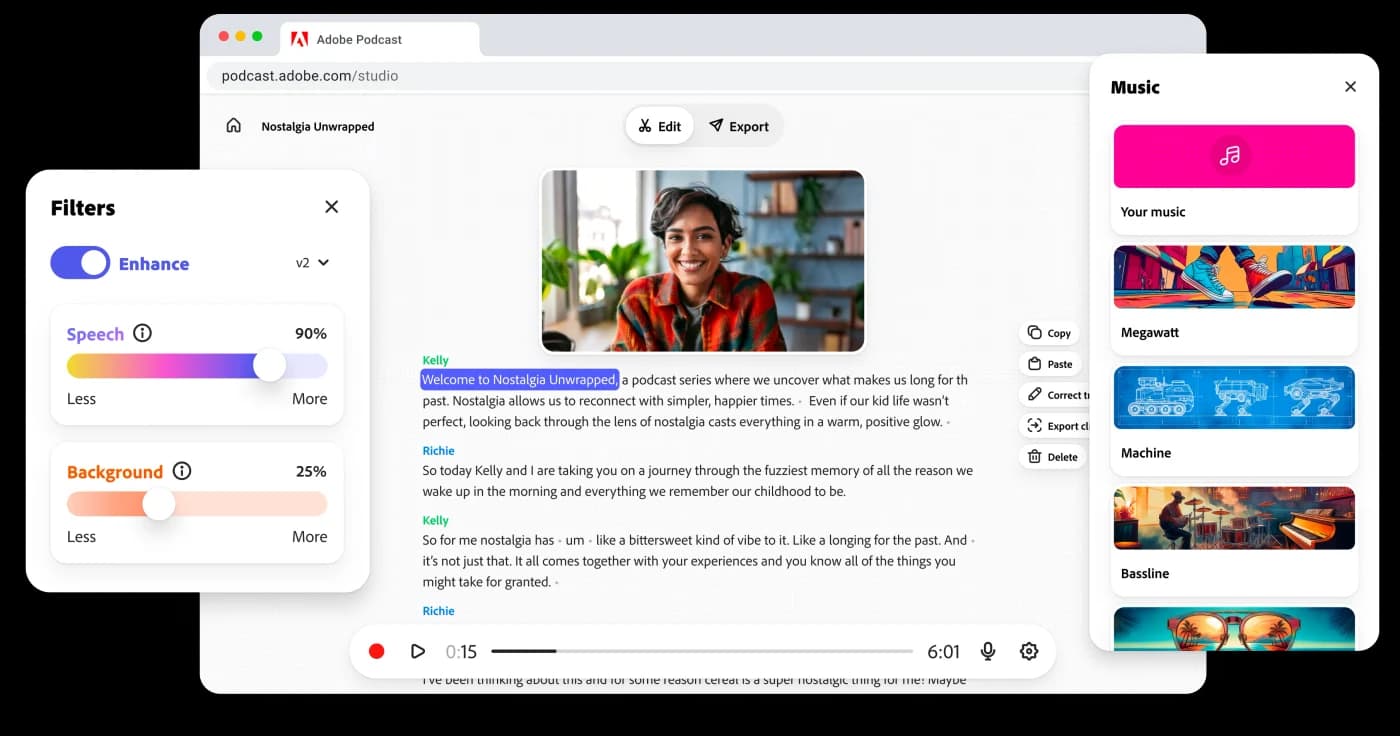
Overview
Adobe Podcast is a browser-based recording and editing service for spoken-word audio. Studio supports remote recording, transcription-based editing and shareable projects, while Enhance Speech processes recorded speech to reduce distracting noise and improve clarity. It fits a creator who needs to capture, clean and edit a conversation without opening a traditional multitrack audio workstation.
Adobe’s current plans page bundles Adobe Podcast Premium with Firefly Pro. The free level allows daily Enhance Speech use and limited Studio downloads; the paid bundle increases file and daily processing limits, supports video enhancement and bulk upload, and permits downloads of original speaker-separated recordings. Processing can make a weak recording easier to hear, but it cannot reliably restore every lost word or replace microphone placement and human quality control.
Use cases
The strongest fit depends on the job you need the product to complete, not the size of its feature list.
Record remote speech, edit from a transcript and prepare an understandable episode.
Clean dialogue from a recorded clip; paid video enhancement may be relevant.
Make lectures, updates or training recordings more intelligible without complex audio software.
Capabilities
Processes an uploaded recording to reduce unwanted noise and improve vocal clarity.
Captures remote conversations and supports browser-based project editing.
Edit spoken-word content through a text representation of the recording.
Firefly Pro adds supported video formats, batch enhancement and longer limits.
The paid bundle allows original speaker-separated recording downloads for more detailed post-production.
Process
Step 1
Use headphones and a reasonable microphone position, or upload a recording that needs cleanup.
Step 2
Process the speech and compare it with the source for artifacts or lost words.
Step 3
Use the transcript to remove sections, arrange the episode and create approved captions or audiograms.
Step 4
Listen to the final file, verify speaker names and captions, and publish through the chosen host or channel.
Cost
Adobe Podcast has a limited free plan. Premium features are included with the Adobe Firefly Pro plan; the official Podcast plans page lists capabilities and usage limits but does not show a dependable Firefly Pro dollar price in the reviewed text.
Free
Basic Enhance Speech and Studio access.
Public price not confirmed on Podcast page
Expands enhancement and Studio limits.
Pricing checked . Check current pricing at the source ↗
Assessment
Compare
The right alternative depends on the specific output, workflow, controls and budget your project requires.
Content Creator
Automated leveling, loudness and audio post-production for finished recordings.
Explore Auphonic →Content Creator
Transcript-based editing with broader video and media-production workflows.
Explore Descript →Content Creator
A remote recording studio when capture quality and guest sessions lead the workflow.
Explore Riverside →Questions
It is Adobe’s browser toolset for recording, editing and enhancing spoken-word audio.
Yes, within the free plan’s limits: audio-only, one file at a time, up to 30 minutes or 500 MB per file and one hour per day.
Adobe lists video enhancement as part of the Firefly Pro bundle with Podcast Premium.
Its main role is recording and production; use a suitable publishing or hosting service for distribution.
Bottom line
Adobe Podcast is a practical first stop for a creator whose main problem is spoken-word cleanup and transcript editing. Compare the enhanced file with the original and verify the bundle price and usage limits before relying on it for a publishing schedule.
Visit Adobe Podcast website ↗
Get access to all our AI courses, hundreds of real-world AI use cases, live expert-led workshops, an exclusive network of AI early adopters, and more.
Get unlimited access to all of our current & upcoming industry-specific AI courses for the duration of your subscription.
To keep up with the rapid pace of AI, our team publishes AI implementation guides daily. Our library contains 300+ practical use cases to automate real-world work.
Join weekly, live, interactive sessions with industry leaders who are at the forefront of AI for hands-on implementation guidance and exclusive insights.
Network with an exclusive community of AI-first professionals who are working smarter with AI. Learn how early adopters are using AI in their work and businesses.