Voice-first personal notes
Capture ideas, journal entries, reminders, and drafts when speaking is more convenient than typing.
Independent tool overview
Voicenotes is a cross-platform AI voice-notes and meeting app that records audio, creates transcripts and summaries, supports voice dictation, and lets users search or reuse their spoken history.
Visit the official Voicenotes site ↗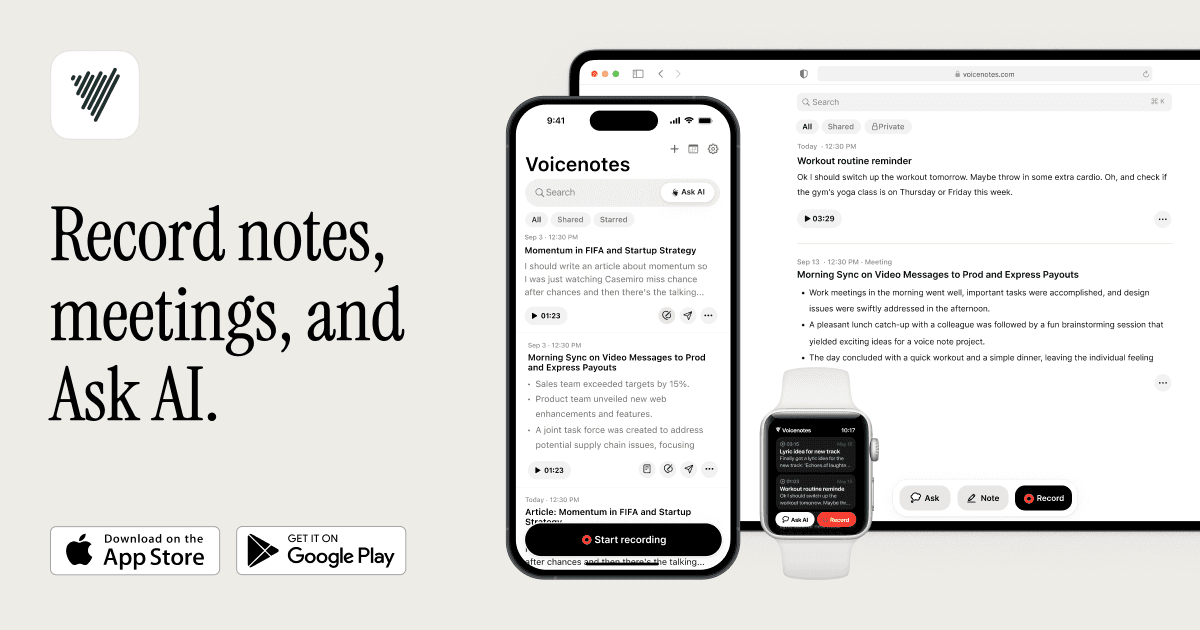
Overview
Voicenotes combines three related workflows: personal voice memos, multi-speaker meeting capture, and voice dictation. After a recording, it can generate a title, transcript, summary or meeting report, speaker labels, decisions, and follow-up actions, then add the result to a searchable note library.
The product is available on web, macOS, Windows, iPhone, Android, and Apple Watch. Pro users can import audio, retain unlimited searchable history, connect notes to tools such as Notion, Obsidian, Zapier, ChatGPT, and Claude, and expose notes to compatible AI assistants through Voicenotes' hosted MCP server.
Voicenotes retired its meeting bot and calendar integration in April 2026. Meetings are now recorded directly from the user's device, so a bot does not join the call and unattended meetings cannot be captured. As with any recording tool, users must obtain required consent, verify names and action items, and avoid treating an AI summary as the authoritative record.
Use cases
The strongest fit depends on the job you need the product to complete, not the size of its feature list.
Capture ideas, journal entries, reminders, and drafts when speaking is more convenient than typing.
Record calls or in-person conversations from a device and receive a transcript, report, decisions, and follow-up actions.
Query prior memos and meetings with Ask AI or connect that archive to compatible AI and productivity tools.
Capabilities
Distinguishes single-speaker memos from multi-speaker meetings and structures the resulting notes accordingly.
Produces searchable transcripts, summaries, speaker attribution, key points, decisions, and action items in more than 100 supported transcription languages.
Pro users can speak text for emails, messages, and other writing across desktop and mobile workflows.
Searches across notes and turns selected material into formats such as summaries, tasks, emails, social posts, or longer drafts.
Pro includes audio import and connections to note, automation, and AI tools; the hosted MCP server supports semantic search and transcript retrieval from compatible assistants.
Process
Step 1
Tell participants and obtain any consent required by law, company policy, contract, or meeting expectations before recording.
Step 2
Use the Voicenotes desktop or mobile app for the memo or meeting; current meeting capture does not send a bot into the call.
Step 3
Correct names, speaker labels, numbers, decisions, and action owners against the audio and your own understanding.
Step 4
Tag the note, share it with appropriate permissions, create a follow-up artifact, or search it later through Ask AI, an integration, or MCP.
Cost
Voicenotes has a useful Free tier, a $9-per-user Pro plan, and a $24-per-user Enterprise plan. Pro removes transcription, history, dictation, import, and storage limits; Enterprise adds identity, consent, sharing, and support controls.
$0
For light personal recording and transcription.
$9/user/month
For individuals and small teams using Voicenotes throughout the day.
$24/user/month
For organizations requiring managed identity, consent, sharing, and integrations.
Pricing checked . Check current pricing at the source ↗
Assessment
Compare
The right alternative depends on the specific output, workflow, controls and budget your project requires.
Project Management
A focused meeting-notes alternative for users who prefer to combine their own typed notes with an AI-generated transcript and summary.
Explore Granola →Project Management
A mature transcription and meeting-assistant option with collaborative notes and established calendar and meeting workflows.
Explore Otter.ai →Questions
Voicenotes records voice memos and attended meetings, transcribes and summarizes them, supports voice dictation, and makes the resulting note library searchable and reusable with AI.
Yes. Basic includes unlimited raw recordings, 100 transcription and summary minutes each week, and access to the most recent 30 days of notes. Older content is stored but hidden until the account upgrades to Pro.
Pro is $9 per user each month and includes unlimited transcription, summaries, dictation, history, audio imports, storage, and advanced integrations.
No. Voicenotes retired its meeting bot on April 30, 2026. Meetings are recorded from the user's Mac or Windows device, and the app cannot record a meeting the user is not attending.
Yes. Pro includes integrations and a hosted MCP server that can let compatible assistants search notes, filter by date or tag, retrieve transcripts, and create notes after the user connects the account.
Voicenotes states that it does not train on customer data and does not permit third-party model providers to use that data for training. Users should still review data controls, access, retention, and company policy before recording sensitive material.
Bottom line
Voicenotes is compelling for people who want one low-cost, voice-first archive across quick ideas, meetings, and dictation. Its move to on-device meeting capture makes conversations less cluttered but removes unattended recording. The $9 Pro plan is unusually straightforward; the deciding factors are whether on-device capture fits the workflow and whether the team has sound consent, review, and data-access practices.
Visit Voicenotes website ↗
Get access to all our AI courses, hundreds of real-world AI use cases, live expert-led workshops, an exclusive network of AI early adopters, and more.
Get unlimited access to all of our current & upcoming industry-specific AI courses for the duration of your subscription.
To keep up with the rapid pace of AI, our team publishes AI implementation guides daily. Our library contains 300+ practical use cases to automate real-world work.
Join weekly, live, interactive sessions with industry leaders who are at the forefront of AI for hands-on implementation guidance and exclusive insights.
Network with an exclusive community of AI-first professionals who are working smarter with AI. Learn how early adopters are using AI in their work and businesses.


