College course organization
Collect lecture notes, readings, syllabi, and assignments into subject-specific study notebooks with a defined learning goal.
Independent tool overview
Gemini Student Hub is Google's dedicated starting point for study notebooks, flashcards, quizzes, practice tests, interactive visualizations, Gemini Live research, and limited-time college student plan offers.
Visit the official Gemini Student Hub site ↗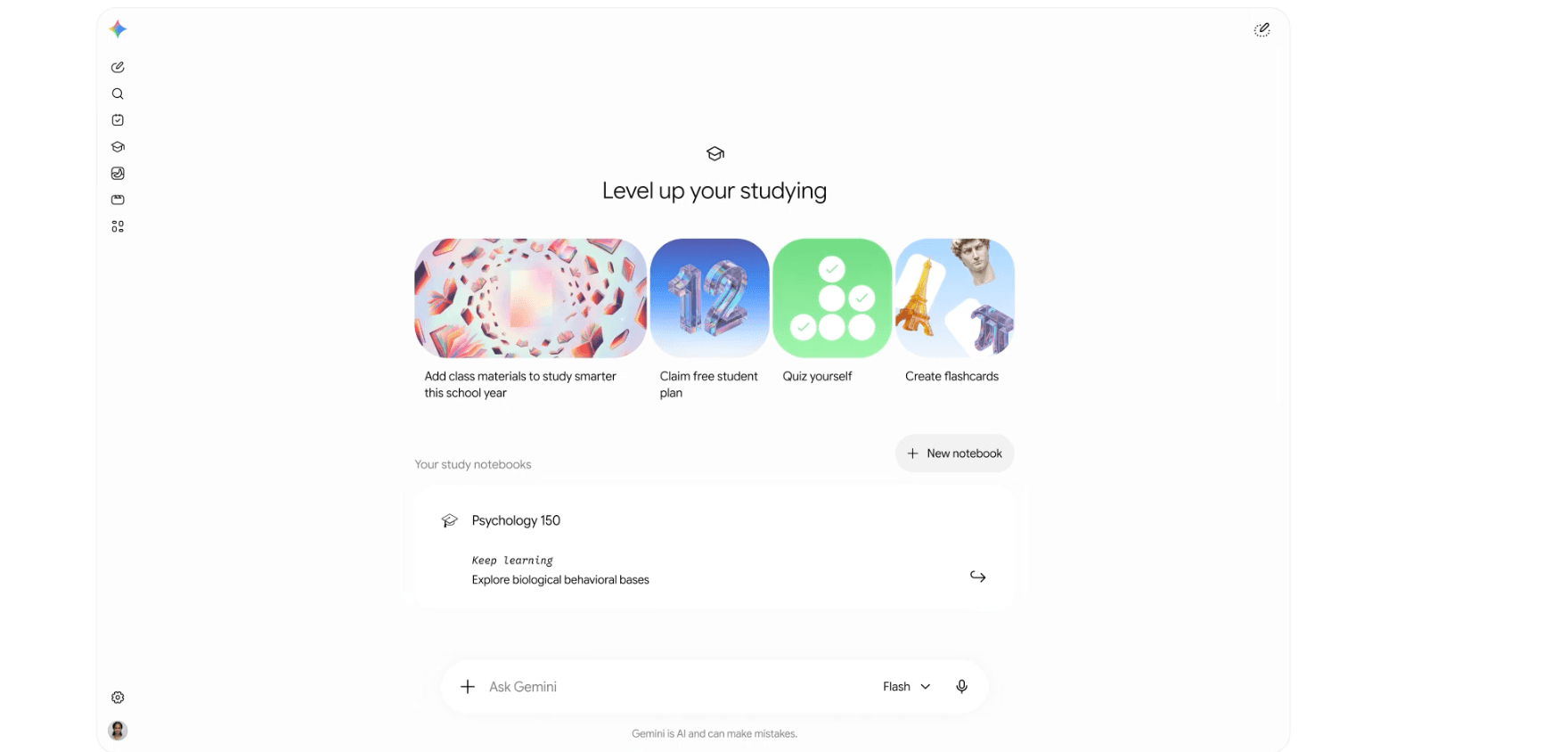
Overview
Gemini Student Hub is an organized entry page inside Gemini rather than a separate learning model. It brings Google's education-oriented tools and student plan offers together so learners can start a study notebook, make flashcards, take a quiz or practice test, and find newer visual and research experiences from one place.
Study notebooks are the most substantial feature. A student uploads course materials, sets a learning goal, and can take a diagnostic quiz that identifies knowledge gaps. Gemini then creates short lessons and follow-up quizzes while tracking progress. Separate Canvas study materials support hints, performance analysis, more questions, shuffleable flashcards, text-to-speech, and practice tests for exams including SAT, JEE Main, and NEET UG.
The hub and learning features are rolling out to Gemini users generally; the 12-month premium plan offer has stricter eligibility. Students should also separate convenience from accuracy and privacy: verify explanations against class sources, follow the institution's academic-integrity policy, and review Gemini's Keep Activity setting before uploading unpublished research, identifiable student records, answer keys, or confidential course material.
Use cases
The strongest fit depends on the job you need the product to complete, not the size of its feature list.
Collect lecture notes, readings, syllabi, and assignments into subject-specific study notebooks with a defined learning goal.
Turn verified source material into flashcards, diagnostic quizzes, timed practice tests, and targeted follow-up questions.
Ask Gemini for interactive tables, diagrams, and 3D simulations when a concept is easier to understand spatially.
Claim the limited 12-month Google AI plan offer after reviewing eligibility, renewal price, storage consequences, and cancellation date.
Capabilities
Collect learning tools and current student offers at gemini.google.com/students instead of requiring students to discover each feature independently.
Upload notes or course materials, state a learning goal, take a diagnostic quiz, and receive bite-sized lessons and recommendations that update with progress.
Generate interactive cards and questions from a topic or source files, use hints and explanations, analyze performance, and request more practice.
Create full or section-level practice tests with an optional timer and a final breakdown of correct, incorrect, and skipped responses.
Generate question-specific tables, grids, and functional 3D simulations that can be rotated or explored inside a Gemini response.
Launch a multi-step research report, let it continue asynchronously, and discuss or refine the completed result through voice.
With permission, study notebooks can identify exams and assignment dates from a syllabus and schedule key dates in Google Calendar as the feature rolls out.
Surface the current one-year plan promotion: AI Pro for eligible U.S. college students and AI Plus in eligible markets outside the U.S.
Process
Step 1
Open the student hub with Gemini, then check the Google One terms separately before assuming the free 12-month paid plan applies to the account.
Step 2
Check Keep Activity, connected-app access, retention, and the institution's AI rules before adding class files or Drive content. Remove student records, unpublished research, and confidential material.
Step 3
Set a specific goal such as mastering one exam unit, upload authoritative course sources, and avoid mixing unrelated classes into the same notebook.
Step 4
Use the initial quiz to expose weak topics, then ask Gemini to cite the uploaded source and explain why each answer is correct.
Step 5
Use flashcards, hints, timed questions, and teach-back prompts. Attempt the problem before revealing Gemini's explanation and check calculations independently.
Step 6
Compare claims and deadlines to the syllabus, textbook, instructor materials, and primary sources before relying on a lesson or adding dates to Calendar.
Step 7
If claiming the student offer, record the end date and review storage usage before renewal so the account is not unexpectedly billed or left above its post-offer storage limit.
Cost
The Student Hub and its core learning entry points are rolling out within Gemini; they are not a separate subscription. Google is also offering eligible college students a Google AI plan for 12 months at no charge when redeemed by December 31, 2026. A qualifying payment method is required, the plan renews automatically at the applicable standard monthly price unless canceled, and the offer is unavailable on school-issued Workspace for Education accounts.
$0
Use the Student Hub and supported learning tools with standard Gemini limits as availability rolls out.
$0 for 12 months, then $19.99/month
Google AI Pro promotion for eligible college students in the United States.
$0 for 12 months, then the local standard price
Google AI Plus promotion in supported countries and regions outside the United States.
Pricing checked . Check current pricing at the source ↗
Assessment
Compare
The right alternative depends on the specific output, workflow, controls and budget your project requires.
Students
Choose Google NotebookLM when source-grounded notebook research and generated study artifacts are the priority rather than Gemini's broader assistant and student-offer hub.
Explore Gemini Notebook (formerly NotebookLM) →Educators
Choose ChatGPT Study Mode when a Socratic, step-by-step tutoring conversation in ChatGPT better fits the learning workflow.
Explore ChatGPT Study Mode →Educators
Choose Khanmigo when a curriculum-oriented tutor and teacher tools from Khan Academy are more important than Google ecosystem integration.
Explore Khanmigo →Questions
It is a dedicated page inside Gemini that organizes Google's learning tools and student offers, including study notebooks, flashcards, quizzes, practice tests, interactive visualizations, and research features.
The hub and generally available learning tools can be used with standard Gemini access as they roll out. Higher usage limits and storage come from paid Google AI plans or the separate limited-time college student offer.
Eligibility generally requires being at least 18, enrolled at an eligible higher-education institution in a supported country, verifying student status, using a personal Google Account, and providing a qualifying payment method. Account and country exclusions apply.
No. Google's current terms say the promotion is not available on a school-issued Workspace for Education account. A personal Google Account is required.
The plan automatically renews at the standard monthly rate for the applicable plan and country unless canceled. In the U.S., Google states that AI Pro renews at $19.99 per month.
It organizes uploaded course sources around a learning goal, offers a diagnostic quiz, creates personalized short lessons and follow-up practice, and tracks progress within that notebook.
Not currently. Google says study notebooks are available at gemini.google.com but not inside the Gemini mobile app, even though other notebook functions can appear on mobile.
Review the material and settings first. With Keep Activity on, uploads and chats are saved and may be used to improve Google services with human review. Do not upload confidential research, student records, restricted answer keys, or material you lack permission to share.
Bottom line
Gemini Student Hub is a strong organizational layer for students already using Google because it turns scattered AI features into a coherent study workflow. Study notebooks, diagnostics, progress-aware lessons, flashcards, and practice tools offer more educational value than a blank chatbot. The one-year promotion is genuinely useful for eligible college students, but it should be claimed with eyes open: it requires a personal account and payment method, renews automatically, and can leave a student using far more storage than the free account supports. Accuracy, privacy, and academic-integrity checks remain mandatory.
Visit Gemini Student Hub website ↗
Get access to all our AI courses, hundreds of real-world AI use cases, live expert-led workshops, an exclusive network of AI early adopters, and more.
Get unlimited access to all of our current & upcoming industry-specific AI courses for the duration of your subscription.
To keep up with the rapid pace of AI, our team publishes AI implementation guides daily. Our library contains 300+ practical use cases to automate real-world work.
Join weekly, live, interactive sessions with industry leaders who are at the forefront of AI for hands-on implementation guidance and exclusive insights.
Network with an exclusive community of AI-first professionals who are working smarter with AI. Learn how early adopters are using AI in their work and businesses.


.avif)
