Commercial video teams
Create seasonal, regional, material or audience variations from an approved master shot.
Independent tool overview
Ray 3.2 Modify is Luma's current production-focused video-to-video model for transforming existing footage while preserving selected motion, structure, timing and character details.
Visit the official Ray 3.2 Modify site ↗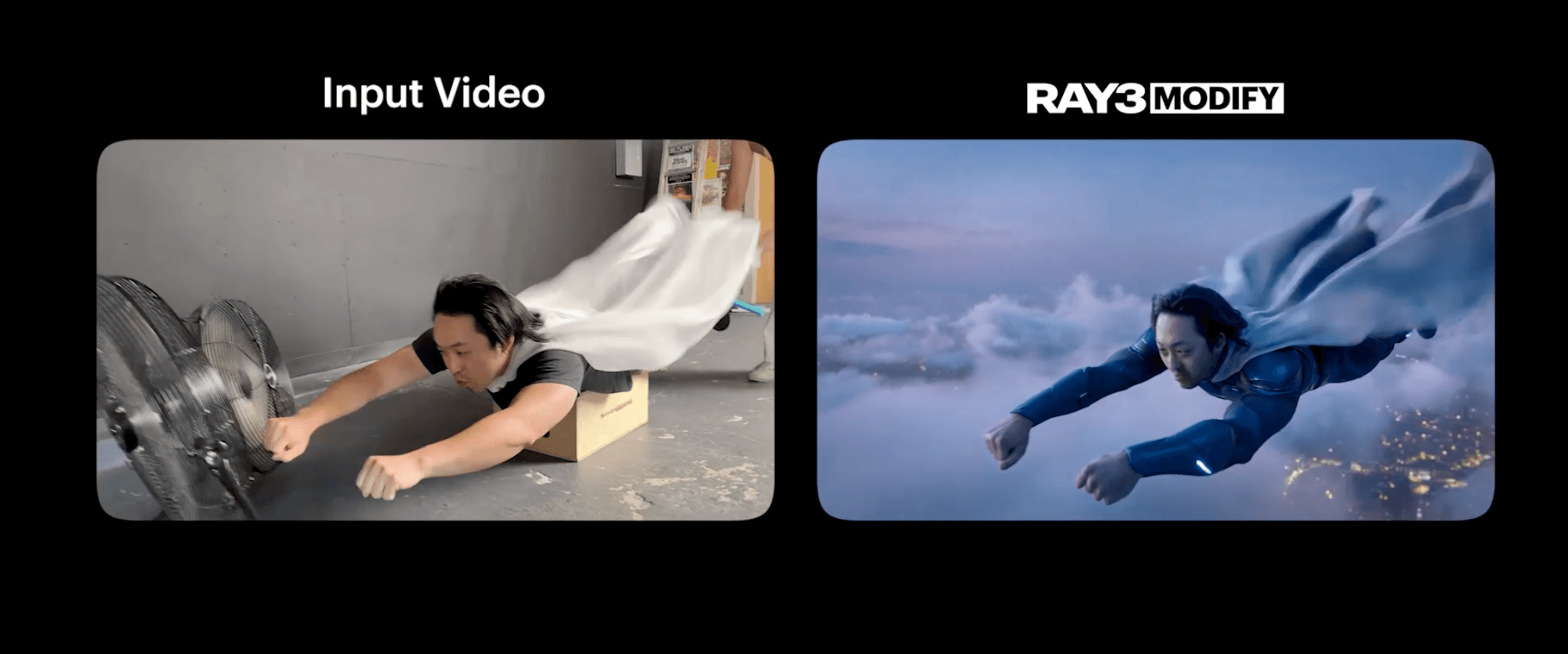
Overview
Ray3 Modify began as Luma's controlled video-to-video workflow for changing a clip's character, style or environment with reference images and start or end keyframes. Luma's current successor is Ray 3.2 Modify, which expands the idea into a more production-oriented editor.
Ray 3.2 always starts with a source video and returns a transformed clip with the same duration, up to 20 seconds. Creators can guide the result with a prompt, as many as 64 keyframes placed at exact source frames, or both, then independently control how much motion, scene structure, faces, bodies and poses should be preserved.
This is not a general text-to-video model. Its value comes from reusing a real performance, camera move, product angle, edit or shot layout while changing the visual treatment. Teams needing loops or duration changes may still use Ray3.14 Modify; teams needing multi-keyframe control, HDR, EXR or deeper preservation settings should use Ray 3.2.
Use cases
The strongest fit depends on the job you need the product to complete, not the size of its feature list.
Create seasonal, regional, material or audience variations from an approved master shot.
Explore stylized treatments, environment changes and temporary composites before committing to a conventional finishing pipeline.
Retain selected motion, body shape, face, pose and timing while changing the character or world around the performance.
Restyle materials, wardrobe, signage, props, weather and environments without rebuilding the original camera move.
Capabilities
Reimagines an existing clip while preserving its exact duration and selected visual structure.
Accepts as many as 64 edited stills at arbitrary source-frame positions to anchor the look throughout the shot.
Works with a text description, keyframes alone, or both for stronger creative control.
Controls how closely the output follows the timing and movement behavior of the source footage.
Controls preservation of framing, geometry, object placement and overall scene layout.
Separately locks faces, bodies and skeletal pose behavior when identity, build or performance must survive the restyle.
Supports HDR video-to-video and EXR export for color grading and professional finishing.
Lets creators choose faster iteration or a higher-quality inference path for final candidates.
Runs through Luma's creative application and is also available as Ray 3.2 video editing through the Luma Agents API.
Process
Step 1
Use clear, stable, high-quality footage with the motion, framing and timing that should remain in the result.
Step 2
Decide whether motion, structure, face, body, pose, product placement or camera behavior is the non-negotiable part of the shot.
Step 3
Start with a concise target-state prompt and moderate adherence before adding complex controls.
Step 4
Export important source frames, restyle them carefully and attach them at their original indexes where the output needs more art direction.
Step 5
Review frame continuity, identity, logos, hands, text and artifacts, then color-grade, composite, edit and clear rights before release.
Cost
Luma's individual plans are Plus at $30 monthly or $300 yearly, Pro at $90 monthly or $900 yearly, and Ultra at $300 monthly or $3,000 yearly. Ray 3.2 video-to-video in the web app consumes 36 credits/second in Draft, 48 at 540p, 72 at 720p and 144 at 1080p; HDR is 2x and HDR+EXR is 3x. The separate Agents API charges standard 5-second edits from $0.54 to $2.16 by resolution.
$30/month or $300/year
The entry paid Luma plan with commercial use and access to Luma and third-party models.
$90/month or $900/year
For creators who need substantially more Luma Agent usage.
$300/month or $3,000/year
The highest public individual tier for intensive creative use.
$0.54-$2.16 per standard 5-second video edit
Pay-as-you-go Ray 3.2 editing for developers and automated workflows.
Contact for pricing
For shared administration, organizational usage and enterprise services.
Pricing checked . Check current pricing at the source ↗
Assessment
Compare
The right alternative depends on the specific output, workflow, controls and budget your project requires.
Content Creator
A multimodal video model for creators who want text, image and video editing controls in Kling's ecosystem.
Explore Kling O1 →Content Creator
A broader cinematic generation alternative for teams already using Runway's creative production suite.
Explore Runway Gen-4.5 →Content Creator
Google's high-end video model for creators prioritizing strong generation quality and native audio workflows over Ray 3.2's source-preserving controls.
Explore Veo 3.1 →Questions
Ray3 Modify remains part of Luma's model history, but Ray 3.2 is the current production-focused successor for standard video-to-video transformation with multi-keyframe, HDR, EXR and deeper preservation controls.
It takes an existing source clip and creates a visually transformed version with the same duration while letting the creator preserve selected motion, structure and character attributes.
Up to 20 seconds. The output keeps the exact source duration rather than using a separate duration setting.
Luma documents support for up to 64 guide keyframes attached to exact indexes in the source timeline.
Use Ray 3.2 for standard V2V work, multi-keyframe direction, exact source duration, HDR, EXR and deeper character controls. Luma recommends Ray3.14 Modify when a workflow specifically needs to change duration or create a loop.
In the Luma app, standard V2V uses 36 credits/second in Draft, 48 at 540p, 72 at 720p and 144 at 1080p. In the separate pay-as-you-go API, a standard 5-second edit ranges from $0.54 to $2.16 by resolution.
Yes. Ray 3.2 supports HDR video-to-video and EXR export, with higher credit and API costs than standard dynamic range.
It provides separate face, body and pose controls designed to preserve identity and performance, but results still need frame-by-frame review because fine features can drift.
Bottom line
Ray 3.2 is a meaningful upgrade for creators who found Ray3 Modify promising but too limited for art-directed production. Its exact-duration transformation, 64 keyframes and separate preservation controls make it especially useful for look development, campaign variants and stylized VFX. It remains a generative first pass rather than a replacement for editing, compositing and final quality control.
Visit Ray 3.2 Modify website ↗
ChatGPT Images - OpenAI's new AI image generation system with upgraded editing, text rendering, quality, and dedicated Images creation space
Hunyuan Motion 1.0 - Tencent's open-source model for 3D character animations from text prompts
Wan 2.6 - Alibaba's new native multimodal model for image and video generation

LTX-2 - Lightricks' open-source foundation video model for long-form, high-fidelity outputs

Get access to all our AI courses, hundreds of real-world AI use cases, live expert-led workshops, an exclusive network of AI early adopters, and more.
Get unlimited access to all of our current & upcoming industry-specific AI courses for the duration of your subscription.
To keep up with the rapid pace of AI, our team publishes AI implementation guides daily. Our library contains 300+ practical use cases to automate real-world work.
Join weekly, live, interactive sessions with industry leaders who are at the forefront of AI for hands-on implementation guidance and exclusive insights.
Network with an exclusive community of AI-first professionals who are working smarter with AI. Learn how early adopters are using AI in their work and businesses.