E-commerce founders
Move from a rough product idea to supplier-facing visual concepts without assembling separate design and sourcing tools.
Independent tool overview
Pietra Product Design Studio is an active AI design workspace inside Pietra's broader commerce platform. It turns prompts, reference images, sketches and existing design files into product and packaging concepts, then helps teams annotate and share those ideas with suppliers in Pietra's factory network. It can accelerate ideation and sourcing, but its renderings are not production-ready engineering files, safety approval or proof that a supplier can manufacture a compliant product.
Visit the official Pietra Product Design Studio site ↗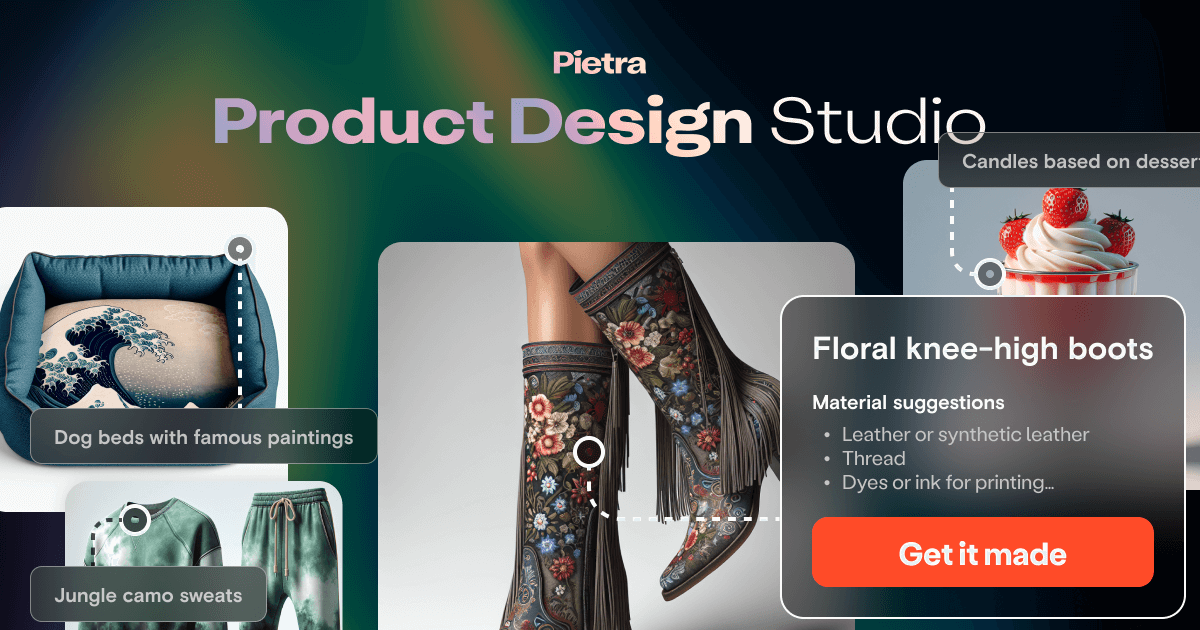
Overview
Pietra connects the early visual-design stage to sourcing and production. Users can generate variations, turn rough sketches into more polished product views, start from manufacturer-informed templates and send measurements or annotations to a team or supplier.
The Product Design Studio sits inside a larger membership that also covers sourcing, fulfillment, storefront, marketing and AI assistants. Published plan limits provide 500 product designs per month on Essentials and 5,000 on Business.
The end-to-end positioning is convenient for small brands, but each transition—from concept to sample to production—needs separate validation. Specifications, intellectual property, materials, testing, labeling, quality control, landed cost and supplier contracts remain the brand owner's responsibility.
Use cases
The strongest fit depends on the job you need the product to complete, not the size of its feature list.
Move from a rough product idea to supplier-facing visual concepts without assembling separate design and sourcing tools.
Create many line, color, pattern or packaging variations and collaborate before paying for samples.
Use annotated visuals and manufacturer templates to make initial requirements easier to discuss.
Capabilities
Creates visual product or packaging directions from written ideas, images, sketches or existing design assets.
Turns basic concept sketches into more detailed 3D-style visualizations for review and iteration.
Generates multiple colors, patterns and concept directions quickly enough to explore a wider design space.
Offers templates connected to product categories and suppliers as a more practical starting point than a blank canvas.
Lets teams communicate dimensions and notes when sharing a concept with vendors.
Connects designs to Pietra's advertised network of more than 1,300 factories and packaging suppliers.
Membership also connects sourcing, sampling, fulfillment, content, retail outreach and operational AI tools.
Process
Step 1
Define customer, use case, target price, materials, size, safety requirements and non-negotiable brand constraints.
Step 2
Use prompts, references or sketches to explore directions, then select ideas using explicit business and product criteria.
Step 3
Add dimensions, construction details, materials, tolerances, packaging copy and a version-controlled tech pack with qualified design help where needed.
Step 4
Compare quotes, minimums, lead times, certifications and contract terms; order physical samples before production.
Step 5
Inspect samples for function, safety, labeling, color, durability and shipping performance, then use independent quality control for production runs.
Cost
Pietra offers a seven-day trial, then platform memberships. Promotional pricing published on August 31, 2026 starts at $39 monthly or $29 per month billed annually for Essentials and $199 monthly or $149 per month billed annually for Business. The company warns these reduced prices may return to standard rates. Manufacturing, samples, freight, duties, inspections, storage and fulfillment are additional costs.
7 days
Temporary access to evaluate Pietra's platform before selecting a membership.
$39/month or $29/month annually
Self-service plan for emerging brands using core sourcing, design, fulfillment and marketing tools.
$199/month or $149/month annually
Higher-limit plan for teams needing collaboration, lower operations rates and premium support.
Custom; typically around $2,000/month
Contracted, customizable service for brands needing hands-on management.
Pricing checked . Check current pricing at the source ↗
Assessment
Compare
The right alternative depends on the specific output, workflow, controls and budget your project requires.
Design
Consider Fabrie AI for a design-first sketch-to-render workflow when supplier sourcing and fulfillment are not the main requirement.
Explore Fabrie AI →Design
Consider Canva Magic Studio for broad brand and marketing design when physical product manufacturing is outside the workflow.
Explore Canva AI (Magic Studio) →Questions
It turns prompts, reference images, sketches and design files into product or packaging concepts and helps teams annotate and share those concepts with suppliers.
On August 31, 2026, promotional pricing was $39 monthly or $29 per month billed annually for Essentials and $199 monthly or $149 per month billed annually for Business, after a seven-day trial. The company says those discounts are temporary.
Pietra's published comparison lists 500 product designs per month on Essentials and 5,000 per month on Business.
It can connect the concept to its supplier network, but you must convert the idea into complete specifications, obtain quotes and samples, confirm intellectual-property and regulatory requirements, and inspect production quality.
No. Membership provides platform tools and plan allowances. Samples, inventory, packaging, shipping, duties, inspection, storage and fulfillment charges are separate.
No. It can speed up exploration and communication, but qualified human design, engineering, packaging and compliance work is still needed where function, fit, safety or regulation matters.
Bottom line
Pietra Product Design Studio is most valuable when a small consumer brand wants to connect fast concept generation with actual supplier conversations and commerce operations. Its recurring membership is harder to justify for occasional mood-board work alone. Treat every generated visual as the start of specification and sampling—not as evidence that a product is safe, original, manufacturable or ready to order at scale.
Visit Pietra Product Design Studio website ↗
Get access to all our AI courses, hundreds of real-world AI use cases, live expert-led workshops, an exclusive network of AI early adopters, and more.
Get unlimited access to all of our current & upcoming industry-specific AI courses for the duration of your subscription.
To keep up with the rapid pace of AI, our team publishes AI implementation guides daily. Our library contains 300+ practical use cases to automate real-world work.
Join weekly, live, interactive sessions with industry leaders who are at the forefront of AI for hands-on implementation guidance and exclusive insights.
Network with an exclusive community of AI-first professionals who are working smarter with AI. Learn how early adopters are using AI in their work and businesses.


