Hardware hobbyists
Prototype a button, display or audio interface to a personal Muse account.
Independent tool overview
Muse Gadgets is an experimental set of open-source device SDKs and firmware for building personal hardware interfaces to the Muse agent.
Visit the official Muse Gadgets site ↗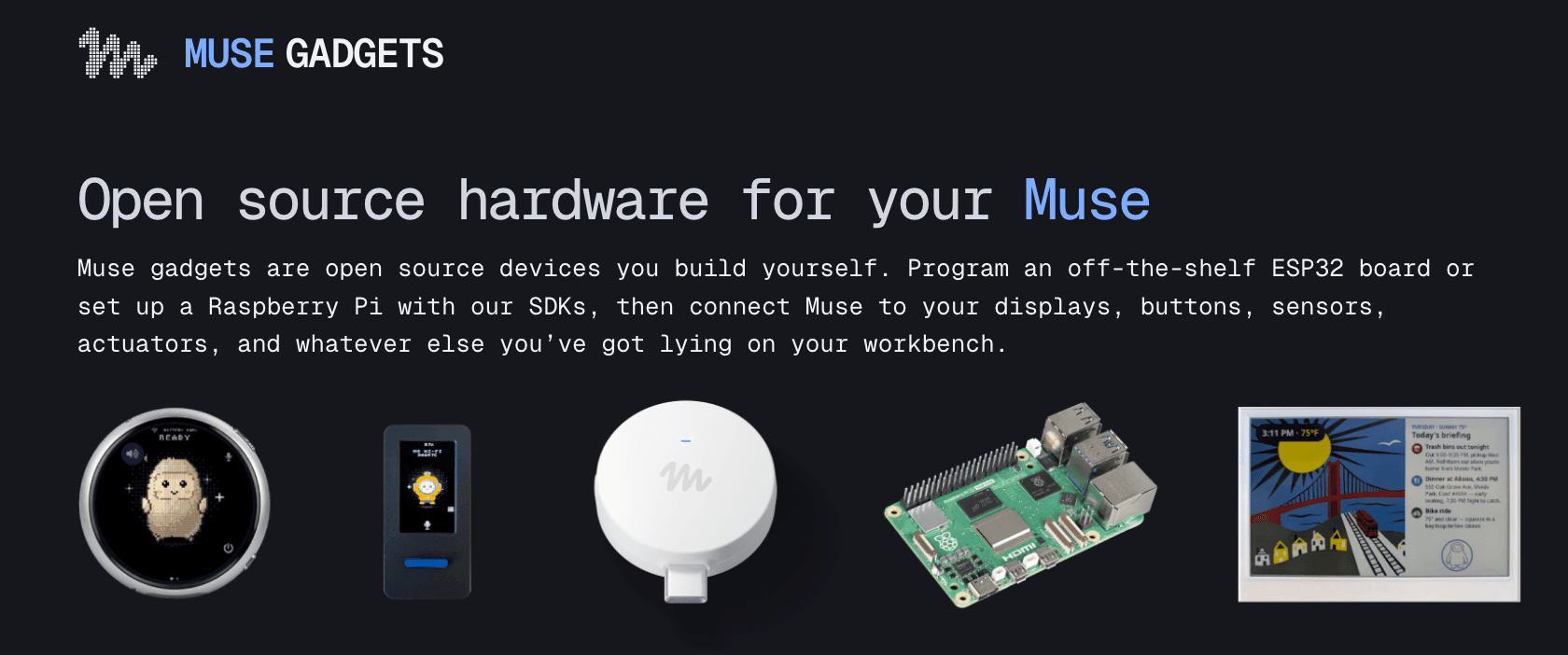
Overview
The project site describes two routes: connect an ESP32 board to displays, audio or sensors, or turn a Raspberry Pi or Linux machine into a Muse-connected gadget. It also offers Muse Home Link, a separate USB device that puts Muse on a home Wi-Fi network so community skills can call compatible local HTTP devices. The SDK and firmware code are Apache 2.0, but access to Muse is governed separately by personal SDK tokens and Muse terms. Open code therefore does not mean an unrestricted commercial platform.
Meta’s token terms permit personal, non-commercial use and set conditions for sharing devices. They explicitly say the SDK and tokens are provided as-is, can change or be withdrawn, and are not a supported developer platform. A person building a gadget must secure credentials, tell other users how information is handled and avoid relying on community skills for safety-critical controls. The Home Link product page says qualifying active US Muse subscribers can claim one free device, subject to availability; self-built boards and accessories have their own hardware cost.
Use cases
The strongest fit depends on the job you need the product to complete, not the size of its feature list.
Prototype a button, display or audio interface to a personal Muse account.
Try Home Link or a Linux gadget with local HTTP devices in a noncritical setting.
Inspect and adapt the SDK or firmware while observing the separate account-token terms.
Learn by doing
Put Muse Gadgets to work with step-by-step guides from The Rundown University.
Capabilities
Connects microcontroller boards and attached inputs or outputs to Muse.
Uses a Raspberry Pi or other Linux host for custom local commands and integrations.
A USB-C ESP32-C5 device links Muse to local network devices and community skills.
SDKs and firmware are published under Apache 2.0, enabling inspection and modification of the code.
A personal token authorizes a gadget to connect to a Muse account under additional restrictions.
Process
Step 1
Start with a display or noncritical home device rather than locks, alarms or medical controls.
Step 2
Follow the project guide for a compatible board or Home Link and request the required SDK token.
Step 3
Flash or install the SDK, pair with Muse and use minimal account permissions.
Step 4
Check disconnected behavior, token handling, user disclosure and how third-party skills process data.
Cost
SDK and firmware source is free under Apache 2.0, but hardware is purchased separately and using Muse requires an eligible account and token. Home Link is offered at no charge to qualifying active US Muse subscribers, one per account, while supplies and rollout permit. No general commercial gadget pricing or supported developer plan is advertised.
Free, open source
Apache 2.0 code for supported device projects.
Free for eligible US subscribers
Claimable hardware for an active Muse subscription.
Pricing checked . Check current pricing at the source ↗
Assessment
Compare
The right alternative depends on the specific output, workflow, controls and budget your project requires.
Agents
Use the main agent without building physical hardware.
Explore Muse →Business Operations
Build repeatable app and device automations with a general workflow tool.
Explore n8n →Business Operations
Choose a hosted cross-app automation service rather than maintaining a gadget.
Explore Zapier →Questions
The SDK code is free and open source, but you supply hardware and an eligible Muse account. Home Link is free only for qualifying active US subscribers while available.
The published token terms restrict use to personal, non-commercial projects and prohibit selling devices with a personal token without Meta’s prior permission.
No. The code license and rights to use Muse through an SDK token are separate.
Meta’s token terms explicitly say the Gadget SDK and tokens are not a supported product or developer platform.
Bottom line
Muse Gadgets is a compelling lab project for someone who enjoys building hardware, but it is too experimental for a dependable commercial or safety-critical system. Read the token terms before distributing a device, and treat local integrations as prototypes until their failure behavior is tested.
Visit Muse Gadgets website ↗
Microsoft's live speech-to-text model, top-ranked for accuracy
Cohere's workplace agent platform, now with memory and spending caps

Inception's cheap, speedy reasoning model for AI voice agents
Google's tiny open model for on-device search across media

Get access to all our AI courses, hundreds of real-world AI use cases, live expert-led workshops, an exclusive network of AI early adopters, and more.
Get unlimited access to all of our current & upcoming industry-specific AI courses for the duration of your subscription.
To keep up with the rapid pace of AI, our team publishes AI implementation guides daily. Our library contains 300+ practical use cases to automate real-world work.
Join weekly, live, interactive sessions with industry leaders who are at the forefront of AI for hands-on implementation guidance and exclusive insights.
Network with an exclusive community of AI-first professionals who are working smarter with AI. Learn how early adopters are using AI in their work and businesses.

