Latency-sensitive voice orchestration
Serving as the text-reasoning layer in an ASR-to-LLM-to-TTS pipeline where pauses are tightly budgeted.
Independent tool overview
Mercury 2 is Inception's active text reasoning model built around diffusion decoding, which refines multiple token positions in parallel instead of generating strictly one token at a time. Inception positions it for low-latency voice agents, customer support, search pipelines, tool use and rapid coding workflows, and advertises more than 1,000 tokens per second on NVIDIA H100 hardware. The OpenAI-compatible API supports a 128K context window, up to 50,000 output tokens, structured outputs, streaming and four reasoning-effort levels. Current list pricing is $0.25 per million input tokens, $0.025 per million cached-input tokens and $0.75 per million output tokens. Performance claims are workload- and hardware-dependent vendor results; production teams must benchmark end-to-end latency, accuracy, safety, tool authorization and cost on their own traffic.
Visit the official Mercury 2 site ↗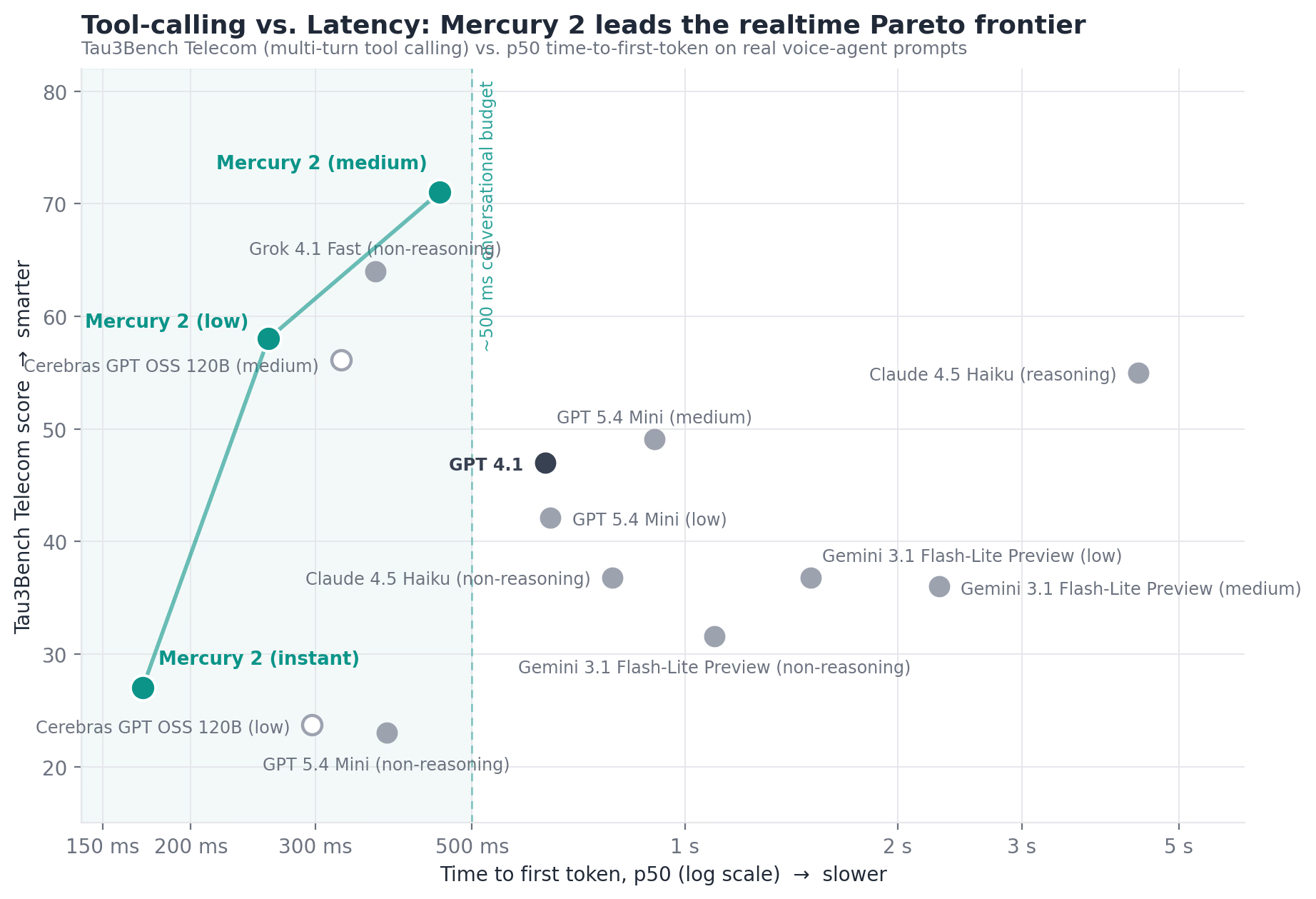
Overview
Mercury 2 is Inception's current general-purpose reasoning diffusion language model. It is an API model, not a complete phone system: a voice deployment still needs speech recognition, text-to-speech, telephony, orchestration, monitoring and human escalation.
Diffusion generation works by refining a span of noisy text over repeated denoising passes, allowing many token positions to be processed together. That differs from conventional left-to-right autoregressive decoding and is the basis for Inception's low-latency claims.
Inception reports more than 1,000 decoded tokens per second on standard NVIDIA H100 GPUs and roughly 300 milliseconds for a 300-token reasoning trace. Those figures are vendor measurements, not guaranteed end-to-end response times.
The model exposes instant, low, medium and high reasoning-effort settings. Instant prioritizes responsiveness and is documented for turns that do not need tool calls; medium is the official default for most applications.
The OpenAI-compatible chat-completions endpoint supports text, a 128K context window, a 50,000-token maximum output, tool calling and structured outputs. Streaming returns blocks, while an optional diffusing mode exposes changing intermediate denoising text and should not be shown as a stable final answer.
Inception highlights realtime voice, customer support, enterprise search, workflow subagents and rapid coding iteration. Its voice cost example estimates only the model layer and explicitly excludes transcription, speech synthesis and telephony.
Current list prices are $0.25 per million input tokens, $0.025 per million cached-input tokens and $0.75 per million output tokens. Inception's docs currently advertise 100 million free tokens for a new account, although one marketing-page line still says 10 million; confirm the actual grant and expiration in the platform.
A low model-token price does not equal a low total voice-call price. Resent conversation history, reasoning tokens, retries, tool calls, retrieval, speech services, phone minutes, logging and human transfers can dominate the real bill.
Inception's terms prohibit misinformation, political campaign content and high-stakes decision-making involving individual rights. They also say the service is for internal personal use and not on behalf of a third party, language that production or customer-facing buyers should reconcile with Inception in writing.
Prompts and other user submissions may be used to train Inception's models unless the account setting called Improve the model for everyone is turned off. The privacy policy also covers personal data in prompts and uploads and provides only purpose-based, not fixed, retention language.
Fast reasoning does not remove hallucinations, prompt injection, tool mistakes or policy failures. Voice agents need deterministic authorization, least-privilege tools, confirmation before consequential actions, transcript review, disclosure that the caller is speaking with AI and an immediate human handoff path.
Use cases
The strongest fit depends on the job you need the product to complete, not the size of its feature list.
Serving as the text-reasoning layer in an ASR-to-LLM-to-TTS pipeline where pauses are tightly budgeted.
Handling tool-assisted support flows with explicit confirmation, limited permissions and human escalation.
Running repeated query rewriting, reranking and summarization calls where per-hop latency compounds.
Producing structured routing, extraction and policy checks after schema and error-rate validation.
Testing a faster endpoint with familiar request shapes while auditing every behavioral difference.
Generating or reviewing text and code quickly when the general Mercury 2 model is preferable to the specialized Mercury Edit 2.
Capabilities
Refines multiple positions across bounded denoising passes rather than decoding only left to right.
Offers instant, low, medium and high modes to trade response depth for latency.
Uses the familiar v1/chat/completions shape and works through several common client libraries.
Accepts long text conversations and instructions, with token cost and retrieval quality still requiring management.
Allows as many as 50,000 output tokens, with a documented default of 16,384.
Can return tool calls for application-side execution; the application remains responsible for validation and authorization.
Supports constrained JSON schemas for extraction and workflow integration.
Returns completed response blocks progressively for chat and realtime interfaces.
Can expose the full changing text at each denoising step for demonstration or specialized interfaces.
Charges cached input at one-tenth of the standard input-token rate under the published table.
Official docs show use with OpenAI clients, LangChain, LiteLLM, AISuite and Vercel AI SDK.
Process
Step 1
Map the application against the current restrictions on high-stakes individual-rights decisions, misinformation, political campaigns and third-party use; obtain written terms for production ambiguity.
Step 2
Exclude secrets, regulated records and unnecessary personal data; turn off Improve the model for everyone before any sensitive authorized test.
Step 3
Measure speech recognition, network, model, tools, speech synthesis and telephony separately instead of treating token throughput as caller-perceived latency.
Step 4
Include common requests, accents, interruptions, ambiguous instructions, angry callers, prompt injection, rare edge cases and unsupported requests.
Step 5
Use Inception's default, then test low or instant only on simple turns; do not use instant for tool calls under the current documentation.
Step 6
Use structured schemas, explicit allowed actions, refusal rules and deterministic validation before downstream processing.
Step 7
Use narrowly scoped credentials, server-side authorization and allowlists; never let model text directly choose arbitrary endpoints or arguments.
Step 8
Read back names, dates, amounts, appointments and account changes and obtain clear user confirmation before committing an action.
Step 9
Do not let the model decide eligibility, employment, credit, healthcare, legal rights or other consequential outcomes; route those to authorized people.
Step 10
Disclose the AI agent, make a human transfer available and preserve context so callers do not have to repeat sensitive information.
Step 11
Measure p50, p95 and p99 latency, rate limiting, timeouts, retries and cost during realistic bursts; published rate limits can still vary with GPU availability.
Step 12
Review sampled transcripts with access controls, track failed actions and hallucinations, cap spend and maintain a rollback model.
Cost
List pricing checked August 31, 2026 is $0.25 per million input tokens, $0.025 per million cached-input tokens and $0.75 per million output tokens. Current documentation advertises 100 million free tokens for new accounts without payment details, while an older line on the model page still says 10 million; confirm the actual promotional balance and any expiration after signup. Enterprise pricing, custom rate limits and SLA guarantees require sales contact. Voice-system cost also includes ASR, TTS, telephony, tools, storage and support.
100M promotional tokens advertised
Trial access to Inception's models without payment details under the current documentation.
$0.25 input / $0.025 cached / $0.75 output per 1M tokens
Usage-based API access after the promotional balance.
Custom
Negotiated production capacity, security terms and support.
Pricing checked . Check current pricing at the source ↗
Assessment
Compare
The right alternative depends on the specific output, workflow, controls and budget your project requires.
Consumer
A broad fast-reasoning model alternative for teams comparing quality, multimodality, ecosystem and latency.
Explore Gemini 3 Flash →Agents
A more integrated voice-agent API when native speech interaction matters more than choosing each cascade component.
Explore Grok Voice Agent →Agents
A voice-focused reasoning option designed for background thinking and tool-assisted support workflows.
Explore Grok Voice Think Fast 1.0 →Sales
An orchestration platform for combining telephony, speech providers and language models, including Mercury-compatible architectures.
Explore Vapi →Business Operations
A managed conversational-voice platform for teams that prefer a fuller agent stack over a standalone model API.
Explore Retell AI →Business Operations
A visual platform for designing, testing and managing chat and voice agents with broader workflow tooling.
Explore Voiceflow →Questions
It is Inception's text reasoning diffusion language model, exposed through an OpenAI-compatible API and positioned for low-latency voice, support, search and agent workflows.
No. It is the text-reasoning layer. A phone agent still needs automatic speech recognition, text-to-speech, telephony and orchestration.
Inception reports more than 1,000 decoded tokens per second on NVIDIA H100 GPUs and about 300 milliseconds for a 300-token reasoning trace. Benchmark the complete application because network, queue, prompt, tool and speech latency differ.
The list price is $0.25 per million input tokens, $0.025 per million cached-input tokens and $0.75 per million output tokens.
Current documentation advertises 100 million free tokens for new accounts without payment details. One public page retains an older 10-million figure, so verify the awarded balance and expiration in the platform.
The production-model table lists a 128K-token chat context window and a maximum output of 50,000 tokens, with 16,384 as the documented default output limit.
It selects instant, low, medium or high reasoning. Medium is the official general default; instant is for near-realtime simple turns and is not recommended for tool calling.
Yes, except that the docs advise against tool use in instant mode. The application must validate arguments, authorize actions and require confirmation for consequential changes.
Yes. Mercury 2 can target a supplied JSON schema, but applications should still validate every response and handle refusals or malformed data.
The terms say user submissions may be used to train models unless Improve the model for everyone is turned off in API Platform settings. Enterprise buyers should obtain contract-specific data terms.
Do not use it to make high-stakes decisions about individual rights. The current terms prohibit that category, and consequential decisions require authorized human review regardless.
The endpoint shape is compatible, but behavior is not identical. Retest prompts, streaming, tool schemas, structured outputs, token accounting, safety, retries and latency before migration.
The advertised estimate covers only Mercury 2. Production also pays for transcription, synthesis, phone minutes, conversation history, reasoning output, tools, storage, monitoring and human handoffs.
Bottom line
Mercury 2 is a compelling model to benchmark when every sequential model call adds visible delay, especially in voice and multi-hop search. Its combination of diffusion decoding, OpenAI-compatible integration and $0.25/$0.75 token pricing is differentiated. The responsible buying decision depends on production evidence: measure full-pipeline p95 latency and accuracy, clarify the provider's customer-facing-use terms, disable prompt training where required, constrain every tool and preserve human control over consequential actions. Speed is valuable only when the system remains correct, permitted and recoverable.
Visit Mercury 2 website ↗
Claude Tag - Tag @Claude as a shared Slack teammate to delegate tasks

Presence - OpenAI's managed enterprise service deploying chat and voice agents
Mistral OCR 4 - Mistral’s OCR model with layout-aware document understanding

Grok Voice Think Fast 2.0 - xAI's new voice model that thinks while it speaks

Get access to all our AI courses, hundreds of real-world AI use cases, live expert-led workshops, an exclusive network of AI early adopters, and more.
Get unlimited access to all of our current & upcoming industry-specific AI courses for the duration of your subscription.
To keep up with the rapid pace of AI, our team publishes AI implementation guides daily. Our library contains 300+ practical use cases to automate real-world work.
Join weekly, live, interactive sessions with industry leaders who are at the forefront of AI for hands-on implementation guidance and exclusive insights.
Network with an exclusive community of AI-first professionals who are working smarter with AI. Learn how early adopters are using AI in their work and businesses.