Voice-agent product teams
Developers who need production-oriented conversation controls, status feedback, messages, and audio visualization.
Independent tool overview
ElevenLabs UI is a free, MIT-licensed collection of customizable React components for building voice, audio, transcription, and multimodal agent interfaces.
Visit the official ElevenLabs UI site ↗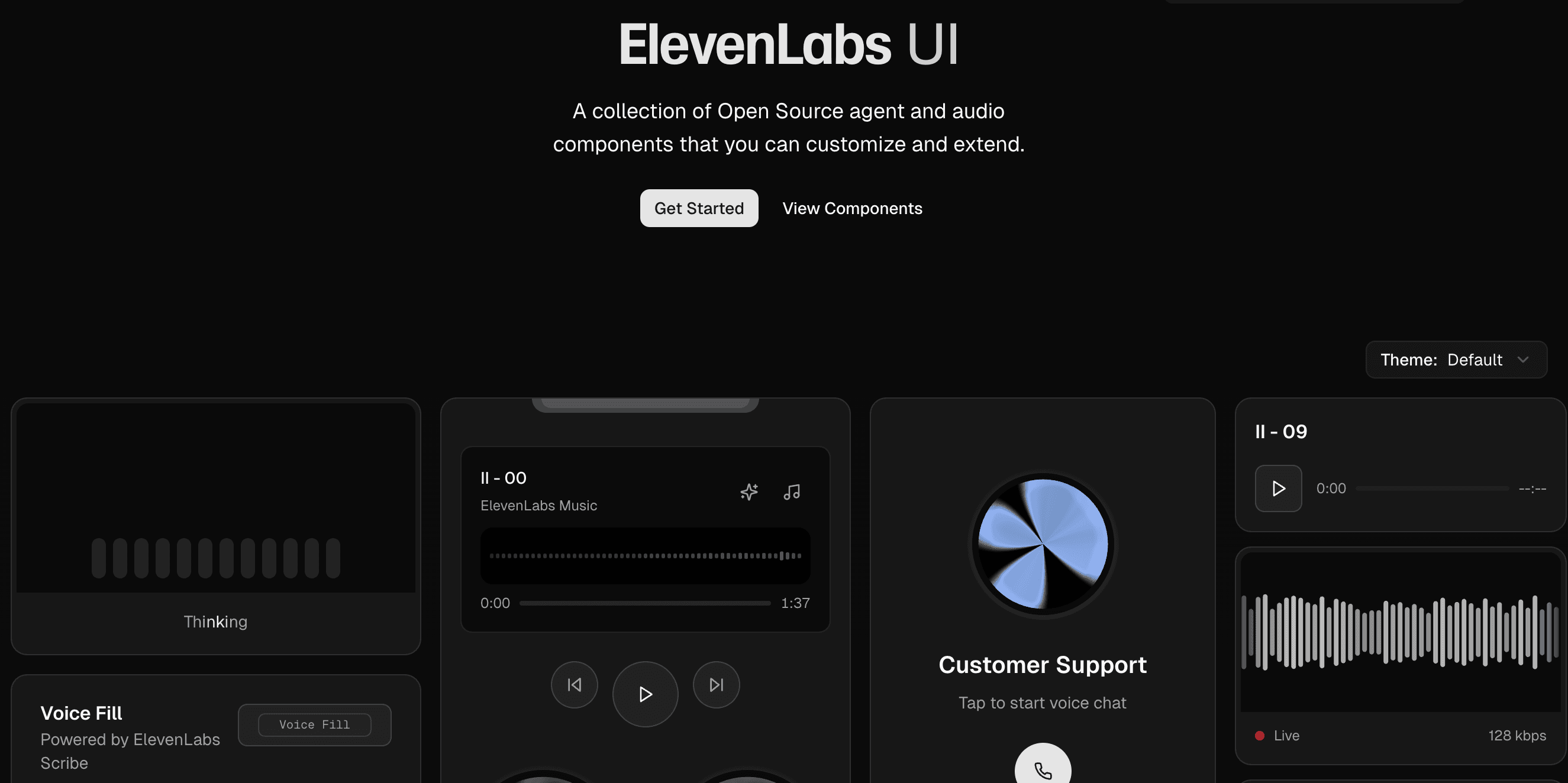
Overview
ElevenLabs UI gives developers ready-made interface pieces for audio and AI-agent products. The official catalog includes conversation layouts, messages, speech input, transcript viewers, voice pickers, live waveforms, audio players, microphone controls, and an animated agent orb.
The project follows the shadcn/ui model: its command-line installer copies each component and its dependencies into your application rather than hiding the implementation inside a closed package. That makes the code easy to inspect, restyle, extend, and maintain alongside the rest of a product.
The component library itself is free and open source. Costs arise when an interface connects to paid ElevenLabs speech, transcription, or agent services, and developers still need to provide the application logic, credentials, data handling, and production safeguards around those services.
Use cases
The strongest fit depends on the job you need the product to complete, not the size of its feature list.
Developers who need production-oriented conversation controls, status feedback, messages, and audio visualization.
Teams already using ElevenLabs Agents, text to speech, or transcription and wanting a faster frontend starting point.
Builders who want polished voice and audio interactions without designing every low-level UI state from scratch.
Organizations that prefer copied, editable components over an opaque hosted widget or rigid component package.
Capabilities
Conversation and Conversation Bar components combine microphone controls, text input, connection states, messages, and real-time audio feedback.
Waveform, Live Waveform, Bar Visualizer, and Orb components provide visual states for listening, thinking, speaking, playback, and recording.
Speech Input, Voice Button, Transcript Viewer, and example transcriber flows cover common capture and transcript experiences.
Audio Player, Scrub Bar, and related primitives support transport controls, progress, timing, and generated-audio playback.
Installed components live inside the application's own component directory, so teams can directly change behavior, styles, accessibility, and dependencies.
Developers can add a single component or the complete registry through ElevenLabs' CLI, with a shadcn CLI route also available.
Process
Step 1
Start with a Next.js project using Node.js 18 or later, Tailwind CSS, and shadcn/ui. The ElevenLabs installer can initialize shadcn/ui when needed.
Step 2
Browse the live examples and select the smallest useful primitive, such as Voice Button, Conversation Bar, Transcript Viewer, or Orb.
Step 3
Use the ElevenLabs CLI or shadcn CLI to copy the selected component and its dependencies into the project.
Step 4
Add the appropriate ElevenLabs SDK, agent ID, and securely managed server-side credentials for features that call ElevenLabs services.
Step 5
Adapt colors, layout, states, copy, responsive behavior, and accessibility to the product's design system and user needs.
Step 6
Verify permissions, muted microphones, reconnects, slow networks, long transcripts, keyboard use, mobile layouts, and service errors before launch.
Cost
ElevenLabs UI is free under the MIT license. Installing components does not require a paid UI subscription. Connected ElevenLabs services are billed separately: the public API page lists speech generation from $0.05 per 1,000 characters, Scribe v2 transcription at $0.22 per hour, and the ElevenAgents speech engine at $0.08 per minute. Agent plans start free, with paid plans beginning at $6 per month.
Free
Use, modify, and ship the component source under the MIT license.
$0/month
Optional hosted agent service for testing a voice-agent interface.
$6/month
Entry paid agent plan with commercial use and a larger included allowance.
Usage based
Pay separately for speech, transcription, and other APIs connected to the components.
Pricing checked . Check current pricing at the source ↗
Assessment
Compare
The right alternative depends on the specific output, workflow, controls and budget your project requires.
Sales
Choose Vapi when you need a broader developer platform for composing and operating voice agents, not only frontend components.
Explore Vapi →Business Operations
Choose Retell AI when managed voice-agent infrastructure and telephony workflows are the primary requirement.
Explore Retell AI →Business Operations
Choose Voiceflow when non-developers need a visual workspace for designing and managing conversational agents.
Explore Voiceflow →Questions
Yes. The component library is free and MIT licensed. ElevenLabs speech, transcription, and agent APIs used behind the components have separate pricing.
No. It is a component registry. The installer copies React component source into your application so your team can customize and maintain it.
Purely visual components can be adapted independently, but components that create conversations, transcription, or generated audio need a service behind them. The official examples are designed around ElevenLabs SDKs and APIs.
The official catalog includes audio players, visualizers, conversations, messages, microphone selection, the animated Orb, response rendering, scrub controls, speech input, transcript viewing, voice buttons, voice picking, and waveforms.
The official setup guide calls for Node.js 18 or later, a Next.js project, shadcn/ui, and Tailwind CSS.
Yes. Each component is added to your repository as editable source, allowing changes to styling, layout, state handling, accessibility, and behavior.
Use the @elevenlabs/cli components command or the standard shadcn CLI registry URL. You can add one component at a time or install the full collection.
Bottom line
ElevenLabs UI is one of the fastest ways for a React team to add polished voice and audio interactions while retaining full control of the frontend code. It is especially useful for ElevenLabs customers, but it should be evaluated as an editable UI foundation—not as a finished agent platform.
Visit ElevenLabs UI website ↗
Reve - Free, high-quality AI image generator

Seed 3D - Bytedance's image to 3D model for simulation-ready assets
Tripo AI - Turn text or images into production-ready 3D assets
.jpeg)
Nano Banana Pro - Google's image generation model with unprecedented control, improved text rendering and enhanced world knowledge.

Get access to all our AI courses, hundreds of real-world AI use cases, live expert-led workshops, an exclusive network of AI early adopters, and more.
Get unlimited access to all of our current & upcoming industry-specific AI courses for the duration of your subscription.
To keep up with the rapid pace of AI, our team publishes AI implementation guides daily. Our library contains 300+ practical use cases to automate real-world work.
Join weekly, live, interactive sessions with industry leaders who are at the forefront of AI for hands-on implementation guidance and exclusive insights.
Network with an exclusive community of AI-first professionals who are working smarter with AI. Learn how early adopters are using AI in their work and businesses.