Starting work away from a laptop
Launch a bounded bug fix, CI investigation, refactor or feature task and let a Cloud Agent continue asynchronously.
Independent tool overview
Cursor for iOS is a native beta app for launching and supervising Cursor coding agents from an iPhone or iPad. It can start cloud runs, remotely direct an agent using a developer's computer, show live progress, review diffs and pull requests and merge approved work, but it is not a mobile code editor or terminal.
Visit the official Cursor for iOS site ↗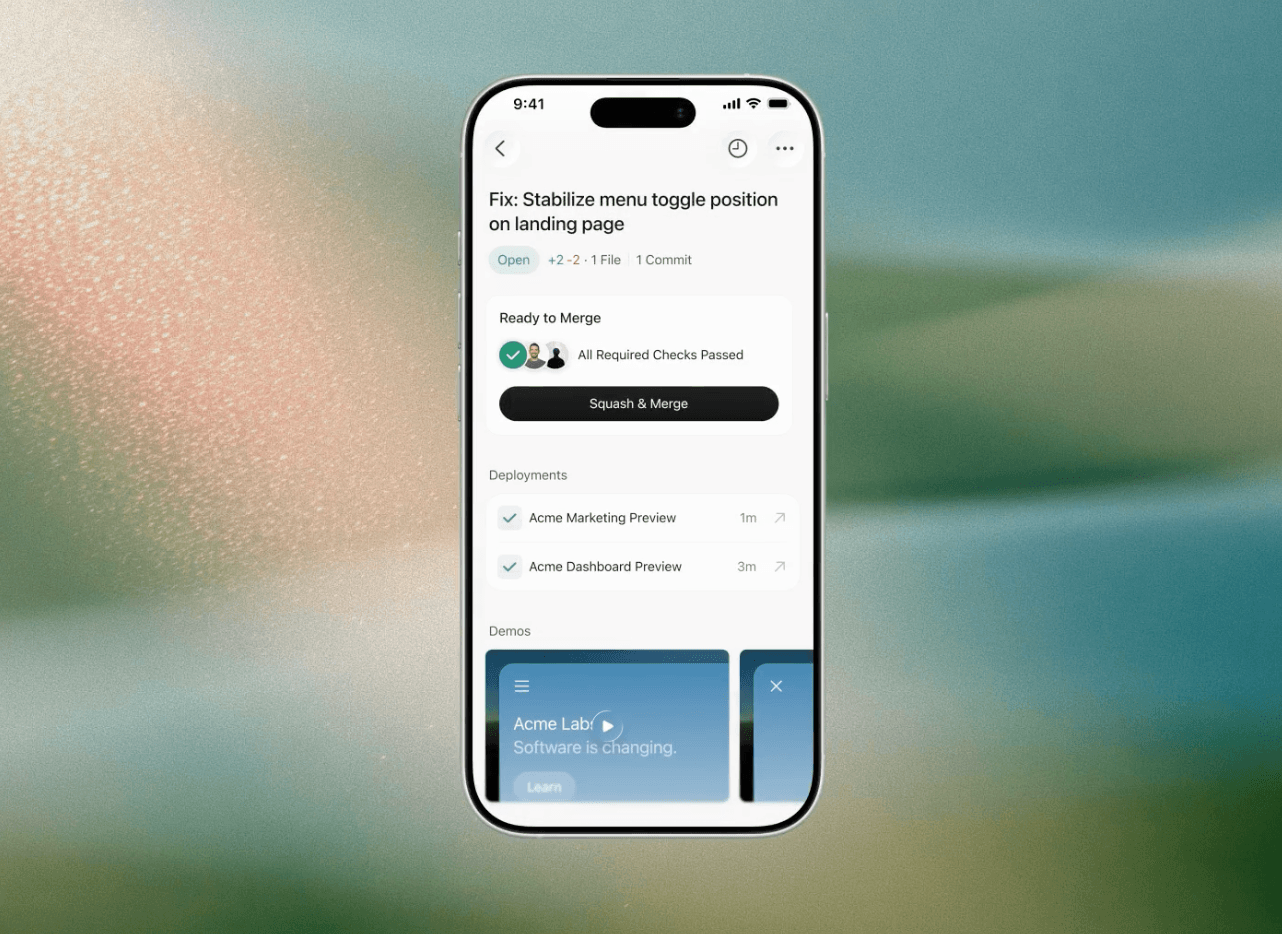
Overview
Cursor for iOS brings the same agent inbox used by cursor.com/agents and the desktop Agents Window to mobile. A task started on the phone appears on the web and desktop, and an existing local or cloud session can be picked up from the app.
The main execution choices are Cloud Agents, which run in isolated remote VMs, and Remote Control, which moves the agent loop to the cloud while tools continue running on the developer's own computer. Cloud runs can continue while the phone is locked; Remote Control requires the computer to remain awake, connected and open to the workspace.
As of August 31, 2026, the app remains in beta, supports iPhone on iOS 26 or later and iPad on iPadOS 26 or later, and has an English-only interface. It is available in App Store regions except mainland China; Android is planned without a published release date.
Use cases
The strongest fit depends on the job you need the product to complete, not the size of its feature list.
Launch a bounded bug fix, CI investigation, refactor or feature task and let a Cloud Agent continue asynchronously.
Watch progress, respond to questions and receive completion or attention notifications without staying at the desk.
Inspect diffs, commits, checks, deployments and comments, ask the agent for changes and merge an already-reviewed result.
Capabilities
Choose a repository and branch, start an agent on a remote machine and follow its live transcript while it works.
Steer an agent whose tools, files and tests remain on the developer's computer, with the agent loop coordinated through the cloud.
Sessions remain visible across the iOS app, web dashboard and desktop Agents Window for fluid handoff.
Read diffs, commits, comments, approvals, checks and deployments; change reviewers, request fixes, update branches and manage merge actions.
Attach photos, files or screenshots, annotate visual feedback in Design Mode and dictate prompts with live transcription.
Track up to eight running agents from the lock screen or Dynamic Island and receive alerts when work finishes or needs input.
Use configured slash commands, skills and automations, and choose from MCP servers already managed through the web setup.
Process
Step 1
Connect source control and configure Cloud Agent environments, secrets and MCP servers before relying on the mobile app.
Step 2
Download Cursor from the App Store on a supported iPhone or iPad and sign in with the same Cursor account or organization SSO.
Step 3
Start a Cloud Agent for unattended remote work, or enable Remote Control from Cursor 3.9.8 or later when the local machine must provide the environment.
Step 4
Select the repository and branch, provide a narrow task and acceptance criteria and follow the stream or send corrections from the phone.
Step 5
Use mobile diffs for triage, but move to desktop when full editing, a terminal, local reproduction or deeper code navigation is required before merge.
Cost
The iOS app has no separate mobile fee, but free accounts cannot start agents. It is available with Cursor Start in India and the Pro, Pro+, Ultra, Teams and Enterprise plans. Monthly Pro, Pro+ and Ultra subscriptions can be bought through Apple, but App Store subscriptions do not support on-demand usage; yearly, team and enterprise plans are purchased through cursor.com.
₹649/month in India
India-only individual plan with Cursor models, Cloud Agents and Cursor for iOS.
$20/month
Entry global individual plan with Cursor for iOS, Cloud Agents and included agent usage.
$60/month
Higher-capacity individual plan for daily agent users.
$200/month
Individual power-user plan for heavy agent workloads.
From $40/user/month
Managed team access with shared controls and administration.
Pricing checked . Check current pricing at the source ↗
Assessment
Compare
The right alternative depends on the specific output, workflow, controls and budget your project requires.
Coding
Cursor Agents on the web or desktop provide the same cloud backend with more room for setup, review and handoff when a native phone app is unnecessary.
Explore Cursor Agents →Coding
Codex App is an alternative multi-agent workspace for developers who prefer OpenAI's coding ecosystem and a desktop-first management surface.
Explore Codex App →Coding
Claude Code is a terminal-first alternative when direct command-line control matters more than a native mobile supervisory interface.
Explore Claude Code →Questions
No. It is designed to direct agents and review their changes. Cursor says the app does not include a full editor, terminal or file browser.
The app has no separate fee, but a paid Cursor plan is required to start Cloud Agents or Remote Control. Free accounts can sign in but cannot launch runs.
As of August 31, 2026, it requires an iPhone running iOS 26.0 or later or an iPad running iPadOS 26.0 or later.
Yes, through Remote Control. Cursor desktop 3.9.8 or later must be configured, and the computer must stay awake, connected and open to the workspace while tools run locally.
Yes. The app can show full diffs, commits, checks, deployments, approvals and comments and supports several pull-request actions. High-risk changes should still receive desktop review and trusted test execution.
Not yet. Cursor says Android is planned but has not published a release date.
Yes. Monthly Pro, Pro+ and Ultra plans are available as Apple in-app purchases. Annual, Teams and Enterprise plans use cursor.com, and Apple-billed plans cannot use on-demand spend.
Bottom line
Cursor for iOS is a capable supervisory client for developers already using Cursor Agents: it is strongest for launching bounded work, responding to agents and triaging a nearly finished pull request while away from the desk. It does not make an iPhone a development workstation, and the best practice remains to move complex review, testing and manual edits back to a trusted desktop environment before shipping.
Visit Cursor for iOS website ↗
Get access to all our AI courses, hundreds of real-world AI use cases, live expert-led workshops, an exclusive network of AI early adopters, and more.
Get unlimited access to all of our current & upcoming industry-specific AI courses for the duration of your subscription.
To keep up with the rapid pace of AI, our team publishes AI implementation guides daily. Our library contains 300+ practical use cases to automate real-world work.
Join weekly, live, interactive sessions with industry leaders who are at the forefront of AI for hands-on implementation guidance and exclusive insights.
Network with an exclusive community of AI-first professionals who are working smarter with AI. Learn how early adopters are using AI in their work and businesses.