First-draft presentations
Turn a topic, outline, report, or uploaded source into a complete slide sequence before final editing in Google Slides.
Independent tool overview
Gemini Canvas is an interactive workspace inside the Gemini app for creating and refining slide presentations, documents, apps, and code beside an AI conversation. It can turn source files or a prompt into a draft, support direct and prompted edits, and export slides to Google Slides or PDF for final production.
Visit the official Gemini Canvas site ↗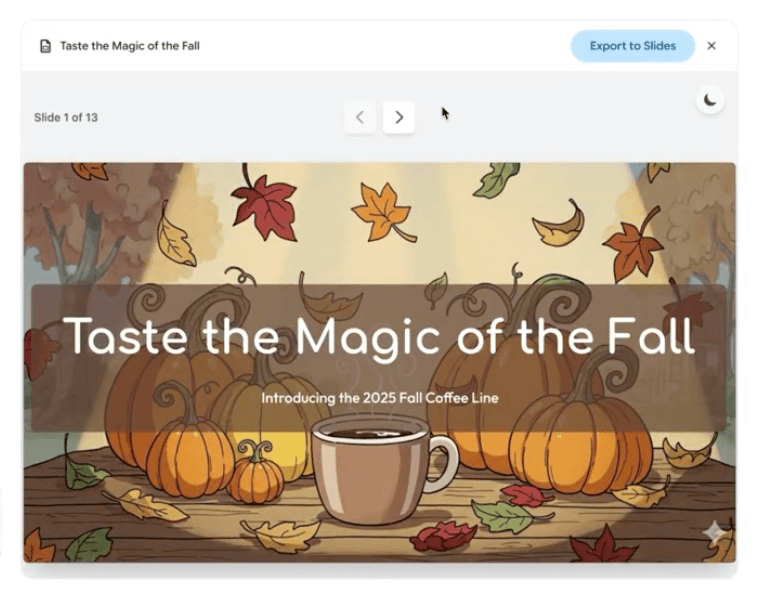
Overview
Gemini Canvas began as a document-and-code workspace and now covers slide decks, apps, quizzes, infographics, web pages, Audio Overviews, and technical documents with LaTeX. For presentations, users can provide a topic or upload source material, generate a themed deck with relevant imagery, refine it in Canvas, and move it to Google Slides.
Canvas is broad and convenient, but the risks differ by output. A slide deck needs factual, visual, and brand review; a generated app needs code, security, and accessibility testing; and any shared multi-user app needs careful data controls because Google warns that data may be visible and editable to anyone with its public link.
Use cases
The strongest fit depends on the job you need the product to complete, not the size of its feature list.
Turn a topic, outline, report, or uploaded source into a complete slide sequence before final editing in Google Slides.
Draft and revise reports, articles, speeches, and technical documents with direct edits, selection-based prompts, and tone controls.
Generate and preview web apps, games, simulations, forms, and other proof-of-concept experiences.
Convert content into quizzes, Audio Overviews, infographics, visual explanations, or simple educational apps.
Generate, edit, preview, debug, and inspect recent changes for code without leaving the Gemini conversation.
Move drafts into Google Docs, Slides, or Colab and continue the familiar collaboration workflow.
Capabilities
Generate a full slide deck from a topic or uploaded source, including a theme and suggested imagery.
Open a Canvas presentation in Google Slides for detailed layout, speaker-note, and collaboration work, or export it as PDF.
Edit text directly, ask Gemini to revise selected passages, adjust length or tone, and apply basic formatting.
Move between prior and later document versions while refining a draft.
Create technical documents with equations and export rendered work to PDF.
Create prototypes, web apps, Python scripts, games, simulations, and other interactive experiences.
Open the generated code, make manual changes, inspect preview errors and logs, and review recent changes.
Select part of a document or app and ask Gemini for a targeted change rather than regenerating everything.
Eligible adult users can add text or image generation features to an app from inside Canvas.
Turn a Canvas document into slides, a quiz, infographic, Audio Overview, custom visual, app, or web page.
Share a public Gemini link, copy text, or let another eligible user make a separate Canvas copy.
Canvas can create a Firestore database for apps that need data across sessions, with important public-versus-private behavior.
Process
Step 1
State whether the result should be a slide deck, document, prototype, code file, quiz, infographic, or another format.
Step 2
Upload approved files or paste a source-backed brief with audience, goal, required facts, and constraints.
Step 3
For decks and documents, approve the narrative structure before spending time on full generation.
Step 4
Ask Canvas to show assumptions, missing information, and placeholders that still require verification.
Step 5
Edit directly or select a specific slide, passage, interface section, or code block for a targeted revision.
Step 6
Check facts and visual hierarchy for slides, prose and citations for documents, or security and behavior for apps and code.
Step 7
Move presentations to Slides, documents to Docs, Python to Colab, or download an appropriate PDF for final review.
Step 8
Remove confidential content, inspect public-link and app-data behavior, and use an approved Workspace account when required.
Cost
Canvas does not have a separate subscription. It is available in Gemini with standard limits, while Google AI plans raise Gemini usage and model access. U.S. monthly prices below reflect Google's current public plan materials; availability, storage offers, taxes, and feature limits vary by account and market.
Free
Canvas access with standard Gemini model and usage limits.
US$9.99/month
Entry paid AI plan with more Gemini access.
US$19.99/month
Higher individual Gemini access plus broader Google AI benefits.
From US$100/month
Power-user tiers with higher Gemini and Google AI limits.
Pricing checked . Check current pricing at the source ↗
Assessment
Compare
The right alternative depends on the specific output, workflow, controls and budget your project requires.
Consulting
A focused AI presentation and document builder with a polished web-first publishing workflow.
Explore Gamma →Design
A stronger choice for visual production, brand systems, editable marketing assets, and Canva-based collaboration.
Explore Canva AI →Consulting
A presentation generator suited to users who prefer Replit's broader creative and development environment.
Explore Replit Slides →Questions
Gemini Canvas is an interactive workspace in the Gemini app for creating and editing presentations, documents, apps, and code alongside an AI conversation.
Yes. It can generate a themed slide deck from a topic or uploaded source and then export the result to Google Slides or PDF.
Canvas has no separate fee and can be used with standard Gemini access. Paid Google AI plans provide higher usage and access to more capable models and features.
Yes. Use Share and export to open the presentation in Google Slides, where you can finish layout, collaboration, notes, and brand work.
Yes. It can generate and preview apps, expose code and logs, and add Gemini-powered features, but generated software still needs professional security and quality review.
It depends on the app. Google says single-user persistent data can be private to that user, while data shared between users is placed in a public database visible and editable to anyone with the public link.
For personal accounts, Google says activity may be used to improve services when Keep Activity is on and some data may be reviewed by humans. Work and school accounts follow different controls and terms.
Python code can be opened in Google Colab, and Canvas provides direct code editing for generated apps. Review and test all code before external use.
Use verified source material, keep sensitive data out, review every output, test generated apps, and inspect public-link and storage behavior before sharing.
Bottom line
Gemini Canvas is a versatile drafting surface for Google-centric users, especially when a project may move between a report, slide deck, prototype, and collaborative Google file. Its presentation workflow is genuinely useful, but the highest-value habit is still the handoff: verify the content, move it into Slides or Docs for final polish, and treat generated apps as untrusted prototypes until tested.
Visit Gemini Canvas website ↗
Pomelli - Google Labs experiment to easily generate on-brand content for your business with AI

Synthesia: Lets you create ai-generated videos with avatars and voiceovers from text.
Lindy AI CMO - A marketing team powered by AI agents

AI CMO - Okara's agent-powered marketing suite that deploys SEO, social, and content agents

Get access to all our AI courses, hundreds of real-world AI use cases, live expert-led workshops, an exclusive network of AI early adopters, and more.
Get unlimited access to all of our current & upcoming industry-specific AI courses for the duration of your subscription.
To keep up with the rapid pace of AI, our team publishes AI implementation guides daily. Our library contains 300+ practical use cases to automate real-world work.
Join weekly, live, interactive sessions with industry leaders who are at the forefront of AI for hands-on implementation guidance and exclusive insights.
Network with an exclusive community of AI-first professionals who are working smarter with AI. Learn how early adopters are using AI in their work and businesses.