Heavy X bookmark users
People who save many posts and need a more navigable archive than a single chronological feed.
Independent tool overview
Twitter Bookmarks Manager imports one X account's saved posts, groups them with GPT-4, supports custom categories, and exports the collection as CSV or JSON.
Visit the official Twitter Bookmarks site ↗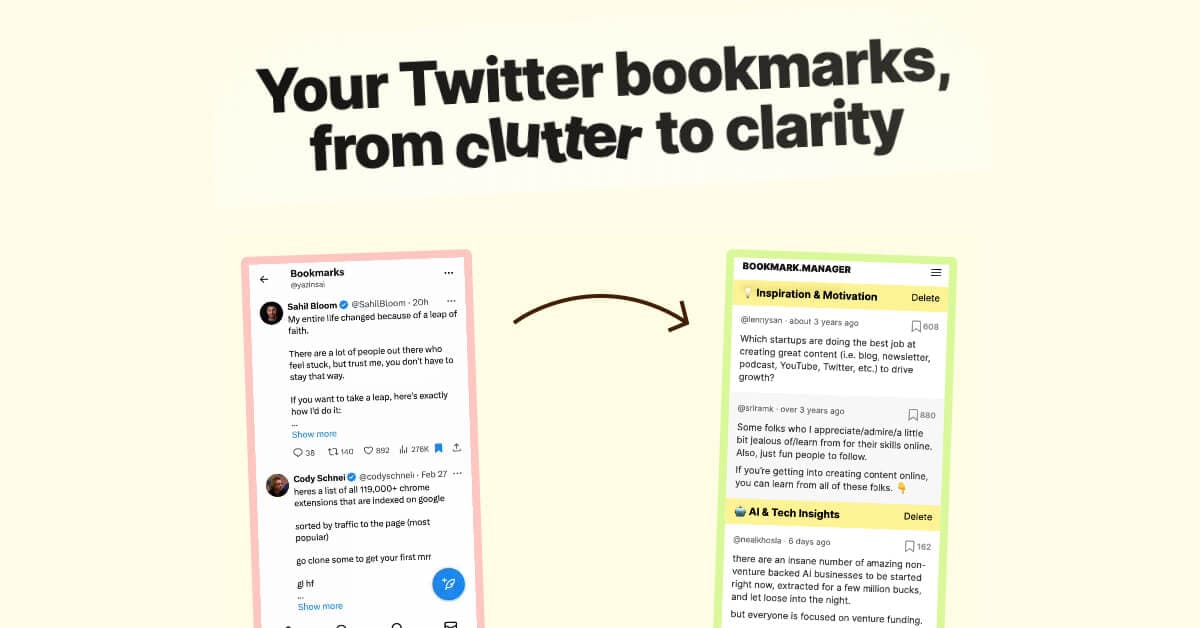
Overview
Twitter Bookmarks Manager is a focused web tool for people whose X bookmark list has become difficult to search or reuse. After the user signs in with X, the service says it imports the account's bookmarks into a separate library where they can be viewed, categorized, filtered, and exported.
Its main differentiator is AI-assisted organization. The product says it uses GPT-4 to generate categories automatically and can also search the imported collection for posts that match custom topics. That can reduce manual sorting, but the generated categories are suggestions rather than a dependable taxonomy.
The service is useful primarily as an archive and retrieval layer, not a complete social-media workspace. Its public materials do not document post scheduling, writing, analytics, team collaboration, or support for more than one X account under the advertised plan.
Use cases
The strongest fit depends on the job you need the product to complete, not the size of its feature list.
People who save many posts and need a more navigable archive than a single chronological feed.
Users who want to turn saved posts into topic collections that can support research, writing, or idea development.
Users who want CSV or JSON copies of their bookmarks for analysis or storage outside X.
Individuals managing one X account who do not need team permissions or publishing features.
Capabilities
Connects to an X account and imports the account's saved posts into the product.
Uses GPT-4 to group imported bookmarks into generated categories.
Lets users define a topic and asks the AI to identify relevant posts within the imported library.
Presents bookmarks outside X's default chronological stream so users can revisit themed collections.
Exports the bookmark archive in CSV or JSON format.
Process
Step 1
Confirm which X account will be connected and inspect the permissions shown during sign-in before approving access.
Step 2
Allow the service to load the account's available bookmarks; large libraries may take longer and deleted or inaccessible posts may not remain usable.
Step 3
Treat GPT-4 labels as a first pass and look for ambiguous, sensitive, or incorrectly grouped posts.
Step 4
Define narrower topics when the automatic groups are too broad for the intended research or content workflow.
Step 5
Download CSV or JSON and store it according to the sensitivity of the saved material.
Step 6
Periodically review the connected account, current privacy terms, and whether old data should be deleted from the service.
Cost
The public site advertised a discounted $29 one-time purchase for unlimited access on one X account when reviewed. The page also displayed $49 as the crossed-out reference price. Confirm the checkout price and current feature limits before paying.
Free landing-page access
The public site explains the product and provides a demo, but does not advertise a functional free plan.
$29 one time
The advertised individual plan for the bookmark manager.
Not publicly listed
The public pricing section does not document multi-account, team, or enterprise plans.
Pricing checked . Check current pricing at the source ↗
Assessment
Compare
The right alternative depends on the specific output, workflow, controls and budget your project requires.
Content Creator
Recall is a broader personal knowledge base for saving and connecting material from multiple source types rather than only X bookmarks.
Explore Recall →Students
Gemini Notebook can synthesize a deliberately curated source set and is better suited to source-grounded research than automatic social-bookmark sorting.
Explore Gemini Notebook (formerly NotebookLM) →Content Creator
Taplio is a stronger fit when the real need is social-content creation, scheduling, and performance workflow rather than bookmark archiving.
Explore Taplio →Questions
It imports bookmarks from one connected X account, automatically groups them with GPT-4, supports custom topic categories, and exports the collection as CSV or JSON.
Yes. The product site, sign-in call to action, pricing, privacy policy, and terms were accessible when reviewed on September 1, 2026.
The public site advertised a $29 one-time purchase, discounted from a displayed $49 reference price, for one X account. Verify the final checkout before buying.
The site provides a public explanation and demo, but it did not document an ongoing functional free tier when reviewed.
The advertised plan lists one account. The public pricing page does not document a multi-account plan.
Yes. The provider advertises bulk CSV and JSON exports.
The public product materials describe importing, organizing, searching, and exporting bookmarks. They do not document posting or scheduling.
No. GPT-generated categories can miss context or group posts incorrectly, so important collections should be reviewed manually.
The provider says it does not sell or rent personal information, but its privacy policy describes collecting account, bookmark, device, usage, log, and cookie data and sharing information with service providers in some circumstances.
The exported record may retain some captured text or metadata, but the original post, media, thread, or linked page may no longer be accessible. Do not assume the tool creates a complete preservation copy.
No practical lifetime offer guarantees that a service will operate indefinitely. The provider's terms reserve the right to modify or discontinue the service.
It is best for individuals with one X account who have accumulated a large bookmark library and want AI-assisted categories plus portable exports.
Bottom line
Twitter Bookmarks Manager is a practical niche tool for turning one unwieldy X bookmark feed into browsable categories and portable data. Its one-time price is attractive for solo users, but buyers should weigh that convenience against third-party account access, sensitive bookmark data, AI misclassification, platform dependence, and the limits of any lifetime-access promise.
Visit Twitter Bookmarks website ↗
Get access to all our AI courses, hundreds of real-world AI use cases, live expert-led workshops, an exclusive network of AI early adopters, and more.
Get unlimited access to all of our current & upcoming industry-specific AI courses for the duration of your subscription.
To keep up with the rapid pace of AI, our team publishes AI implementation guides daily. Our library contains 300+ practical use cases to automate real-world work.
Join weekly, live, interactive sessions with industry leaders who are at the forefront of AI for hands-on implementation guidance and exclusive insights.
Network with an exclusive community of AI-first professionals who are working smarter with AI. Learn how early adopters are using AI in their work and businesses.


