Mac users who forget timers
Automatic background capture is useful when manual start-and-stop time tracking is too easy to miss.
Independent tool overview
timeMaster is an automatic time and productivity tracker for macOS that records app and website activity, categorizes work, and turns the history into focus and productivity insights.
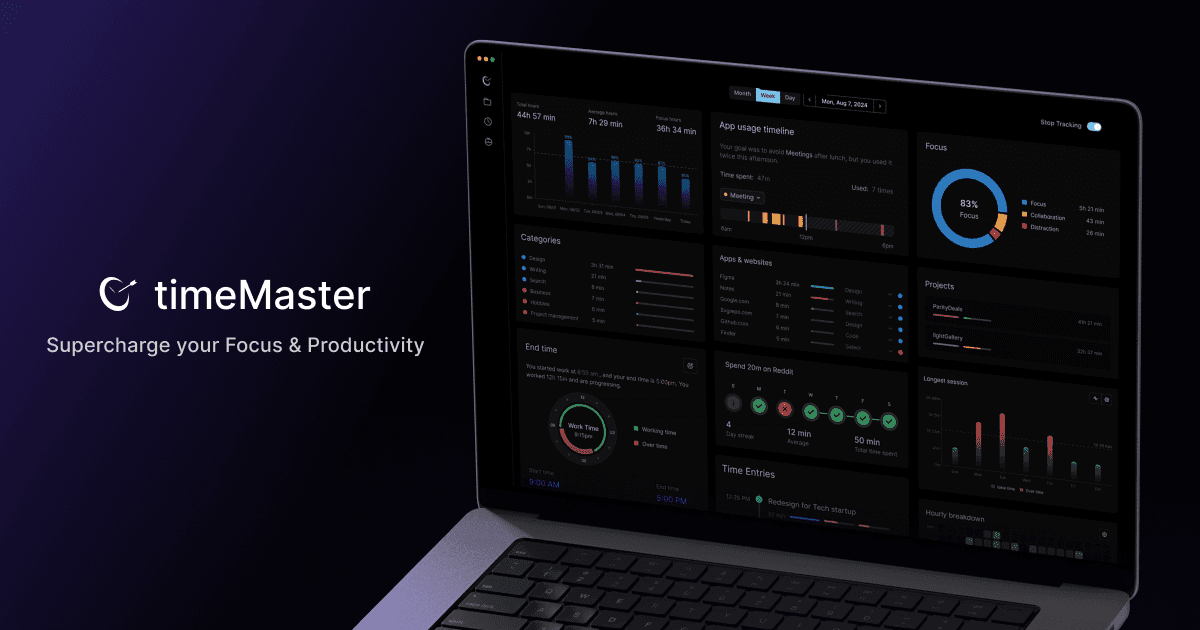
Overview
timeMaster is designed for people who want a detailed record of how they use a Mac without starting and stopping timers throughout the day. It runs in the background, tracks applications and websites, groups activity into projects and categories, and surfaces focus, distraction, meeting, and work-pattern summaries.
Its most important differentiator is local-first tracking. The company says detailed tracking data is encrypted and stored on the Mac rather than in its cloud. That is meaningfully different from a fully cloud-hosted employee-monitoring product, but it does not mean the app is completely offline: the privacy policy says the service saves an email during onboarding, sends the app name and time used for activity categorization, and uses Mixpanel for product analytics unless the user opts out.
The product is best treated as a personal reflection and time-accounting aid, not an objective judge of performance. Productivity scores and automatic categories cannot see the value, difficulty, or context of a task, so users should correct classifications and avoid using the output as the sole basis for employee evaluation.
Use cases
The strongest fit depends on the job you need the product to complete, not the size of its feature list.
Automatic background capture is useful when manual start-and-stop time tracking is too easy to miss.
Project tagging and time logs can help consultants and creators reconstruct where a day went before preparing invoices or estimates.
App, website, distraction, focus-session, break, and overwork patterns can provide useful prompts for weekly reflection.
Local storage reduces central exposure of the detailed activity history, provided the user is comfortable with the limited network activity described in the privacy policy.
Capabilities
Records Mac app and website activity in the background instead of relying on a manually operated timer.
Classifies captured activity into work, collaboration, distraction, and other categories for easier review.
Attempts to recognize project context in applications such as editors and design tools and associate sessions with that project.
Builds chronological records and breakdowns that can be reviewed when estimating effort or reconstructing a workday.
Summarizes focused time, distractions, meetings, messaging, work hours, and longer-term patterns.
Includes task planning, end-of-day reflection, breaks, Pomodoro-style focus sessions, goals, and overwork alerts.
The company says detailed activity data is encrypted and retained on the user's Mac rather than uploaded as a cloud activity history.
The paid tier advertises advanced AI categorization and an AI productivity score alongside unlimited history.
Process
Step 1
Download the macOS app and inspect each requested permission. Activity-title access can expose sensitive project, document, and browsing context even when screenshots are not recorded.
Step 2
Define work, distraction, and project rules so the system's labels reflect the user's own responsibilities.
Step 3
Use the Mac normally while timeMaster builds an encrypted local activity timeline.
Step 4
Review sessions and fix misclassified apps, websites, projects, meetings, and idle periods before relying on the totals.
Step 5
Use focus, distraction, workload, and time-allocation reports to identify a small behavior or scheduling change.
Step 6
Decide how much history is worth keeping, opt out of analytics if desired, and account for the risk that local-only records can be lost with the device.
Cost
timeMaster has a free-forever plan and a Pro plan. The public pricing page exposed the plan structure but did not show a dependable numeric Pro price in our September 1, 2026 review, so buyers should confirm the amount and billing cadence at checkout rather than relying on an older quoted price.
$0
A free-forever entry point for personal time tracking.
Verify current checkout price
The paid tier for longer history and the product's advanced AI analysis.
Pricing checked . The previously reviewed pricing source is no longer available.
Assessment
Compare
The right alternative depends on the specific output, workflow, controls and budget your project requires.
Project Management
Choose Reclaim AI when calendar optimization and automatic scheduling matter more than a local Mac activity history.
Explore Reclaim AI →Questions
timeMaster is an automatic macOS time and productivity tracker. It records application and website activity, organizes it into sessions, projects, and categories, and provides focus and work-pattern insights.
The product describes tracking app and website activity rather than recording screenshots. Because macOS permissions and active-window information can still expose sensitive context, users should inspect the exact permission prompt and current app behavior before enabling it.
The company says detailed tracking data is encrypted and stored locally. Its privacy policy nevertheless describes network activity for saving an onboarding email, anonymously sending the app name and time used for categorization, and Mixpanel usage analytics.
Yes. The company says core tracking can work offline and save data locally, although categorization and other connected functions may involve network activity.
A free-forever plan includes core features and retains the current week's data. Pro adds unlimited retention, advanced AI categorization, and an AI productivity score.
The public page listed monthly, yearly, and lifetime options but did not render a dependable numeric amount in our September 1, 2026 review. Confirm the price, currency, taxes, and billing cadence in the live checkout.
It can tag and summarize project activity, which may help reconstruct billable work. Review and correct the record before invoicing because automatic detection can assign time to the wrong project or include idle activity.
It is presented primarily as a personal productivity tracker. Any workplace deployment should be transparent, legally reviewed where needed, narrowly scoped, and never treat an AI productivity score as an objective measure of employee value.
The privacy policy says deleting the app can remove locally stored user data. Before deletion, determine whether you need an export or backup and separately request account deletion if an email-based account remains.
It is a poor fit for Windows-first teams, organizations that require centralized audited timesheets, and anyone uncomfortable granting a background app access to detailed application and browsing context.
Bottom line
timeMaster is a thoughtful option for an individual Mac user who wants automatic time insight without placing a complete activity timeline in a vendor cloud. Its usefulness depends on disciplined review: labels and productivity scores are prompts, not facts, and the limited network activity and macOS permissions still deserve scrutiny. Start with the free week-retention tier, inspect what is captured, and only pay once the history produces a concrete benefit.

Get access to all our AI courses, hundreds of real-world AI use cases, live expert-led workshops, an exclusive network of AI early adopters, and more.
Get unlimited access to all of our current & upcoming industry-specific AI courses for the duration of your subscription.
To keep up with the rapid pace of AI, our team publishes AI implementation guides daily. Our library contains 300+ practical use cases to automate real-world work.
Join weekly, live, interactive sessions with industry leaders who are at the forefront of AI for hands-on implementation guidance and exclusive insights.
Network with an exclusive community of AI-first professionals who are working smarter with AI. Learn how early adopters are using AI in their work and businesses.