Support teams with a documented knowledge base
Use approved help-center articles, policies, and product documentation to answer repetitive questions before escalating exceptions to a person.
Independent tool overview
SiteSpeakAI turns websites and uploaded business content into a support chatbot that can answer questions, capture leads, hand conversations to people, and—on higher plans—use APIs and tools to take actions.
Visit the official SiteSpeakAI site ↗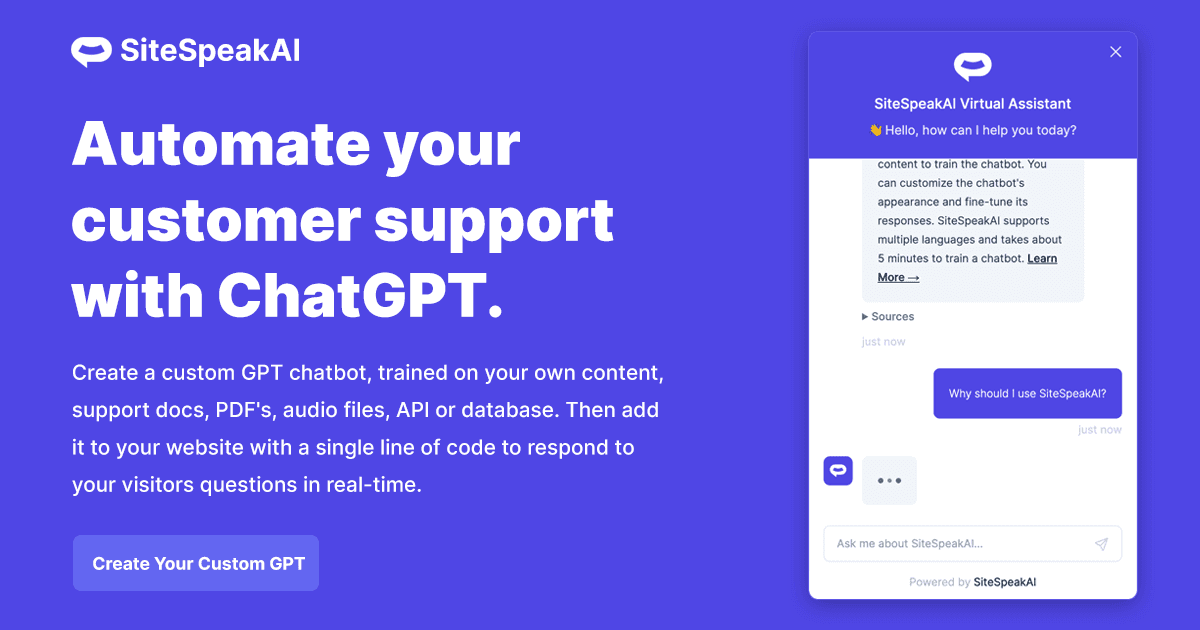
Overview
SiteSpeakAI is a hosted platform for building AI support and lead-generation agents from a company's existing knowledge. It can learn from websites, PDFs, office documents, Notion, Google Docs, YouTube, audio, spreadsheets, and pasted text, then place the resulting chatbot on a website or supported messaging channel.
Its strongest fit is a team that wants a managed retrieval-based chatbot without building the ingestion, search, widget, analytics, and model connections itself. The product includes source syncing, conversation history, lead capture, live human handoff, page-aware responses, and access to models from several major AI providers.
Higher plans go beyond question answering. SiteSpeakAI can connect an agent to custom APIs, an MCP server, scheduling and commerce services, web search, and other tools. That can make the agent more useful, but it also raises the stakes: every action should have narrow permissions, validation, logging, and human approval for consequential changes.
The current pricing model combines a monthly plan with message credits. Extra usage costs $25 per 1,000 message credits, or 2.5 cents per message credit, so teams should estimate real conversation volume rather than comparing only the base subscription.
SiteSpeakAI says customer content and visitor conversations are not used to train its own or third-party AI models. They are still processed by SiteSpeakAI, the selected model provider, and relevant infrastructure subprocessors, so buyers handling personal or regulated data should review the data-processing agreement, configure retention, and minimize what users can submit.
Use cases
The strongest fit depends on the job you need the product to complete, not the size of its feature list.
Use approved help-center articles, policies, and product documentation to answer repetitive questions before escalating exceptions to a person.
Add contextual help, lead capture, scheduling, or supported commerce actions without creating the retrieval and chat infrastructure from scratch.
Pro and higher plans support multiple agents, broader source limits, API access, and branding controls that are more practical for a multi-site portfolio.
Select among supported AI providers or bring API keys on eligible plans instead of being locked to one underlying model.
Capabilities
Build a knowledge base from crawled websites, uploaded documents, workspace content, video or audio, spreadsheets, and direct text.
Re-crawl connected sources on the schedule included with the selected plan so the chatbot can follow content changes.
Embed a live-chat widget or search experience that can use the visitor's current page as additional context.
Collect contact details and route conversations to a person when automation is insufficient, subject to plan availability and configuration.
Use supported models from OpenAI, Anthropic, Google, and xAI, with bring-your-own-key support on Pro and higher plans.
Eligible plans can connect agents to custom APIs, remote MCP servers, scheduling, payments, commerce, web search, and other services.
Review conversations, identify missing knowledge, monitor usage, and use visitor feedback to improve source coverage.
Published controls include TLS encryption, encryption at rest, role-based access, MFA, visitor rate limits, response restrictions, and pattern-based PII redaction.
Process
Step 1
Import only current, approved material. Remove duplicate, conflicting, internal-only, and legally sensitive content before training.
Step 2
Choose the model, instructions, tone, citations, restricted topics, and clear conditions for saying the answer is unknown.
Step 3
Disclose that the assistant is automated, minimize submitted personal data, set an appropriate conversation-retention period, and review subprocessors.
Step 4
Give API and MCP integrations the least privilege possible. Validate inputs, make writes idempotent, log calls, and require approval for refunds, account changes, or other consequential actions.
Step 5
Probe stale pages, conflicting policies, prompt injection, unsupported requests, malicious uploads, multilingual questions, and handoff behavior before launch.
Step 6
Make escalation obvious and ensure staff can see enough conversation context to resolve the issue without asking the visitor to start over.
Step 7
Track unanswered questions, incorrect retrieval, message-credit use, action failures, and source-sync status, then update the knowledge base and limits.
Cost
SiteSpeakAI currently offers a permanent Free plan and four paid monthly plans. Annual billing is advertised as saving up to 17%. Paid plans include a 7-day trial, and additional message credits cost $25 per 1,000. Confirm current taxes, annual totals, and plan-specific integration availability before purchasing.
$0
A small evaluation tier for a basic website chatbot.
$29 per month
For one production agent with modest traffic and basic commercial controls.
$79 per month
For teams that need several agents, advanced models, and developer access.
$249 per month
For larger multi-agent deployments with more sources and action capacity.
$499 per month
For higher-volume organizations that need unlimited agents and onboarding support.
Pricing checked . Check current pricing at the source ↗
Assessment
Compare
The right alternative depends on the specific output, workflow, controls and budget your project requires.
Business Operations
Consider ChatBotKit when developer tooling, custom integrations, and a broader conversational-app platform are the main priorities.
Explore ChatBotKit →Business Operations
Consider Voiceflow when a visual conversation-design workflow and collaborative prototyping matter more than rapid website-source ingestion.
Explore Voiceflow →Business Operations
Consider Hoory when the priority is a shared omnichannel support inbox with AI automation and explicit per-seat pricing.
Explore Hoory →Questions
The current plans are Free, Starter at $29 per month, Pro at $79 per month, Growth at $249 per month, and Business at $499 per month. Annual billing is advertised as saving up to 17%, and extra message credits cost $25 per 1,000.
Yes. The Free plan includes 30 message credits per month, one AI agent, ten training sources, basic AI models, and the live-chat widget.
Supported source types include websites, PDFs, Word documents, Notion, Google Docs, YouTube, audio, spreadsheets, and pasted text. Teams should still check that every important page was imported correctly.
Eligible plans can use tools including custom APIs, remote MCP servers, scheduling, commerce, payments, databases, and web search. Availability varies, and any write-capable action should use least-privilege credentials and approval controls.
SiteSpeakAI says it does not use customer content or visitor conversations to train its own models or third-party AI models. The data is still processed to provide the service by SiteSpeakAI, the configured model provider, and relevant subprocessors.
Its privacy policy states that conversations are retained for two years, or until they are deleted, with configurable retention controls available. Buyers should confirm the exact control available on their plan and choose the shortest period their use case requires.
Yes, paid functionality includes routing conversations to a human. Configure and test the handoff path before launch so visitors are not trapped in automation.
It publishes encryption, access, rate-limit, prompt-protection, PII-redaction, DPA, and breach-notification controls, but that does not make every sensitive use case appropriate. Minimize submitted data and complete a legal, security, and vendor review for regulated or high-risk information.
Bottom line
SiteSpeakAI is a strong managed option for turning an existing website and document library into a support chatbot quickly, particularly when a team values multiple model choices and a path to API or MCP actions. Its value depends on disciplined source curation and realistic message-volume estimates. Start with answer-only behavior, verify retrieval quality and escalation, shorten retention where appropriate, and add actions only after the permissions and approval model are ready.
Visit SiteSpeakAI website ↗
Get access to all our AI courses, hundreds of real-world AI use cases, live expert-led workshops, an exclusive network of AI early adopters, and more.
Get unlimited access to all of our current & upcoming industry-specific AI courses for the duration of your subscription.
To keep up with the rapid pace of AI, our team publishes AI implementation guides daily. Our library contains 300+ practical use cases to automate real-world work.
Join weekly, live, interactive sessions with industry leaders who are at the forefront of AI for hands-on implementation guidance and exclusive insights.
Network with an exclusive community of AI-first professionals who are working smarter with AI. Learn how early adopters are using AI in their work and businesses.