Literature reviews
Organize papers, query them together and trace claims back to exact pages.
Independent tool overview
Otio is a multi-model research workspace that keeps PDFs, web pages, videos, audio, spreadsheets and notes in a shared source library. Users can compare models, ask cited questions, run deep web research, create notes, charts and drafts, and deliver results to other services. Its page- and timestamp-level citations make it more auditable than a generic chat, but every quotation, interpretation and bibliography entry still needs human verification in the original source.
Visit the official Otio site ↗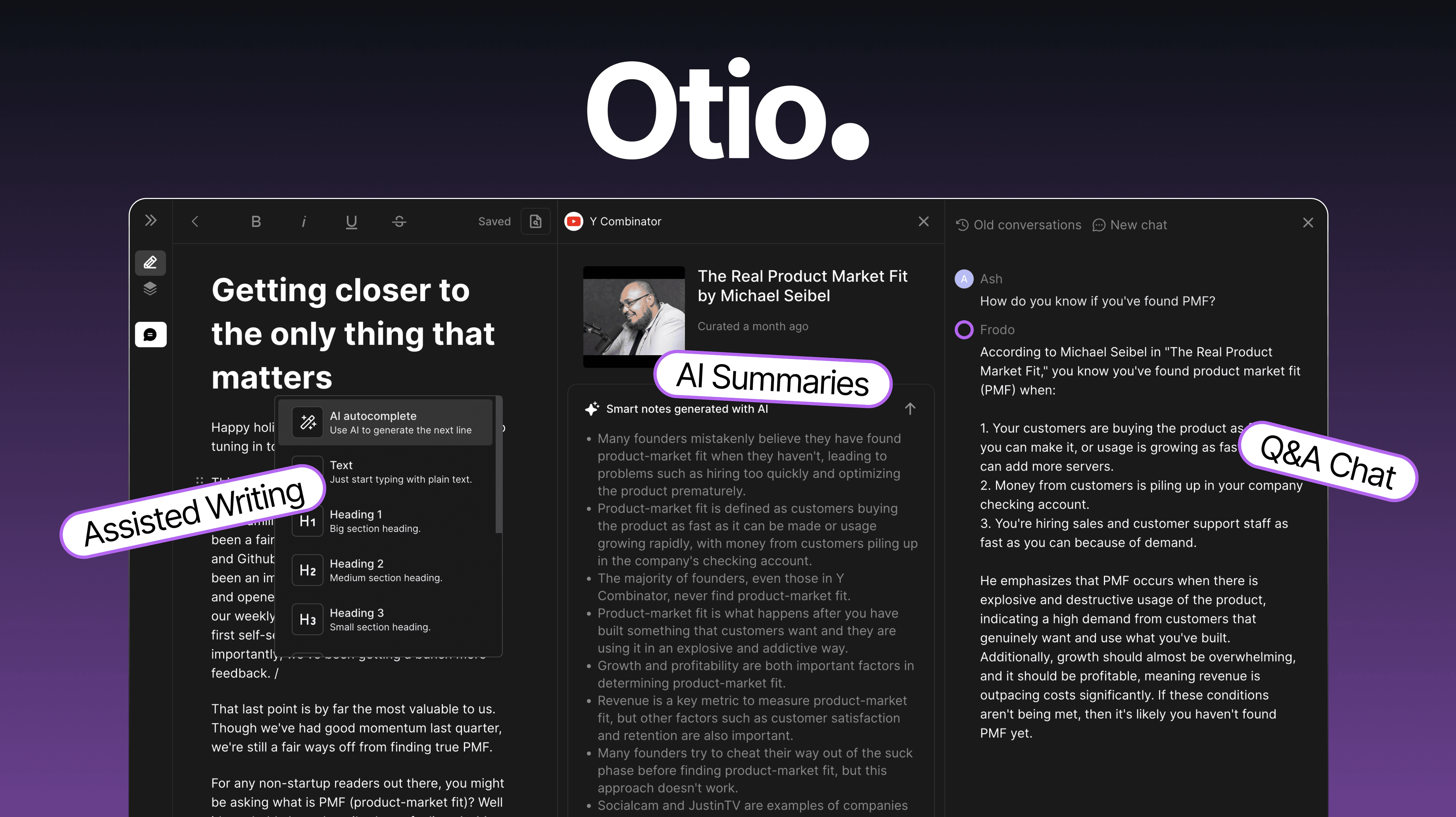
Overview
Otio is designed for researchers, students, consultants and analysts who need to read, organize, compare and write from many sources.
A shared library can contain PDFs, web pages, YouTube videos, podcasts, audio, spreadsheets and notes.
The product currently advertises access to models from OpenAI, Anthropic, Google, xAI, Meta, DeepSeek and Moonshot on every plan, plus an automatic model router.
Users can compare two model responses against the same sources or retry a question with a different model without rebuilding the workspace.
Source-grounded chat links answers to exact PDF pages or media timestamps, which helps users inspect the underlying passage.
Deep Research combines the user's library with the live web and exposes a multi-step research process on every plan.
Otio can turn sources into editable notes, draft documents, charts and images, then export notes as Markdown or deliver selected results through connected services.
Cloud-storage integrations are available across plans, while Zotero and Mendeley desktop connections and richer reader tools begin with Lite.
The pricing page says there is no cap on library source count, but each plan still has explicit daily upload, storage, PDF-length, workspace and usage limits.
Otio's current terms state that Inputs and Outputs are not used to train its or third-party models unless the user expressly opts in or a separate agreement applies.
Third-party AI infrastructure providers may still process prompts, uploads, outputs and related metadata to provide the service, so confidential or regulated work requires an organizational review.
Pricing, limits and policies were checked on August 31, 2026.
Use cases
The strongest fit depends on the job you need the product to complete, not the size of its feature list.
Organize papers, query them together and trace claims back to exact pages.
Combine client-approved files with web discovery and create reviewable notes and drafts.
Work across large PDFs with plan-dependent page and storage allowances.
Test two models against the same evidence without duplicating the source library.
Study videos and podcasts alongside documents using timestamp-level references.
Move from collection and notes to charts, structured documents and external delivery.
Capabilities
Stores supported documents, links, media, spreadsheets and notes in shared Spaces.
Offers several model families plus Auto, Fast and Expert routing choices.
Runs the same question through two models against the same source set.
Answers across selected sources and links claims to supporting pages or timestamps.
Performs multi-step research across the user's sources and the open web.
Opens cited passages in context and supports in-source questions on paid plans.
Summarizes and extracts notes from supported video, podcast and audio inputs.
Analyzes tabular files and creates charts alongside qualitative source material.
Generates editable reports, drafts, charts and images from the research workspace.
Keeps several research questions or models active side by side, with plan-based limits.
Connects cloud drives on all plans and reference managers on Lite and above.
Exports Markdown notes and can send results through email, Google Drive, Telegram and other supported services.
Process
Step 1
State the decision, population, scope, period and evidence standard before collecting sources.
Step 2
Separate projects so unrelated sources and instructions do not contaminate one another.
Step 3
Prefer original papers, filings, official datasets and primary documents over derivative summaries.
Step 4
Confirm copyright, license, confidentiality and data-protection authority before adding files.
Step 5
Use clear folders, names, dates and source types so later citations remain understandable.
Step 6
Begin with direct facts, definitions, quotations and methods before requesting synthesis.
Step 7
Verify that the cited page or timestamp supports the exact wording, scope and inference.
Step 8
Use side-by-side responses for difficult interpretation, then judge both against the evidence.
Step 9
Keep discovered web claims distinct from conclusions grounded in the controlled library.
Step 10
Record claim, source, page, method, date, limitations and confidence before drafting.
Step 11
Retain the source spreadsheet, transformations and independent checks behind every chart.
Step 12
Generate an outline or prose only after the evidence set has been reviewed.
Step 13
Rewrite, reconcile contradictions, disclose AI use when required and preserve a revision trail.
Step 14
Save final notes, source links and checked citations outside Otio before submission or handoff.
Cost
Otio has a Free plan and three personal paid tiers. The displayed Lite, Go and Pro prices are monthly equivalents billed annually under a 50% annual discount. Core models, Deep Research and citations are available across plans; paid tiers mainly increase usage, uploads, storage, PDF length, Spaces and workflow conveniences.
$0
Limited test of the core research workspace.
$7/month billed annually ($84/year)
Entry paid plan for regular research.
$18/month billed annually ($216/year)
Higher-capacity plan for professional analysis.
$45/month billed annually ($540/year)
Heavy-use research plan.
Plan or quote dependent
Multi-user plans with organizational controls and contracts.
Pricing checked . Check current pricing at the source ↗
Assessment
Compare
The right alternative depends on the specific output, workflow, controls and budget your project requires.
Students
Choose Gemini Notebook for a Google-centered, source-grounded notebook experience with audio and learning formats.
Explore Gemini Notebook (formerly NotebookLM) →Data Analysis
Choose Perplexity when current web discovery is the priority and a persistent multi-format library is less important.
Explore Perplexity →Data Analysis
Choose Elicit for structured academic-paper discovery, screening and evidence extraction.
Explore Elicit →Educators
Choose Consensus for question-driven searches focused on published scientific research.
Explore ResearchGPT (now Consensus) →Questions
Otio is a multi-model research workspace for collecting sources, asking cited questions, running web research, making notes, analyzing data and drafting outputs.
It supports PDFs, web pages, YouTube videos, podcasts, audio, spreadsheets, notes and other listed document formats.
The current pricing page advertises model families from OpenAI, Anthropic, Google, xAI, Meta, DeepSeek and Moonshot on every plan, plus automatic routing.
Yes. Free includes limited monthly AI use, 10 uploads daily, 50MB total storage, one Space, two parallel chats and a basic PDF viewer.
Annual-equivalent prices checked August 31, 2026 were $7 per month for Lite, $18 for Go and $45 for Pro, billed as $84, $216 and $540 per year.
They improve traceability by linking to pages and timestamps, but the user must still open the source and confirm that it supports the precise claim.
It says the library has no source-count cap, but plans still impose daily upload, storage, per-file and PDF-length limits.
Yes. Deep Research can combine the open web with the user's own sources and is listed on every plan.
The current policy says Inputs and Outputs are not used to train Otio or third-party models unless the user expressly opts in or another written agreement applies.
Only with proper authorization and after reviewing privacy, third-party processing, retention, account controls and any required DPA or enterprise terms.
It can help produce notes and drafts, but the final reasoning and writing should remain yours and must comply with academic, employer and publisher policies.
It is strongest for people with a source-heavy workflow who value one library, multiple models and inspectable citations.
Bottom line
Otio is compelling when the real problem is fragmented research: the same source library can support reading, model comparison, web investigation, data analysis and drafting. Its granular citations are the standout feature, but they are an audit path—not a guarantee of correctness. Test the Free plan with a known source set, verify citation alignment and only then choose a paid volume tier.
Visit Otio website ↗
Get access to all our AI courses, hundreds of real-world AI use cases, live expert-led workshops, an exclusive network of AI early adopters, and more.
Get unlimited access to all of our current & upcoming industry-specific AI courses for the duration of your subscription.
To keep up with the rapid pace of AI, our team publishes AI implementation guides daily. Our library contains 300+ practical use cases to automate real-world work.
Join weekly, live, interactive sessions with industry leaders who are at the forefront of AI for hands-on implementation guidance and exclusive insights.
Network with an exclusive community of AI-first professionals who are working smarter with AI. Learn how early adopters are using AI in their work and businesses.


