Student-owned drafting
Developing a paper from the student's own notes, argument and evidence with bounded structural or sentence-level help.
Independent tool overview
Olovka is an active web-based AI essay editor and learning companion for students. It combines autocomplete, rewriting, research suggestions, journal and web citations, document chat, lecture recording and essay-to-quiz generation in an interface tailored by academic level, field and paper type. A free account includes up to 10,000 AI-generated words and limited quizzes and lecture notes; Unlimited costs $9.95 monthly or $71.40 annually, equivalent to $5.95 per month. The strongest use is guided work around a student's own research: planning a structure, interrogating a draft, locating candidate sources, revising specific passages and turning the finished paper into retrieval-practice questions. Its marketing also emphasizes that output is 'undetectable' and writes like a clone, which is not a responsible academic standard. Detection evasion does not establish authorship or permission. Students should follow the exact course policy, disclose AI assistance when required, verify every citation in the original source and never submit generated prose they cannot independently defend.
Visit the official Olovka site ↗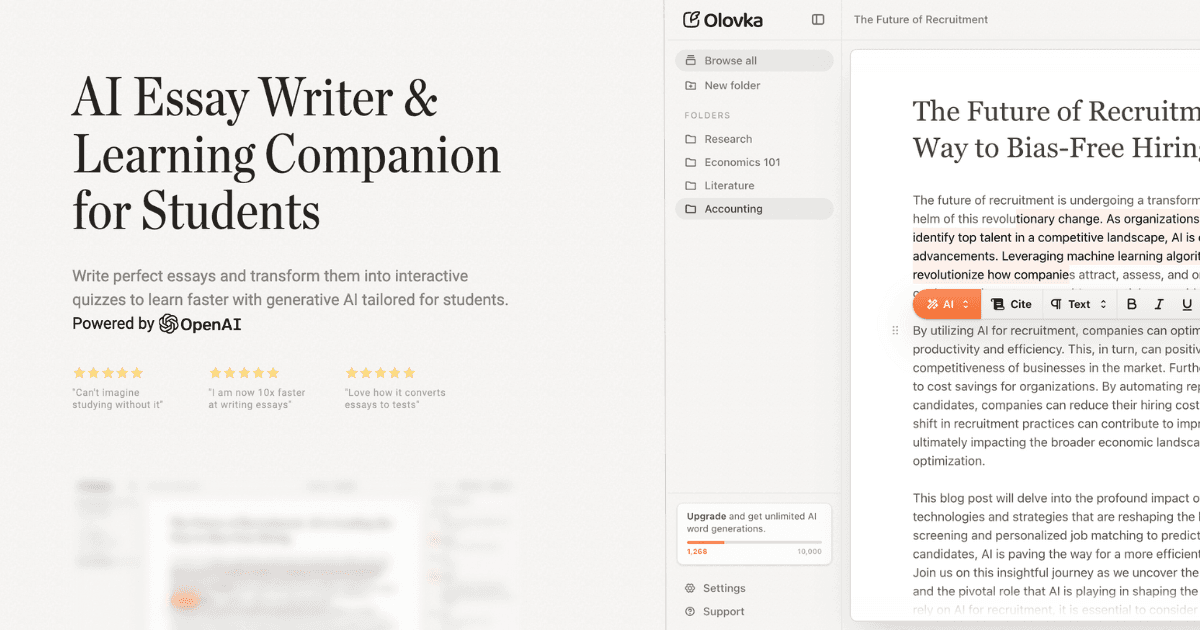
Overview
Olovka is an active AI writing and study web application operated by UNIT01 doo in Serbia and powered by OpenAI.
It supports essays, theses, research papers, literature reviews, reflective journals, case studies, project reports, presentations and other academic formats.
The editor tailors suggestions to a selected academic level, subject and document type and includes autocomplete, rewrite, expand and shorten commands.
Research tools can suggest journal and web references while the user writes. Olovka's own pricing FAQ says AI finds relevant citations, which makes original-source verification essential.
Users can chat with a document to request explanations, develop ideas or interrogate a draft. The model can still misread a source or invent a confident interpretation.
Essay-to-quiz converts a paper into interactive questions, a valuable shift from passive generation to active retrieval practice.
Lecture Notes can record live audio or process YouTube, audio, PDF and Word inputs to produce transcripts, organized notes and captured assignments.
Olovka markets output as 'undetectable' and says it writes like the user's clone. AI detection scores are not proof of authorship, and attempting to evade a course's rules can be academic misconduct.
The site asserts that universities do not see Olovka as a problem, but it provides no universal institutional approval. Each instructor, course, exam, journal and funding body can impose different rules.
The terms say users must be at least 13 and minors require parent or guardian permission and direct supervision.
The service is hosted in Serbia and its terms state that users accessing from elsewhere transfer data there. The public privacy policy gives only broad retention and security descriptions.
Do not upload unpublished research, confidential peer-review material, student records, personal health data or copyrighted course content unless the owner and institutional policy explicitly allow it.
Use cases
The strongest fit depends on the job you need the product to complete, not the size of its feature list.
Developing a paper from the student's own notes, argument and evidence with bounded structural or sentence-level help.
Testing thesis clarity, organization, counterarguments, transitions and gaps before final proofreading.
Finding possible journal or web references that the student then opens, reads and verifies independently.
Turning a completed, understood paper into quizzes that expose what the student cannot yet explain.
Creating a draft transcript and study notes when the instructor and every recorded participant permit it.
Generating questions, alternative structures or a next-step suggestion without outsourcing the assessed intellectual work.
Capabilities
Provides autocomplete, rewriting, expansion, shortening and targeted suggestions inside a document workspace.
Adapts assistance to the user's academic level, field and selected paper type.
Answers questions about the current paper and supports idea development or explanation.
Finds candidate journal and web citations related to the text, subject to independent verification.
Generates interactive study questions from the written document.
Captures and transcribes live lectures when recording is permitted.
Creates notes from YouTube, audio files, PDFs and Word documents.
Adjusts output toward a requested academic voice or level while preserving the need for authentic authorship.
Olovka says previously created essays remain available after cancellation under the limited plan.
Process
Step 1
Confirm whether AI is prohibited, allowed for brainstorming or editing, or permitted with disclosure before opening the tool.
Step 2
Write the research question, provisional thesis, evidence plan and personal notes before asking for suggestions.
Step 3
Remove personal data and do not upload unpublished, proprietary, peer-review or copyrighted course material without permission.
Step 4
Ask for structural options and missing questions, then choose and rewrite the plan based on the student's own reasoning.
Step 5
Use library databases, assigned readings and authoritative primary sources to collect actual evidence.
Step 6
Open the original publication, confirm authors, title, date, DOI, pages and claim support, and reject anything that cannot be found.
Step 7
Write from notes and sources, using AI only for the level of assistance the course explicitly permits.
Step 8
Check that each claim follows from cited evidence and that the student can explain the reasoning without the tool.
Step 9
Keep notes, source annotations, draft history, prompts and required AI disclosures to demonstrate the writing process.
Step 10
Answer generated questions without looking at the paper and revisit sources when an answer is weak.
Step 11
Obtain instructor and participant permission and follow institutional recording, accessibility and retention policies.
Step 12
Check argument, evidence, citations, quotations, formatting, originality, disclosure and every assignment requirement.
Cost
Olovka's Free plan costs $0 and includes a displayed 10,000-AI-word limit, limited quiz generations and lecture notes, autocomplete, citations and editing commands; the public page does not clearly state whether the 10,000-word allowance resets. Unlimited costs $9.95 month-to-month or $71.40 billed annually, equivalent to $5.95 per month, with unlimited AI words, quizzes and lecture notes. Subscriptions renew automatically and are generally non-refundable; the terms describe a 14-day cancellation right for eligible EU consumers. Prices and terms were checked August 31, 2026.
$0
A limited account for trying the editor, citations, quizzes and lecture notes.
$9.95/month
Month-to-month access to the complete AI feature allowance.
$71.40/year
The same Unlimited feature set billed once per year at a $5.95 monthly equivalent.
Pricing checked . Check current pricing at the source ↗
Assessment
Compare
The right alternative depends on the specific output, workflow, controls and budget your project requires.
Students
A direct academic-writing alternative with its own citation and autocomplete workflow.
Explore Jenni AI →Students
Better for source-grounded study and synthesis when the student wants answers tied to an uploaded reading set.
Explore Gemini Notebook (formerly NotebookLM) →Educators
Better for discovering and verifying academic literature before writing.
Explore Semantic Scholar →Content Creator
A narrower rewriting and clarity tool for students who already have an original draft and do not need a full essay workspace.
Explore QuillBot →Questions
Olovka is a student-focused AI editor that supports academic drafting, citation suggestions, document chat, lecture notes and essay-generated quizzes.
Yes. The Free plan includes up to 10,000 displayed AI words plus limited quizzes and lecture notes, although the page does not clearly state the reset cadence.
It costs $9.95 monthly or $71.40 billed annually, equivalent to $5.95 per month.
It can generate substantial academic prose, but whether that use is allowed depends on the assignment. Students should retain authorship, follow policy and never submit work they cannot defend.
Its marketing uses that term, but no detector result proves authorship or permission. Trying to evade a course policy can still be misconduct regardless of detection.
Not reliably enough to submit unchecked. Open every source and verify the bibliographic record, quoted text, page and claim support.
Yes. It converts essays and papers into interactive questions; students should answer from memory and verify the answer key.
Yes, and it can process audio, YouTube, PDF and Word inputs. Record only with required instructor and participant consent.
The public privacy and terms pages reviewed do not make a clear, specific no-training promise for essay content. Do not upload restricted material without written assurance.
Its terms say the service is hosted in Serbia and that users elsewhere transfer data there.
The terms set a minimum age of 13 and require minors to have parent or guardian permission and direct supervision.
Check course rules, research original sources, write from your own notes, use bounded AI edits, verify every citation, retain draft history and disclose assistance when required.
Bottom line
Olovka is strongest when treated as a structured tutor around a student's own work: its editor, source suggestions, document chat and quizzes can connect writing with learning at a low price. The same product becomes risky when used to generate an 'undetectable' submission. The standard should be authentic authorship and documented permission, not whether a detector notices. Students should use Olovka for plans, questions, targeted revisions and retrieval practice, then verify sources and produce a final argument they can explain line by line.
Visit Olovka website ↗
Get access to all our AI courses, hundreds of real-world AI use cases, live expert-led workshops, an exclusive network of AI early adopters, and more.
Get unlimited access to all of our current & upcoming industry-specific AI courses for the duration of your subscription.
To keep up with the rapid pace of AI, our team publishes AI implementation guides daily. Our library contains 300+ practical use cases to automate real-world work.
Join weekly, live, interactive sessions with industry leaders who are at the forefront of AI for hands-on implementation guidance and exclusive insights.
Network with an exclusive community of AI-first professionals who are working smarter with AI. Learn how early adopters are using AI in their work and businesses.


.avif)