Video creators
Create a soundtrack, narration and custom effects without moving among several separate audio subscriptions.
Independent tool overview
Adobe Firefly Audio is a set of generally available tools for generating music, speech and sound effects inside Adobe's broader creative AI studio.
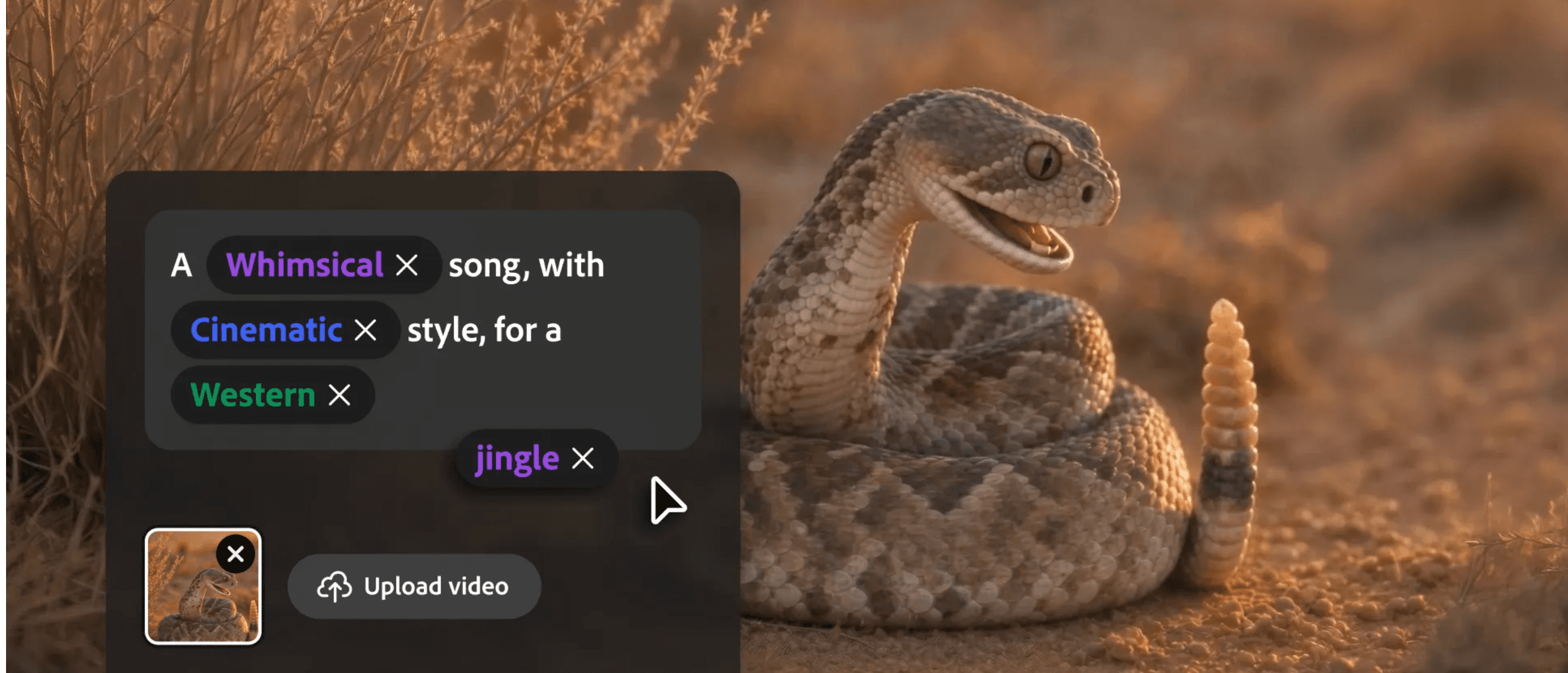
Overview
Firefly Audio is not a separate standalone subscription. It is the audio workspace inside Adobe Firefly, bringing Generate Music, Generate Speech and Generate Sound Effects into the same environment used for images, video and design.
Generate Music creates original tracks matched to a video's duration and mood. Generate Speech turns scripts into voiceovers with controls such as voice, pacing and emotion, while Generate Sound Effects creates timed effects and ambience from text, reference audio or sounds performed into a microphone.
Adobe positions its own Firefly audio models as commercially safe and describes generated music as universally licensed. Creators should still review outputs, disclosure requirements and the exact terms of their plan, especially when selecting a partner model such as ElevenLabs.
Use cases
The strongest fit depends on the job you need the product to complete, not the size of its feature list.
Create a soundtrack, narration and custom effects without moving among several separate audio subscriptions.
Produce voiceovers and music for social clips, product tutorials and campaign variations.
Turn written scripts into controlled narration and add supporting audio elements.
Use shared Firefly credits and move generated assets into other Creative Cloud production tools.
Capabilities
Creates original tracks aligned to the desired length and mood using the Firefly Music Model.
Converts a script into narration with controls for voice, accent, language, pacing, speed, pitch and emotion.
Produces effects and ambient audio from a text description, reference audio or vocal performance.
Lets users choose Adobe's Firefly Speech model or an available ElevenLabs model inside the workflow.
Keeps audio beside Firefly's image, video, storyboard and design workflows.
Adobe describes Firefly-generated music as universally licensed and its own audio tools as commercially safe.
Process
Step 1
Open Firefly's Audio area and select music, speech or sound effects based on the production need.
Step 2
Enter a mood and duration, paste a narration script, or describe and optionally perform the desired effect.
Step 3
For speech, choose the available voice model and tune language, voice and delivery settings.
Step 4
Compare outputs for intelligibility, unwanted artifacts, timing and fit with the visual edit.
Step 5
Download or move the asset into the editing workflow, then balance levels, timing, transitions and required disclosures.
Cost
Firefly audio features consume generative credits. Credits reset each billing cycle and do not roll over; exact daily Free limits and some plan offers can change.
$0
Limited daily generations across Firefly image, video and audio tools.
$9.99/month
Entry paid plan with 2,000 monthly generative credits.
$19.99/month
4,000 monthly credits plus Adobe Express Premium and Photoshop on web and mobile.
$49.99/month
10,000 monthly credits for higher-volume creative work.
$199.99/month
50,000 monthly credits for high-volume generation.
Pricing checked . Check current pricing at the source ↗
Assessment
Compare
The right alternative depends on the specific output, workflow, controls and budget your project requires.
Content Creator
A music-first alternative for generating complete songs and instrumental tracks.
Explore Suno AI →Content Creator
A broader ElevenLabs production workspace centered on high-quality voices, music and sound.
Explore ElevenLabs Image & Video →Content Creator
An audio-model alternative for teams interested in open weights and different deployment options.
Explore Stable Audio 3.0 →Content Creator
A post-production alternative for cleaning, leveling and mastering recorded or generated audio.
Explore Auphonic →Questions
Firefly Audio is the group of Adobe Firefly tools for generating music, voiceovers and sound effects. It is part of the broader Firefly studio rather than a separate product.
Adobe offers limited free daily generations. Paid Firefly plans start at $9.99 per month with a monthly pool of generative credits.
Adobe currently lists 20 credits per minute for Generate Soundtrack, 10 credits per sound-effect generation, 10 credits per 1,000 characters with Firefly Speech and 15 credits per 1,000 characters with ElevenLabs Multilingual v2.
Yes. Generate Music creates original tracks guided by a requested mood and duration, including tracks intended to fit video content.
Yes. Generate Speech converts a script into narration and offers controls for the selected voice, language, accent, pace, speed, pitch and emotion.
Adobe describes its Firefly audio models as commercially safe and Firefly music as universally licensed. Users should still confirm the current plan terms, review every output and distinguish Adobe models from partner models.
It can generate useful source material, but most finished productions still benefit from human timing, cleanup, mixing, loudness and quality-control work.
Bottom line
Firefly Audio is most compelling for creators who need several kinds of production-ready audio and already work in Adobe's ecosystem. The integrated workflow and commercial-use positioning reduce friction, but credit consumption and the differences between Adobe and partner models should be understood before scaling.

Black Forest Labs' video upscaler that regenerates clips at native 4K

Alibaba's latest AI video model, now generally available
Pika Audio - Pika’s four-model AI audio family spanning music, speech, SFX, and soundtracks
fal's MiniMax H3 remixed video model tuned for speed and quality

Get access to all our AI courses, hundreds of real-world AI use cases, live expert-led workshops, an exclusive network of AI early adopters, and more.
Get unlimited access to all of our current & upcoming industry-specific AI courses for the duration of your subscription.
To keep up with the rapid pace of AI, our team publishes AI implementation guides daily. Our library contains 300+ practical use cases to automate real-world work.
Join weekly, live, interactive sessions with industry leaders who are at the forefront of AI for hands-on implementation guidance and exclusive insights.
Network with an exclusive community of AI-first professionals who are working smarter with AI. Learn how early adopters are using AI in their work and businesses.