Fast style exploration
Comparing several visual directions from the same rough drawing before committing to a detailed illustration.
Independent tool overview
Drawn to Style is a third-party custom GPT that reinterprets an uploaded drawing or picture in a requested visual style. It is useful for rapid concept exploration, but it runs inside ChatGPT, inherits ChatGPT's image limits and can change details rather than applying a perfectly faithful filter.
Visit the official Drawn to Style site ↗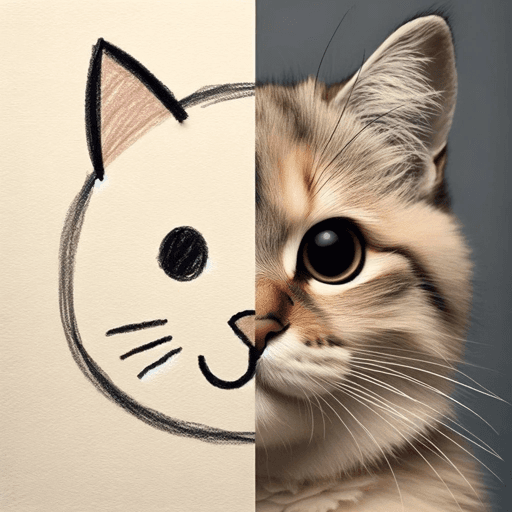
Overview
Drawn to Style accepts a drawing or image, asks for a target look and generates a new interpretation. Its published prompts cover transformations such as anime, 1950s comic, minimalist, neon, photorealistic, traditional animation, watercolor, pencil sketch and pop art.
The GPT is best for mood boards, children's sketch explorations, character concepts and quick style comparisons. It is not a precision design editor: generated results may redraw anatomy, composition, text, logos, colors or small identifying features instead of preserving them exactly.
This is a community-built GPT, not a separate image model or an official OpenAI product. The public listing does not disclose its full instructions, test suite or version history, and output quality depends on the image model and usage limits available in the user's ChatGPT account.
Use cases
The strongest fit depends on the job you need the product to complete, not the size of its feature list.
Comparing several visual directions from the same rough drawing before committing to a detailed illustration.
Creating early references for characters, scenes, campaigns or classroom projects where iteration matters more than exact reproduction.
Reimagining personal sketches in comic, watercolor, neon, minimalist or photorealistic treatments for non-critical use.
Capabilities
Starts from a drawing or picture supplied in the ChatGPT conversation.
Supports direct requests for looks such as anime, watercolor, pencil, pop art, comic and photorealism.
Can choose an unexpected style when the user wants creative exploration rather than a fixed brief.
Lets users follow up with changes to palette, detail, mood, background or composition.
Uses the image-generation capability available to the current ChatGPT account instead of requiring a separate editor.
Process
Step 1
Use artwork or photos you own or have permission to edit, and remove signatures, addresses, school details or other sensitive information.
Step 2
Crop distractions and provide enough resolution for the important shapes and subjects to be understood.
Step 3
Specify medium, palette, lighting, texture and mood instead of relying only on a broad label such as 'comic style.'
Step 4
State which pose, object, layout, facial feature or color must remain, while expecting some generative drift.
Step 5
Inspect hands, faces, text, logos, perspective, object count and unintended additions before downloading or sharing.
Step 6
Label AI involvement when context requires it, keep the source file and use a conventional editor for exact typography, brand assets or production-ready corrections.
Cost
Drawn to Style does not publish a separate subscription. It is used through ChatGPT: current ChatGPT pricing says Free users can discover and use GPTs with limited uploads and image generation, while paid plans expand those limits. Availability and limits can vary by account and region.
Included with eligible Free and paid plans
No separate Drawn to Style fee is listed; ChatGPT plan limits control access and generation volume.
Pricing checked . Check current pricing at the source ↗
Assessment
Compare
The right alternative depends on the specific output, workflow, controls and budget your project requires.
Content Creator
Use ChatGPT's general image workspace directly for a broader generation and editing workflow without relying on a community GPT's hidden instructions.
Explore ChatGPT Images →Design
A custom GPT aimed at broader image editing, replication and merging rather than primarily restyling drawings.
Explore Image Edit and img2img →Design
A narrower option for generating clean black-and-white sketch treatments.
Explore Sketchy →Questions
It takes an uploaded drawing or picture and generates a new interpretation in a requested style such as watercolor, anime, comic, pencil, minimalist or photorealistic.
Yes. The custom GPT page was accessible in ChatGPT when reviewed on August 31, 2026. A ChatGPT login is required to generate images.
It has no separate published price. ChatGPT's Free plan can discover and use GPTs but applies limited upload and image-generation allowances; paid plans expand access.
No. It generates a new image and may redraw composition, text, anatomy and small details. Use a conventional image editor when exact preservation is required.
OpenAI's terms generally assign output rights to the user to the extent permitted by law, but you remain responsible for the input and output. Confirm rights to the source image and review copyright, trademark, likeness and client-contract restrictions for the intended use.
Only with appropriate adult permission and after removing identifying details. Avoid names, school information, locations and private family content, and review the account's data controls first.
Use a clean crop, name the medium, palette, lighting and mood, list the details that must remain and iterate one change at a time.
Bottom line
Drawn to Style is a convenient creative prompt wrapper for turning sketches into quick visual variations. It is most valuable during exploration, where a surprising reinterpretation is useful. For client deliverables, identity-sensitive photos, exact brand work or repeatable production, use it only for concepts and finish the image in a controlled editor after rights, privacy and artifact review.
Visit Drawn to Style website ↗
Get access to all our AI courses, hundreds of real-world AI use cases, live expert-led workshops, an exclusive network of AI early adopters, and more.
Get unlimited access to all of our current & upcoming industry-specific AI courses for the duration of your subscription.
To keep up with the rapid pace of AI, our team publishes AI implementation guides daily. Our library contains 300+ practical use cases to automate real-world work.
Join weekly, live, interactive sessions with industry leaders who are at the forefront of AI for hands-on implementation guidance and exclusive insights.
Network with an exclusive community of AI-first professionals who are working smarter with AI. Learn how early adopters are using AI in their work and businesses.


