Competitive and market research
Collect current evidence from many sites, preserve the exact supporting passages, and organize findings by competitor or market.
Independent tool overview
Cluing Research Copilot, formerly Collabwriting, combines AI-assisted web research with a source-linked knowledge workspace for saving, organizing, discussing, and reusing evidence.
Visit the official Cluing Research Copilot site ↗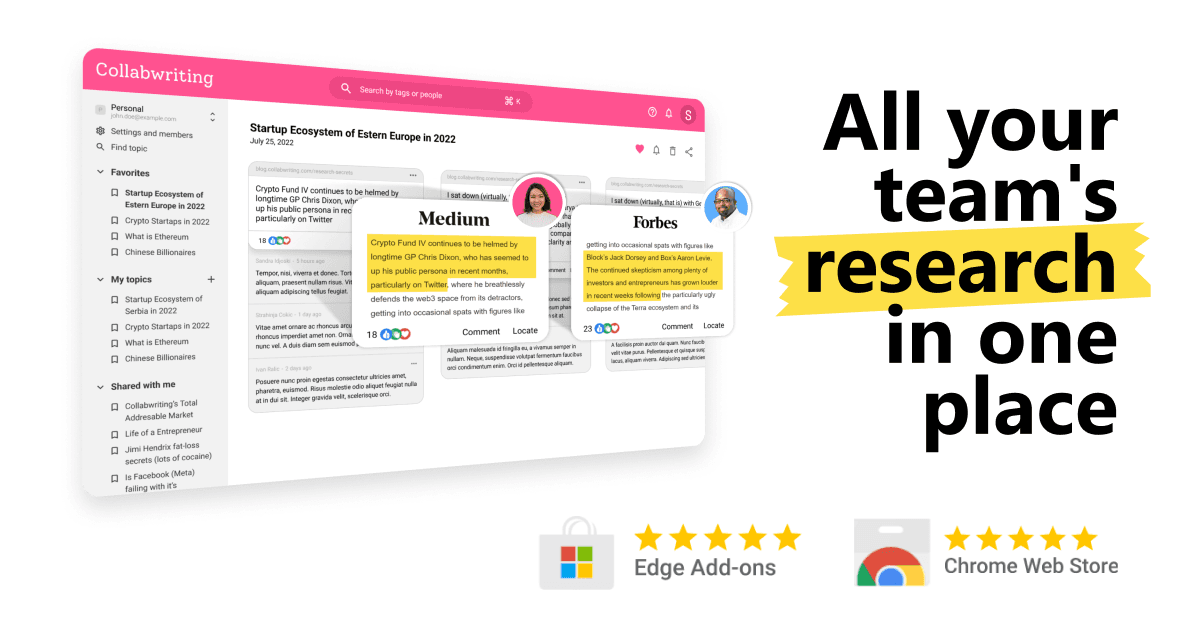
Overview
Collabwriting officially rebranded to Cluing in January 2026. The original Research Copilot URL now redirects to Cluing, and existing saved insights, clusters, and login information carried over through the name change.
The Research Copilot can send agents to search and read current web pages, surface relevant passages as locatable snippets, and add comments explaining why each finding matters. Users can also bring PDFs, CSV files, reports, papers, and other documents into the research process.
Cluing is broader than the original Copilot. Its browser extensions and mobile apps capture exact passages from websites, PDFs, YouTube, social platforms, newsletters, email, and Kindle highlights. Snippets retain their source and can be organized into Topics and Clusters, shared with collaborators, and used as context in AI Chat.
The strongest use case is research that must remain traceable and reusable after the initial answer. The main limitations are a changing product and pricing structure, the need to verify agent-selected evidence, and the privacy implications of uploading internal material or allowing agents and third-party models to work with it.
Use cases
The strongest fit depends on the job you need the product to complete, not the size of its feature list.
Collect current evidence from many sites, preserve the exact supporting passages, and organize findings by competitor or market.
Build a reusable evidence base for client work instead of losing citations across tabs, spreadsheets, and chat threads.
Save exact regulatory language, add interpretation and ownership, control sharing, and compare updates with prior research.
Capture customer language, market signals, examples, and statistics, then turn those sources into briefs or drafts in Canvas.
Organize readings, compare arguments, identify gaps, create study materials, and draft from source-linked notes.
Capabilities
Research agents search current web content and visit pages to identify potentially relevant evidence.
Findings preserve the exact highlighted passage and its source instead of returning only an unsupported summary.
The Copilot can attach a note explaining why a selected passage may matter to the research question.
Upload PDFs and other supported documents so agents or AI Chat can summarize, extract, compare, and answer questions about them.
Save material from web pages, PDFs, YouTube, LinkedIn, Reddit, X, Quora, Kindle, newsletters, email, and mobile share sheets.
Group snippets into shareable Topics and place related Topics into larger Clusters for projects, clients, or workstreams.
Add comments, tags, reminders, mentions, and view, comment, or edit permissions directly on research evidence.
Ask questions across the web, uploaded files, and saved Topics, with source links for checking the response.
Cluing advertises access to agents and models from providers including OpenAI, Anthropic, Google, xAI, DeepSeek, and Meta, depending on plan.
Turn a research conversation into a structured editable document, then revise sections and format the result.
Suggest titles, tags, and Topics for new snippets or use a workspace agent to propose a cleaner knowledge structure.
Copy research into Google Docs, Word, Notion, or email, and export Topics as PDF or CSV for other workflows.
Process
Step 1
Write the specific question, audience, geography, time range, and decision the work must support.
Step 2
Set up the research structure before collecting sources so every finding lands in the right project context.
Step 3
Upload approved documents and save the best internal or external sources you already trust.
Step 4
Give the agent clear subquestions, preferred source types, exclusions, and freshness requirements.
Step 5
Check the original passage, publication date, author, context, methodology, and whether a newer source supersedes it.
Step 6
Add comments that distinguish facts, interpretations, contradictions, risks, and follow-up questions.
Step 7
Merge overlapping findings, tag themes, separate primary from secondary evidence, and keep conflicting sources visible.
Step 8
Ask for comparisons, gaps, or an outline grounded in selected Topics, then edit the resulting document directly.
Step 9
Verify every consequential claim, preserve source links, remove sensitive material, and export the deliverable to the team's final system.
Cost
Cluing's current main platform offers Free, Pro, and Team plans, while the separate Research Copilot early-access page still advertises a $15 monthly offer. The main site shows annual-effective pricing by default, and the Help Center publishes separate month-to-month and add-on rates. Because plan and credit language is evolving, confirm the live checkout before purchasing.
$0
For building a personal source-linked knowledge base with limited AI access.
$12/mo annually or $20 monthly
For individuals who research heavily and want frontier models, deeper research, and shared memory.
From $140/mo annually
For a shared research and agent workspace.
$15/mo
A separate public offer on the Copilot-specific landing page.
From $12/mo
Optional capacity described in Cluing's current Help Center.
Custom
For organizations that require broader administration, security, procurement, or deployment terms.
Pricing checked . Check current pricing at the source ↗
Assessment
Compare
The right alternative depends on the specific output, workflow, controls and budget your project requires.
Students
A strong source-grounded notebook for asking questions, generating study materials, and synthesizing a defined collection of documents.
Explore Gemini Notebook (formerly NotebookLM) →Data Analysis
A faster choice for current web research and cited answers when long-term snippet organization and collaboration are less important.
Explore Perplexity →Data Analysis
A focused workspace for reading, linking, and writing from academic papers and long documents.
Explore Unriddle →Questions
Yes. Collabwriting rebranded to Cluing, and the old Copilot URL redirects to the active Cluing Research Copilot page.
The company said users were doing more than collaborative writing: they were collecting, connecting, and acting on research. The Cluing name reflects that broader knowledge-work focus.
Cluing's rebrand announcement says saved insights, Clusters, and login information remained intact through the name change.
It uses agents to research current web sources, extracts locatable passages, explains their relevance, and can work with uploaded documents.
Yes. Saved snippets remain linked to their original location, and Cluing AI Chat advertises source links. Users should still open and verify important sources.
Yes. The Copilot page advertises documents such as CSV files, PDFs, reports, papers, and e-books, while current AI Chat supports direct document uploads.
Yes. Teams can share Topics and Clusters, assign view, comment, or edit access, discuss exact snippets, mention collaborators, and maintain shared context.
Canvas turns research from an AI conversation into a structured editable document with headings, lists, quotes, and other formatting controls.
Cluing has a free plan with unlimited snippets and Topics but limits on Clusters, guests, upload size, and AI access.
The current site shows $12 per month when billed annually at $144. Cluing's Help Center lists Professional at $20 for month-to-month billing.
The active Copilot landing page still advertises $15 per month for unlimited research Topics, priority agents, and document uploads. Confirm the current checkout and how it relates to Pro before purchasing.
No. Open the underlying sources and verify authority, date, methodology, context, and whether the AI's interpretation actually follows from the cited passage.
Bottom line
Cluing is most valuable when research needs to become durable team knowledge, not merely a cited answer. Its exact-source snippets, collaborative annotations, saved context, AI Chat, and Canvas create a strong path from discovery to a reusable deliverable. The product has outgrown the original Collabwriting Copilot, but its public pricing and legal documentation need clearer consolidation; verify the plan and data terms before rolling it out broadly.
Visit Cluing Research Copilot website ↗
Get access to all our AI courses, hundreds of real-world AI use cases, live expert-led workshops, an exclusive network of AI early adopters, and more.
Get unlimited access to all of our current & upcoming industry-specific AI courses for the duration of your subscription.
To keep up with the rapid pace of AI, our team publishes AI implementation guides daily. Our library contains 300+ practical use cases to automate real-world work.
Join weekly, live, interactive sessions with industry leaders who are at the forefront of AI for hands-on implementation guidance and exclusive insights.
Network with an exclusive community of AI-first professionals who are working smarter with AI. Learn how early adopters are using AI in their work and businesses.