Social profile avatars
Create a more playful version of a headshot for personal social accounts and community profiles.
Independent tool overview
Cartoonify Me is a lightweight custom GPT for turning an uploaded portrait or profile photo into a cartoon-style image. It runs inside ChatGPT and uses the image capabilities available to the signed-in user's plan rather than offering a separate editor or subscription.
Visit the official Cartoonify Me site ↗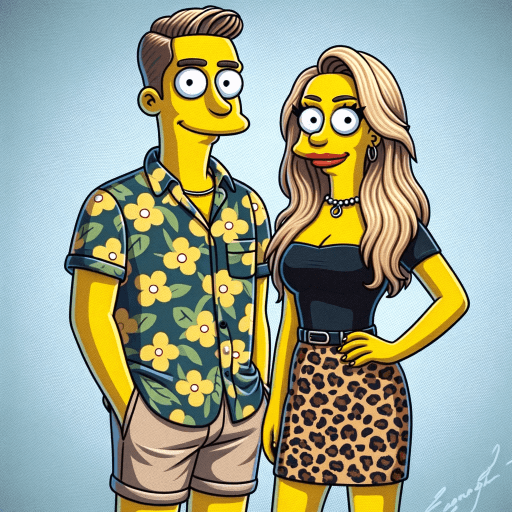
Overview
The basic workflow is simple: upload a clear photo, describe the cartoon treatment you want, generate an image, and refine it through follow-up messages. Useful prompt details include the visual style, background, colors, facial expression, clothing, crop, and the platform where the finished avatar will appear.
Cartoonify Me is a configured version of ChatGPT, not a dedicated avatar-production platform. Its public listing does not disclose a proprietary model, training process, batch workflow, or identity-consistency system. Results depend on ChatGPT's current image model, the GPT's instructions, the source photo, and the specificity of the prompt.
Use cases
The strongest fit depends on the job you need the product to complete, not the size of its feature list.
Create a more playful version of a headshot for personal social accounts and community profiles.
Explore cartoon treatments, palettes, and background ideas before commissioning final branded artwork.
Turn a consensually shared portrait into a casual illustration for cards, messages, or private keepsakes.
Try several directions conversationally without learning layers, masks, brushes, or desktop illustration software.
Capabilities
Starts from a portrait supplied in the ChatGPT conversation.
Accepts plain-language requests for colors, mood, wardrobe, setting, expression, and degree of stylization.
Users can ask for follow-up changes without rebuilding the entire prompt from scratch.
Can request a solid color, transparent-looking composition, illustrated scene, or profile-friendly backdrop.
ChatGPT Images supports different aspect ratios, useful for square avatars, banners, or portrait crops.
The ChatGPT image editor can target a selected area, though edits may extend beyond the highlighted region.
Generated images can be saved from ChatGPT and reused in another app, subject to applicable rights and platform rules.
Current OpenAI-generated images include C2PA metadata and SynthID signals intended to help indicate their origin.
Process
Step 1
Use a sharp, well-lit, front-facing portrait with the subject's permission and enough space around the head for cropping.
Step 2
Specify the platform, aspect ratio, background, palette, expression, clothing, and how closely the face should resemble the source.
Step 3
Describe traits such as clean vector lines, soft shading, bold outlines, editorial illustration, or playful 3D character design without relying only on an artist's name.
Step 4
Ask for distinct directions rather than tiny variations so it is easier to choose a strong concept.
Step 5
Correct the most important issue first—likeness, crop, expression, color, or background—and inspect the entire image after every edit.
Step 6
Save the result, preview it at small avatar size, and verify that the face remains readable in the platform's circular or square crop.
Cost
Cartoonify Me does not advertise a separate fee. Existing public GPTs are available to signed-in ChatGPT users, while image-generation speed, limits, thinking features, uploads, and workspace access depend on the user's ChatGPT plan.
$0
ChatGPT Images and public GPT access are available with Free-plan limits.
Plan-dependent
Go, Plus, and Pro offer different image, upload, model, and speed allowances; Cartoonify Me adds no separate charge.
Plan-dependent
Business, Enterprise, and Edu access depends on workspace settings, enabled GPTs, and administrator controls.
Pricing checked . Check current pricing at the source ↗
Assessment
Compare
The right alternative depends on the specific output, workflow, controls and budget your project requires.
Content Creator
Use Avatar Maker by HeadshotPro for another photo-to-avatar custom GPT with a similar conversational workflow.
Explore Avatar Maker by HeadshotPro →Content Creator
Use Cartoonization when you want a more character-oriented custom GPT that can make depicted objects speak.
Explore Cartoonization →Design
Use Storybook Vision for a more cinematic storybook-style transformation rather than a simple profile avatar.
Explore Storybook Vision →Recruiting / HR
Use HeadshotPro when the goal is a polished, realistic professional headshot instead of a cartoon.
Explore HeadshotPro →Questions
Cartoonify Me is a public custom GPT that turns an uploaded portrait into a cartoon-style image through ChatGPT's image-generation capabilities.
There is no separate Cartoonify Me fee. Signed-in Free users can access public GPTs and ChatGPT Images with plan limits; paid plans provide different allowances and features.
Use a high-resolution, well-lit image with one clearly visible face, limited obstruction, and enough space around the subject for the desired crop.
State which traits must remain unchanged, use a clear source photo, keep the first style request relatively simple, and correct likeness before adding a complex background or costume.
You can explore concepts, but a generated image is not automatically distinctive or legally clear. Run trademark and similarity checks and have a designer create production files before adopting it as a brand asset.
OpenAI says GPT builders cannot view individual conversations. If a GPT uses an external app or API, relevant content may be sent to that third party, so review the connection and avoid sensitive images.
No. OpenAI says custom GPTs do not use saved memory, custom instructions, or previous conversations; each new conversation starts fresh.
Delete the ChatGPT conversation containing the file. OpenAI says associated files are generally deleted within 30 days, subject to de-identification and security or legal exceptions.
Bottom line
Cartoonify Me is convenient for quick, casual profile-art experiments, especially if you already use ChatGPT. It is not a specialized identity-consistency or production illustration system, so use a clear photo, give concrete art direction, protect other people's likenesses, and expect to refine or finish important brand assets elsewhere.
Visit Cartoonify Me website ↗
Adapts parameters for customizable image generation.

Figma Plugin Development for Beginners and Beyond

Expert gardener provides tailored, visual landscaping advice.

AI-powered requirements and mocks for product development.

Get access to all our AI courses, hundreds of real-world AI use cases, live expert-led workshops, an exclusive network of AI early adopters, and more.
Get unlimited access to all of our current & upcoming industry-specific AI courses for the duration of your subscription.
To keep up with the rapid pace of AI, our team publishes AI implementation guides daily. Our library contains 300+ practical use cases to automate real-world work.
Join weekly, live, interactive sessions with industry leaders who are at the forefront of AI for hands-on implementation guidance and exclusive insights.
Network with an exclusive community of AI-first professionals who are working smarter with AI. Learn how early adopters are using AI in their work and businesses.