Quick sticker experiments
Generate a playful transparent-background graphic from a short prompt with almost no setup.
Independent tool overview
StickerBaker is a simple browser tool that generates transparent-background sticker art from text prompts and turns uploaded faces into stickers. The live service is free to use and exposes its source code, but its public gallery, limited policy information, and the face model's non-commercial license make it a better fit for experiments and personal projects than unreviewed commercial merchandise.
Visit the official StickerBaker site ↗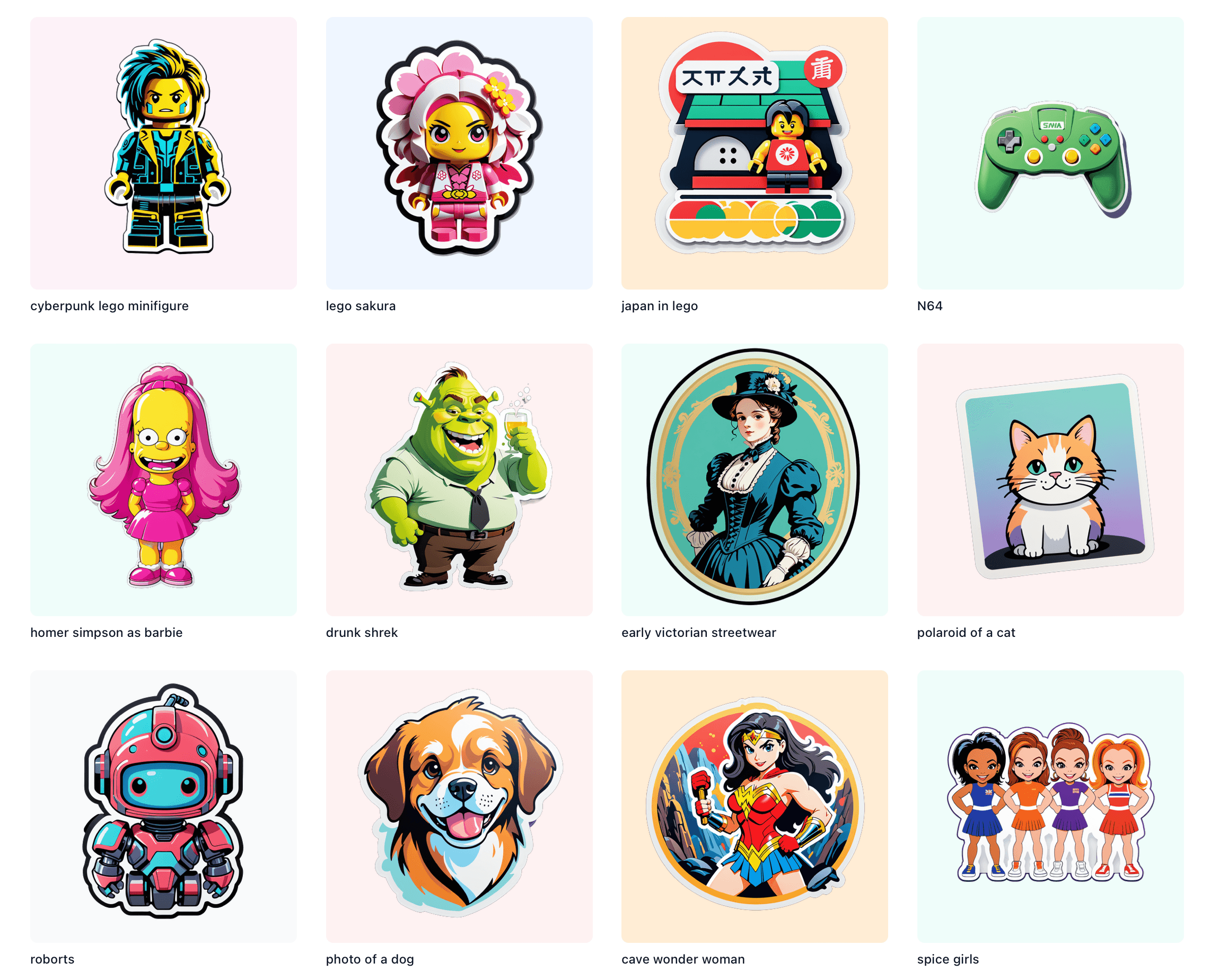
Overview
StickerBaker reduces AI sticker generation to two direct workflows: type a prompt into the Oven or upload a face photo. The text route uses fofr/sticker-maker on Replicate, while the face route uses fofr/face-to-sticker.
The text model is designed to create sticker graphics with transparent backgrounds. StickerBaker also says a prompt can request multiple stickers at once, and its Latest gallery provides examples and prompt inspiration without requiring an account.
The face workflow deserves stricter handling. StickerBaker says uploads are deleted after processing, but the underlying model is explicitly labeled non-commercial by its publisher because it uses non-commercial weights. A face-generated result should not be used in paid merchandise or client work without separate permission and a full license review.
StickerBaker publishes recent creations on the home page and stores generated images on its own infrastructure after Replicate processing. Users should assume prompts or outputs may become public unless the interface clearly says otherwise, avoid confidential material, and complete normal print preparation before manufacturing stickers.
Use cases
The strongest fit depends on the job you need the product to complete, not the size of its feature list.
Generate a playful transparent-background graphic from a short prompt with almost no setup.
Browse the live gallery to see how other prompts translate into sticker-style art.
Turn a consented portrait into a sticker for personal, non-commercial use.
Inspect or adapt the public Phoenix application and connect directly to the underlying Replicate models.
Capabilities
Creates isolated sticker graphics from a short natural-language prompt.
The underlying sticker-maker model uses LayerDiffuse to generate transparency.
The interface explicitly supports asking for more than one sticker in a single generation.
Provides a separate flow for converting a portrait into a stylized sticker.
Displays recent community outputs and their prompts on the public home page.
The application source and architecture are available in a public GitHub repository.
Process
Step 1
Use text generation for general art; reserve the face route for consented personal images and non-commercial output.
Step 2
Name the subject, action, expression, palette, and any must-have attributes while keeping the composition simple.
Step 3
Bake one or more candidates and use the gallery as inspiration for clearer prompt language.
Step 4
Check transparency, edge halos, anatomy, text, duplicated objects, and small details before downloading or sharing.
Step 5
Resize and clean the image for the intended chat app, social post, or printer, adding bleed and a cut path when required.
Step 6
Confirm source-image consent, model license, trademark and copyright status, and the destination platform's format rules.
Cost
The hosted StickerBaker interface did not show a subscription, credit counter, or checkout during this review. Its underlying Replicate models have per-run infrastructure costs for developers using the API directly, but those prices are not a StickerBaker user fee and can change with hardware and inputs.
Free
Use the public text and face interfaces without a displayed account or payment step.
About $0.0046 per run
For developers running the text model directly on Replicate; pricing varies by input and hardware.
About $0.022 per run
For direct API use of the face model, which the publisher labels non-commercial.
Pricing checked . Check current pricing at the source ↗
Assessment
Compare
The right alternative depends on the specific output, workflow, controls and budget your project requires.
Design
A guided custom GPT for conversational sticker ideation inside ChatGPT, with broader revision dialogue.
Explore Sticker Whiz →Content Creator
A more general image-generation and editing workflow with account-level data controls and broader prompt refinement.
Explore ChatGPT Images →Questions
The live hosted web generator showed no login, subscription, credit meter, or checkout during this review. Developers who call its underlying Replicate models directly pay Replicate's current per-run charges.
Yes. The prompt generator, face upload interface, and continuously populated Latest gallery were available when reviewed on August 31, 2026.
Yes. Its face-to-sticker workflow accepts a portrait upload, and the site says face uploads are deleted after processing. Use only consented photos and avoid sensitive images.
Not under the published face model terms. The fofr/face-to-sticker page explicitly says non-commercial use only because it relies on non-commercial weights.
Do not assume automatic clearance. Review the current sticker-maker model license, the site's terms if provided, and the rights in your prompt and output. Avoid protected characters, logos, likenesses, and unlicensed source material.
The site displays recent creations and their prompts in a public Latest gallery. Unless the interface clearly confirms privacy for a specific generation, treat submitted prompts and resulting art as potentially public.
The underlying sticker-maker model is designed to generate transparent-background graphics. Inspect the downloaded pixels because edge halos, partial transparency, or unwanted fragments may still require cleanup.
Not automatically. Confirm resolution, actual transparency, bleed, safe area, color requirements, and cut path with your printer, then order a proof before a large run.
Yes. The public GitHub repository documents the Phoenix application and its Replicate, Fly.io, and Tigris architecture. Self-hosters still need to review every dependency and model license and pay their own infrastructure costs.
Bottom line
StickerBaker is one of the quickest ways to turn a casual prompt into transparent sticker art, and its open implementation makes it unusually inspectable. Use it for public, low-risk concepts and personal experiments. Commercial teams should be cautious: the face workflow is non-commercial, the gallery is public, and every result still needs rights review and production cleanup.
Visit StickerBaker website ↗
GetSite: Launch your business online effortlessly.

AI art generation for effortless creative expression.

Pixpic: Generate professional headshots instantly with advanced AI technology.

Transform your style with personalized fashion tips from a renowned stylist.

Get access to all our AI courses, hundreds of real-world AI use cases, live expert-led workshops, an exclusive network of AI early adopters, and more.
Get unlimited access to all of our current & upcoming industry-specific AI courses for the duration of your subscription.
To keep up with the rapid pace of AI, our team publishes AI implementation guides daily. Our library contains 300+ practical use cases to automate real-world work.
Join weekly, live, interactive sessions with industry leaders who are at the forefront of AI for hands-on implementation guidance and exclusive insights.
Network with an exclusive community of AI-first professionals who are working smarter with AI. Learn how early adopters are using AI in their work and businesses.