Apple browser testing
Verify AI-built pages for Safari users.
Independent tool overview
Safari is Apple’s web browser for running AI web apps, researching original sources, and checking how generated websites behave on Apple devices.
Visit the official Safari site ↗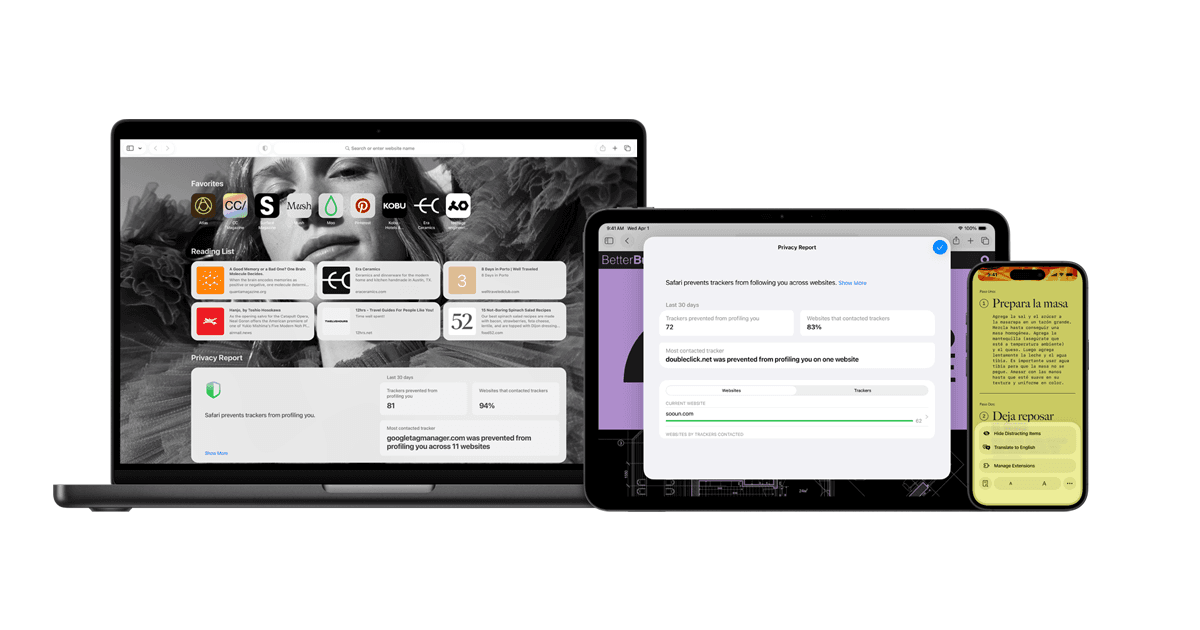
Overview
Safari supplies browser access and platform-specific rendering on Apple devices. In an AI-assisted workflow, it is a place to use web products and test the actual customer experience. It is particularly useful as a second browser check for a generated site.
For a first workflow, load the exact preview or published URL on the target Apple device. Test the controls, forms, and media a user will encounter. Compare the behavior with the expected output and other target browsers.
Use cases
The strongest fit depends on the job you need the product to complete, not the size of its feature list.
Verify AI-built pages for Safari users.
Read original material beside an AI-assisted draft.
Capabilities
Access browser-based applications and original sources.
Use the browser across supported Apple devices.
Check layouts, navigation, and media behavior in Safari.
Process
Step 1
Load the exact preview or published URL on the target Apple device.
Step 2
Test the controls, forms, and media a user will encounter.
Step 3
Compare the behavior with the expected output and other target browsers.
Cost
Safari is included with supported Apple operating systems; third-party AI services may charge separately.
See official plans
Safari is included with supported Apple operating systems; third-party AI services may charge separately.
Pricing checked . Check current pricing at the source ↗
Assessment
Compare
The right alternative depends on the specific output, workflow, controls and budget your project requires.
Coding
Choose Google Chrome for a Chromium browser with its own developer tooling, extension ecosystem, and browser AI APIs.
Explore Google Chrome →Questions
Safari is Apple’s web browser for running AI web apps, researching original sources, and checking how generated websites behave on Apple devices.
Safari supplies browser access and platform-specific rendering on Apple devices. In an AI-assisted workflow, it is a place to use web products and test the actual customer experience. It is particularly useful as a second browser check for a generated site.
Web APIs and extensions may behave differently from Chromium browsers. An AI app’s account and subscription requirements are separate from Safari.
Bottom line
Safari is useful for apple browser testing. An AI app’s account and subscription requirements are separate from Safari.
Visit Safari website ↗
Get access to all our AI courses, hundreds of real-world AI use cases, live expert-led workshops, an exclusive network of AI early adopters, and more.
Get unlimited access to all of our current & upcoming industry-specific AI courses for the duration of your subscription.
To keep up with the rapid pace of AI, our team publishes AI implementation guides daily. Our library contains 300+ practical use cases to automate real-world work.
Join weekly, live, interactive sessions with industry leaders who are at the forefront of AI for hands-on implementation guidance and exclusive insights.
Network with an exclusive community of AI-first professionals who are working smarter with AI. Learn how early adopters are using AI in their work and businesses.