Overwhelming personal goals
Break a broad ambition into a first action, a sequence of tasks, and visible checkpoints.
Independent tool overview
Mentor is an AI goal-planning app that turns an ambitious objective into a personalized roadmap of tasks and checkpoints. Each task has a focused workspace with notes, step-by-step guidance, and contextual AI chat, while reminders, streaks, and analytics help users maintain momentum.
Visit the official Mentor site ↗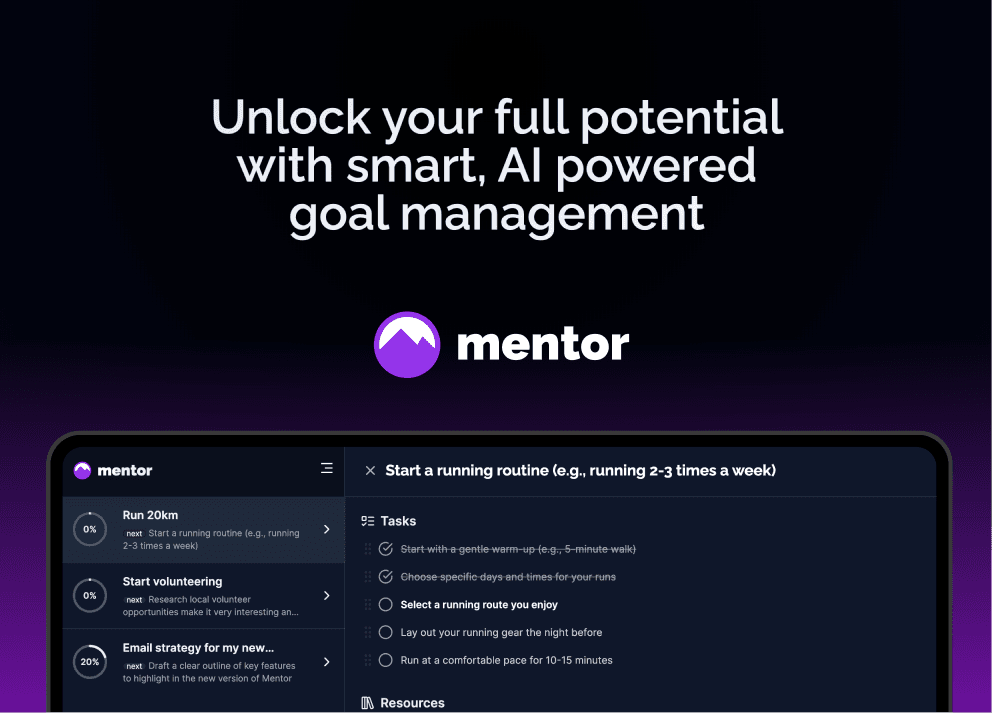
Overview
Mentor is built for the gap between naming a goal and knowing what to do next. After a user enters an objective, the app asks follow-up questions about the situation and desired result, then generates a proposed sequence of editable tasks and checkpoints.
The product keeps planning and execution together. Opening a task reveals a rich-text workspace, guidance, smart actions, and a chat that uses the goal, task, and notes as context. Progress views, streaks, reminders, cross-device sync, offline access, notifications, and an optional Discord accountability community support continued follow-through.
AI can make a blank page less intimidating, but it does not know whether a plan is safe, realistic, complete, or professionally sound. Users should rewrite vague tasks, verify resources, add deadlines and measurable completion criteria, and seek qualified help for medical, mental-health, legal, financial, high-risk fitness, or other consequential goals.
Use cases
The strongest fit depends on the job you need the product to complete, not the size of its feature list.
Break a broad ambition into a first action, a sequence of tasks, and visible checkpoints.
Plan a certification, language, coding, creative, or professional-development goal and track practice.
Turn ideas such as a newsletter, course, app, portfolio, or small business into an editable execution roadmap.
Structure a paper, exam plan, application, or semester project without treating AI-generated work as the student's own.
Use reminders, streaks, progress views, and optional community support without adopting a complex project-management system.
Capabilities
Asks about the user's circumstances and desired outcome before creating a personalized plan.
Converts a broad goal into smaller editable tasks and checkpoints arranged as a roadmap.
Combines task details, deadlines, notes, a rich-text editor, and completion controls in one focused view.
Uses the active goal, task, notes, and messages to answer questions, suggest resources, and break down a stuck step further.
Provides quick AI-assisted ways to refine, plan, research, or continue work inside a task.
Shows task and checkpoint completion, goal progress, streaks, and analytics across current work.
Supports notifications and an optional community route for people who want external encouragement.
Installs from a browser on iOS, Android, Windows, macOS, and Linux with syncing, notifications, and offline mode.
Process
Step 1
Define what done looks like, why it matters, the deadline, important constraints, and how progress will be measured.
Step 2
Give Mentor realistic information about current ability, time, budget, dependencies, risks, and available support.
Step 3
Remove filler, reorder dependencies, resize tasks, add milestones, and replace unsafe or unverifiable advice before starting.
Step 4
Keep notes, evidence, questions, and drafts with the active task so the AI receives useful context without unrelated personal data.
Step 5
End each session with a small action, owner, due date, and completion test instead of another broad intention.
Step 6
Compare the roadmap with what actually happened, adjust scope and timing, celebrate milestones, and escalate to a professional when needed.
Cost
Mentor currently promotes free goal creation and free starting access, but its public website does not show a complete current plan comparison or authoritative paid price. Account holders should review the subscription screen before upgrading and confirm renewal cadence, AI limits, included features, cancellation, and refund terms. Older third-party listings should not be treated as current pricing.
$0 to start
Create an account and begin building a goal through the current public entry flow.
Shown in app
Any current premium plan, AI allowance, and renewal terms are presented after account access rather than in a public pricing table.
Pricing checked . Check current pricing at the source ↗
Assessment
Compare
The right alternative depends on the specific output, workflow, controls and budget your project requires.
Consulting
A broader personal productivity option that connects notes, tasks, email, calendar, files, and proactive daily planning.
Explore Saner AI →Consumer
A more reflective AI mentoring alternative focused on patterns, personal growth, recurring conversations, Quests, and accountability.
Explore Purpose →Project Management
A more flexible workspace for users who need shared documents, databases, projects, and team knowledge alongside AI assistance.
Explore Notion AI →Questions
Mentor is an AI goal-planning app that asks about an objective, creates an editable roadmap, gives each task a focused workspace, and tracks progress with reminders and analytics.
After the user enters a goal, Mentor asks follow-up questions about the situation and desired result, then proposes tasks and checkpoints that the user can edit, delete, reorder, and expand.
Mentor currently offers free starting access and promotes free goal setup. Its public website does not show a complete current paid plan table, so confirm any upgrade price and limits inside the account.
Mentor is a progressive web app rather than a separate native store app. It can be installed from the browser on iOS, Android, Windows, macOS, and Linux.
Yes. The current site says its installable web app supports offline mode, real-time sync, and notifications.
Yes. The interface is in English, but Mentor says the AI adapts to the language the user types.
No. It can structure reflection and tasks, but it cannot verify every recommendation or provide accountable professional care. Consequential goals require qualified human guidance.
Its main value comes before ordinary task tracking: it questions the user about an ambiguous goal, creates a roadmap, and supplies contextual guidance when a task is unclear or stuck.
Bottom line
Mentor is a well-focused option for people who know what they want but cannot translate it into a manageable first week of work. Its goal questions, editable roadmap, task workspaces, and progress feedback are more purposeful than asking a general chatbot to produce a list once. The main buying hesitation is not the feature set but pricing and privacy transparency: test the free flow, avoid oversharing, inspect in-app terms, and judge the value by whether the plan survives contact with real life.
Visit Mentor website ↗
Get access to all our AI courses, hundreds of real-world AI use cases, live expert-led workshops, an exclusive network of AI early adopters, and more.
Get unlimited access to all of our current & upcoming industry-specific AI courses for the duration of your subscription.
To keep up with the rapid pace of AI, our team publishes AI implementation guides daily. Our library contains 300+ practical use cases to automate real-world work.
Join weekly, live, interactive sessions with industry leaders who are at the forefront of AI for hands-on implementation guidance and exclusive insights.
Network with an exclusive community of AI-first professionals who are working smarter with AI. Learn how early adopters are using AI in their work and businesses.


