Simple looping animations
Create a short repeating motion for a post, message, presentation, or lightweight visual.
Independent tool overview
Gif-PT is a public custom GPT that helps users create and refine animated GIFs through a ChatGPT conversation.
Visit the official Gif-PT site ↗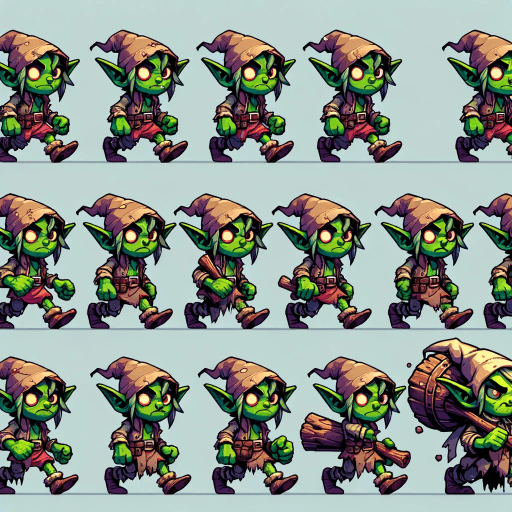
Overview
Gif-PT is a specialized GPT inside ChatGPT, not a separate design application. You describe the subject, visual style, movement, loop, and intended use, and the GPT guides the generation of an animated GIF.
Its advantage is a conversational workflow: instead of learning a timeline editor, users can request changes in plain language. This makes it practical for reactions, simple illustrations, social posts, lightweight explainers, and quick motion concepts.
A ChatGPT account is required to use it. Existing public GPTs are available on the Free plan, but GPT access, image generation, uploads, data analysis, and file creation have plan-dependent limits.
Use cases
The strongest fit depends on the job you need the product to complete, not the size of its feature list.
Create a short repeating motion for a post, message, presentation, or lightweight visual.
Use conversational instructions instead of manually drawing frames or learning animation software.
Turn an animation idea into a draft that can be reviewed before a designer recreates or polishes it.
Adjust the subject, style, color, motion, pacing, or loop behavior through follow-up requests.
Capabilities
Describe the animation in natural language and continue refining it without switching to a conventional timeline interface.
GPTs with image generation enabled can create visual frames using ChatGPT's current image model.
The assistant can turn a loose concept into more specific instructions covering subject, composition, style, motion, and loop.
Plan-dependent upload tools can provide a reference image or source asset when the GPT and account support the file type.
When the GPT's file-generation workflow completes successfully, users can save the resulting animation from the conversation.
Process
Step 1
State where the GIF will appear, the desired aspect ratio or dimensions, and any file-size constraint.
Step 2
Specify the subject, background, art style, colors, camera framing, and text—if any.
Step 3
Explain what moves, how fast it moves, how long the loop should feel, and whether the transition back to the first frame should be seamless.
Step 4
Check consistency, text accuracy, unwanted artifacts, loop quality, dimensions, and whether the animation communicates clearly at its final display size.
Step 5
Request targeted changes, then reduce dimensions, frames, or colors if the exported file is too large for the destination.
Cost
Gif-PT does not list a separate fee. It uses the limits of the user's ChatGPT plan; Free accounts can use existing GPTs and create images with tighter limits, while Plus provides expanded access.
$0/month
Use existing public GPTs with limited image generation, uploads, data analysis, and GPT access.
$20/month
Higher limits and broader access for users creating images and files more regularly.
Plan-dependent
Go, Pro, Business, Enterprise, and Edu access varies by region, workspace, and current feature policy.
Pricing checked . Check current pricing at the source ↗
Assessment
Compare
The right alternative depends on the specific output, workflow, controls and budget your project requires.
Design
A better choice when users want templates, a visual editor, brand assets, and more direct control over animated designs.
Explore Canva AI →Content Creator
Another dedicated custom GPT for users who prefer to compare a second prompt-driven GIF workflow inside ChatGPT.
Explore GIF Maker →Content Creator
A stronger option for generating richer AI video motion that can later be trimmed or converted for looping use.
Explore Pika →Questions
Gif-PT is a public custom GPT inside ChatGPT designed to help users make animated GIFs through a conversational prompt-and-revision workflow.
There is no separate Gif-PT fee. Free ChatGPT users can use existing public GPTs, but GPT access, image generation, uploads, analysis, and file creation have separate limits. ChatGPT Plus costs $20 per month and provides expanded access.
Yes. The public page can be opened without an account, but OpenAI requires users to sign in before starting a conversation with a GPT.
Include the subject, visual style, background, action, loop behavior, approximate duration, final dimensions or aspect ratio, and where the file will be used.
ChatGPT supports image and file uploads, but availability depends on the user's plan and the GPT's enabled tools. Avoid uploading confidential or copyrighted material you do not have permission to use.
OpenAI says GPT builders cannot view individual conversations. If a GPT uses an external app or API, relevant input can be sent to that third party under its own privacy policy.
GIF stores many image frames and uses limited compression. Reducing pixel dimensions, frame count, frame rate, duration, or color complexity can materially shrink the output.
Bottom line
Gif-PT is a convenient way to create a basic animated GIF without learning a timeline editor. It is best for quick concepts and simple loops; designers who need exact timing, consistent characters, small files, layers, or production export controls will be better served by a visual animation or video tool.
Visit Gif-PT website ↗
Get access to all our AI courses, hundreds of real-world AI use cases, live expert-led workshops, an exclusive network of AI early adopters, and more.
Get unlimited access to all of our current & upcoming industry-specific AI courses for the duration of your subscription.
To keep up with the rapid pace of AI, our team publishes AI implementation guides daily. Our library contains 300+ practical use cases to automate real-world work.
Join weekly, live, interactive sessions with industry leaders who are at the forefront of AI for hands-on implementation guidance and exclusive insights.
Network with an exclusive community of AI-first professionals who are working smarter with AI. Learn how early adopters are using AI in their work and businesses.


