Long-form nonfiction writers
Develop essays, articles, reports, and books while keeping their notes, evidence, structure, and draft connected.
Independent tool overview
Strut is a long-form writing workspace that keeps notes, research sources, outlines, drafts, versions, feedback, and context-aware AI assistance in one project.
Visit the official Strut site ↗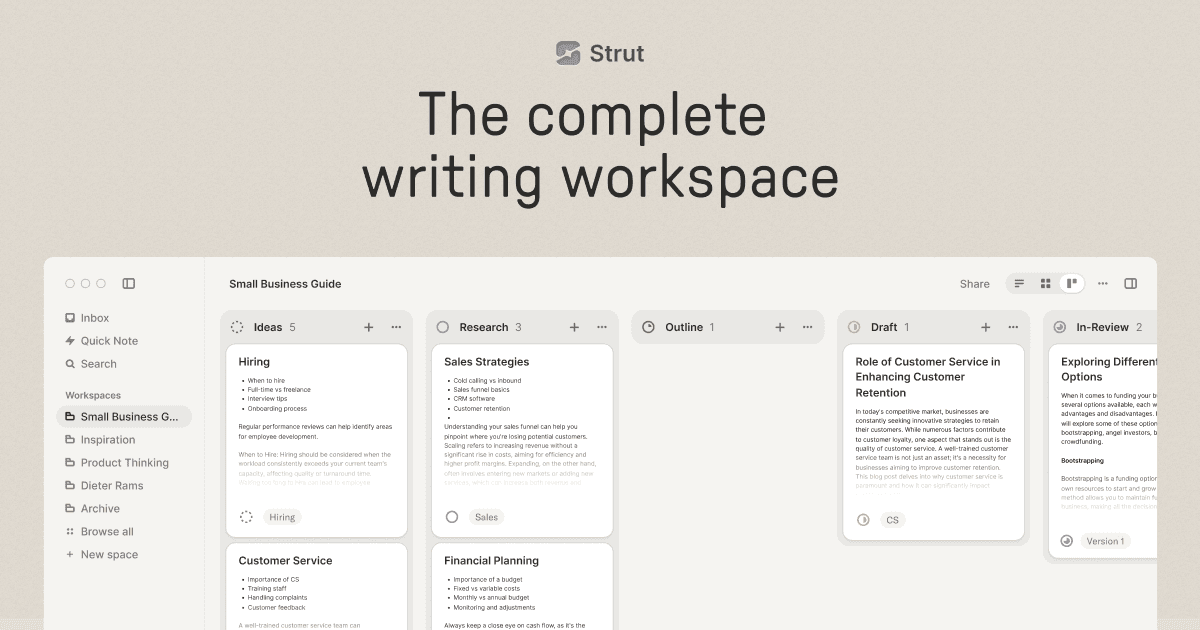
Overview
Strut is an AI-assisted workspace for writing projects that take more than one sitting, including essays, articles, reports, theses, newsletters, and manuscripts. It connects the writer's notebook, imported research, structure, current draft, version history, and feedback around one project.
The product has narrowed its focus from a general collaborative writing workspace to long-form work. Writers can capture fragments, develop notes, arrange an outline, draft in a focused editor, ask questions of source material, invite reviewers, and export the finished document without moving through several unrelated apps.
Strut AI works through named operations such as expand, outline, strengthen, summarize, critique, tone, plot, and rewrite. It acts on a selected passage with project context, shows the proposed result beside the draft, and saves a restorable version before accepted AI text replaces anything.
Most of the writing workspace continues working without AI tokens. Notes, editing, search, versions, comments, collaboration, and exports remain available after the allowance ends, which makes Strut more useful as an editor than products built entirely around chat generation.
Strut says writing is not used to train AI models, but requested AI features send the necessary text to contracted processing services. Writers handling unpublished, confidential, regulated, or third-party material should still review sharing, processor, retention, and ownership requirements before importing it.
Use cases
The strongest fit depends on the job you need the product to complete, not the size of its feature list.
Develop essays, articles, reports, and books while keeping their notes, evidence, structure, and draft connected.
Import source files, ask source-grounded questions, preserve page citations, and move from reading notes to a structured paper.
Manage recurring or complex drafts that require evidence, multiple sections, review, and reliable version history.
Capture quotations, observations, questions, voice notes, and partial ideas before deciding where they belong.
Apply bounded transformations to selected passages, inspect the result, and retain control over every accepted change.
Share a controlled snapshot or invite reviewers for inline comments without exposing unrelated projects.
Capabilities
Captures rough notes, quotations, questions, source clips, and voice notes close to the manuscript they may support.
Keeps a project's notes, research, documents, outline, versions, collaborators, and next writing move together.
Adds outline navigation, word goals, focus and typewriter modes, local style statistics, read-aloud, and standard editing tools.
Provides expand, outline, strengthen, summarize, critique, tone, plot, and rewrite actions for selected material.
Displays proposed text separately and requires the writer to accept it before the draft changes.
Analyzes writing samples to help supported AI operations revise in a style closer to the author's existing voice.
Imports PDF, Word, Excel, CSV, Markdown, and text sources, with opt-in OCR and source questions that can include page citations.
Saves checkpoints, creates a version before AI replacement, compares states, and supports one-click restoration.
Supports project reviewers, inline comments, and frozen review snapshots with optional passwords, expiration, and revocation.
Exports documents as PDF, Word, Markdown, or plain text so finished work is not trapped in the workspace.
Process
Step 1
Name the essay, report, thesis, newsletter, or manuscript after the outcome you intend to complete.
Step 2
Save rough observations, quotations, questions, voice notes, and partial passages without forcing an early outline.
Step 3
Add the research files that support the piece and confirm that you have permission to process and share their contents.
Step 4
Keep the piece's purpose, audience, central claim, and immediate writing task visible before drafting.
Step 5
Arrange notes and ideas into an outline, sections, or chapters while keeping the underlying sources accessible.
Step 6
Use the editor, word goal, outline navigation, and focus mode to advance one visible section or milestone at a time.
Step 7
Choose a specific operation, give a narrow direction, inspect the result and diff, and accept only changes that preserve meaning and voice.
Step 8
Check facts, citations, originality, rights, and tone; collect human feedback; then export the approved document and keep an external backup.
Cost
The core Strut workspace has a permanent free plan. Pro removes project and document caps and adds a monthly AI allowance. A card is required for the seven-day Pro trial, which renews unless cancelled.
$0 forever
For testing the complete local writing workflow with one bounded project and a lifetime AI allowance.
$9.99/month
For ongoing long-form work that needs unlimited projects and a renewable AI allowance.
$69.99/year
The same Pro feature set at the lower effective annual rate displayed by Strut.
Pricing checked . Check current pricing at the source ↗
Assessment
Compare
The right alternative depends on the specific output, workflow, controls and budget your project requires.
Project Management
Better for flexible team knowledge bases and mixed project documentation beyond long-form manuscripts.
Explore Notion AI →Students
More focused on academic drafting, citations, and research-oriented writing assistance.
Explore Jenni AI →Content Creator
More oriented toward marketing teams producing campaigns, brand-controlled content, and high-volume business copy.
Explore Jasper →Questions
Strut is an AI-assisted long-form writing workspace that keeps notes, imported sources, outlines, drafts, versions, reviewers, and targeted AI editing inside one project.
It is designed for work that develops over multiple sessions, including essays, articles, reports, theses, longer newsletters, technical documents, and book manuscripts.
Yes. The free plan includes one project with up to three documents, unlimited notes and version history in that project, source imports, review features, search, export, and a lifetime AI allowance.
Strut lists Pro at $9.99 per month or $69.99 per year after a seven-day card-verified trial. Confirm the checkout terms before starting because pricing can change.
The pricing and privacy pages describe 50,000 starter tokens plus 2,000 tokens collected on days the dashboard is opened, up to an 80,000-token lifetime maximum. Pro includes 1,000,000 tokens each calendar month.
No. AI operations work on selected material, show a proposal beside the manuscript, and require acceptance. Strut also saves a restorable version before a replacement is applied.
Strut says it does not use customer writing to train AI models. Text needed for requested AI features can be sent to contracted processing services, so sensitive-work requirements should still be reviewed.
Yes. Strut documents can be exported as PDF, Word, Markdown, or plain text, and downgraded accounts retain readable and exportable work.
Bottom line
Strut is a thoughtful choice for individual writers who want their notes, evidence, structure, draft, and revision history in one calm workspace. Its strongest distinction is control: the editor remains useful without AI, every proposed rewrite is reviewable, and completed work is portable. It is less compelling for quick copy or large enterprise content operations.
Visit Strut website ↗
Get access to all our AI courses, hundreds of real-world AI use cases, live expert-led workshops, an exclusive network of AI early adopters, and more.
Get unlimited access to all of our current & upcoming industry-specific AI courses for the duration of your subscription.
To keep up with the rapid pace of AI, our team publishes AI implementation guides daily. Our library contains 300+ practical use cases to automate real-world work.
Join weekly, live, interactive sessions with industry leaders who are at the forefront of AI for hands-on implementation guidance and exclusive insights.
Network with an exclusive community of AI-first professionals who are working smarter with AI. Learn how early adopters are using AI in their work and businesses.


